ConfigMaps and Kubernetes Secrets on k3s
Kubernetes Secrets and their plainer sibling the ConfigMap keep an app's settings and credentials outside the image, so the same image runs in any environment with different values. This chapter, run on the live k3s node, creates a ConfigMap and a Secret, mounts both into a pod, and shows the app reading them with the sensitive value kept masked.
Beacon is served and routed now, but it still ships one fixed page. The moment it needs a database URL or an API token, baking those into the image ties it to one setup and risks leaking a token into a registry. Config objects fix both problems.
- A ConfigMap holds non-sensitive settings as plain key and value pairs, ready to inject as environment variables or files.
- A Secret holds sensitive values and is stored base64-encoded, which is encoding for transport, not encryption at rest.
- A pod can read config from environment variables or from files mounted into the container, and Secrets are usually mounted as files.
- Keeping config and credentials in these objects lets one image run unchanged across dev, staging, and production.
The rule of thumb is simple. Anything that changes between environments and is safe to read belongs in a ConfigMap. Anything that must not leak, such as an API token or a database password, belongs in a Secret. Both are cluster objects, versioned and referenced by name, so a pod asks for them rather than carrying them.
Prerequisites
- The working k3s node with
kubectlfrom the earlier chapters, still running the Beacon app. - The
busybox:1.36image reachable, which the demo pod uses to print its config back to you.
Create the ConfigMap and the Secret
Create both from literals on the command line. In real use you would keep these in files under tighter control, but literals show the idea clearly.
kubectl create configmap beacon-config \
  --from-literal=APP_TIER=production --from-literal=APP_REGION=ap-south-1
kubectl create secret generic beacon-secret \
  --from-literal=API_TOKEN=sk_live_your_secret_key_here
kubectl get configmap beacon-config -o yaml
kubectl get secret beacon-secret -o jsonpath='{.data.API_TOKEN}'
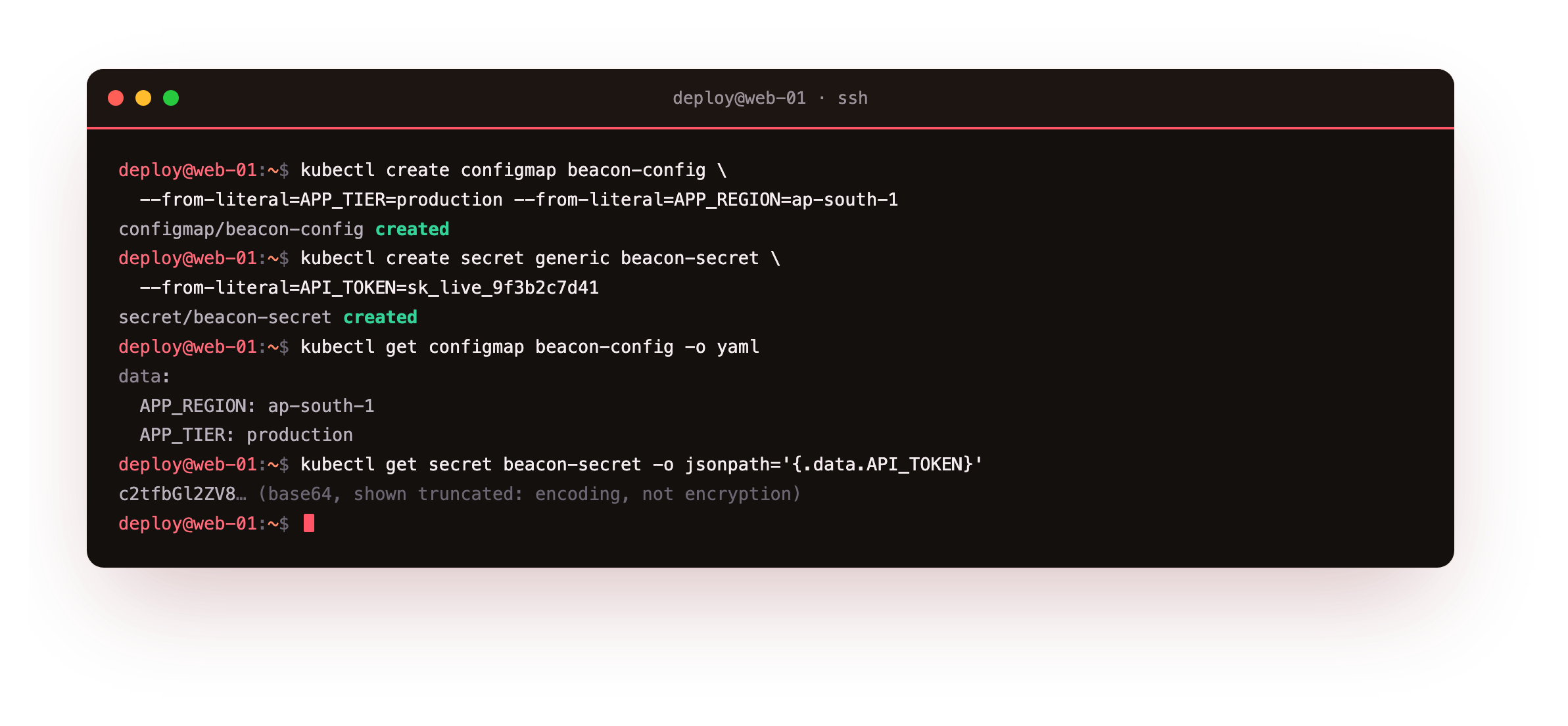
kubectl get configmap beacon-config -o yaml shows the two settings in plain text, which is fine because they are not sensitive. The Secret is different: its value comes back base64-encoded, and decoding it returns the original string. That matters. Base64 is not a lock. Anyone who can read the Secret object can read the value, so treat access to Secrets like access to the credentials themselves, and never print the decoded value into a log or a screenshot.
You should see the ConfigMap print its two values as plain text, and the Secret return a base64 blob rather than the raw token. If the Secret ever shows its value in the clear, something created it wrong. Encoded, not exposed, is the state you want.
Mount both into a pod
A pod references config by name. This one pulls the ConfigMap in as environment variables with envFrom, and mounts the Secret as files under /etc/beacon.
apiVersion: v1
kind: Pod
metadata: { name: beacon-cfg }
spec:
  containers:
    - name: app
      image: busybox:1.36
      command: ["sh", "-c", "sleep 3600"]
      envFrom:
        - configMapRef: { name: beacon-config }
      volumeMounts:
        - { name: token, mountPath: /etc/beacon, readOnly: true }
  volumes:
    - name: token
      secret: { secretName: beacon-secret }
Watch the app read its config
With the pod running, read the values the way the app would.
kubectl exec beacon-cfg -- printenv APP_TIER APP_REGION
kubectl exec beacon-cfg -- sh -c 'head -c8 /etc/beacon/API_TOKEN; echo "***"'
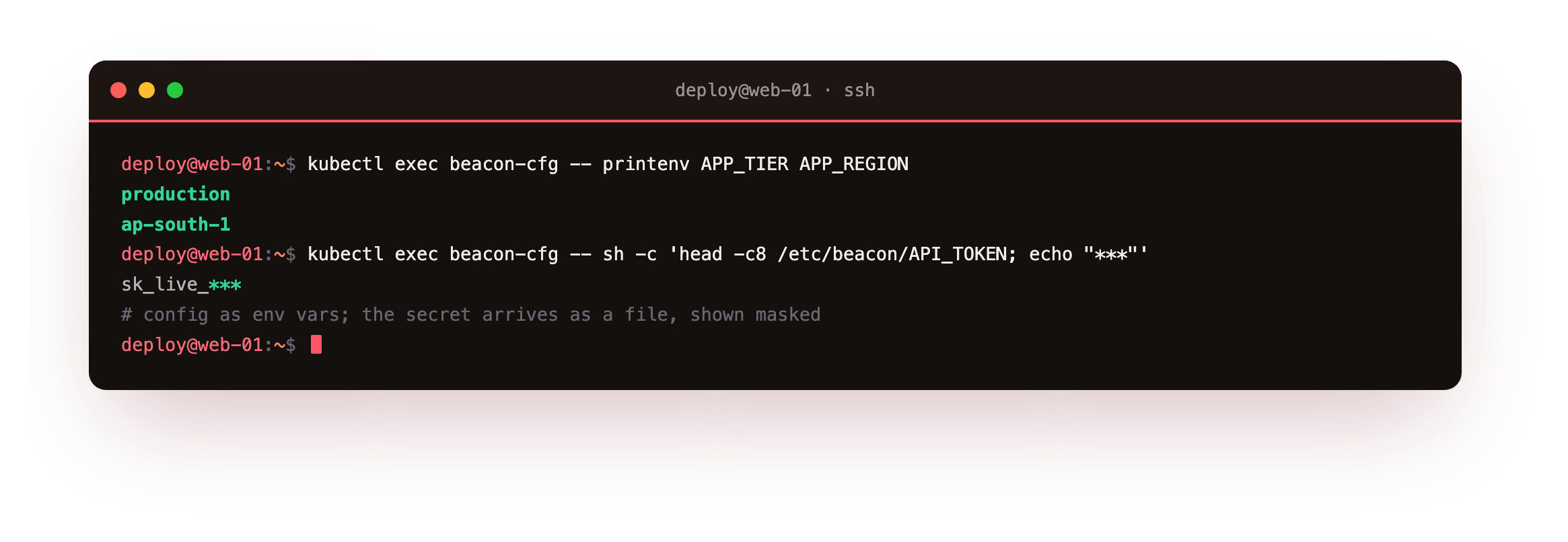
printenv prints production and ap-south-1, the ConfigMap values delivered as environment variables. The Secret arrives as a file at /etc/beacon/API_TOKEN, and here the command shows only a masked preview of it rather than the full token. Mounting Secrets as files, rather than as environment variables, is the safer default: files are less likely to be dumped by accident into a crash log or a process listing, and the app reads the file only when it needs the value.
You should see the two ConfigMap values print in the clear and only a masked stub of the token. The same image now behaves differently by environment purely from what the cluster hands it, which is the whole point of pulling config out of the build.
Going further: live updates and keeping Secrets out of git
A ConfigMap or Secret is not copied into the pod once. It is projected in, so updating a mounted ConfigMap eventually updates the files in running pods. Values injected as environment variables, though, are read only at start, so a pod must restart to pick up changes to those. Mounted files are the more flexible of the two when live updates matter.
And never commit a real Secret with its value in it. Keep sensitive values in a secrets manager or an encrypted file, create the Secret from those at deploy time, and commit only the pod and Deployment specs that reference the Secret by name.
Frequently asked questions
Are Kubernetes Secrets encrypted?
By default a Secret is base64-encoded in the datastore, not encrypted. Anyone with read access to the object or the datastore can recover the value. You can turn on encryption at rest for Secrets, and you should restrict who can read them with role-based access control. Treat a Secret as sensitive regardless.
Should I put config in environment variables or files?
Use environment variables for simple, non-sensitive settings that rarely change. Mount Secrets and larger config as files, which keeps sensitive values out of process listings and lets a running pod see updates without a restart. Many apps use both at once.
Can I edit a ConfigMap without redeploying?
Yes. Update the ConfigMap and mounted files in running pods refresh after a short delay. Values consumed as environment variables are fixed at pod start, so those need a rollout to change. Plan which delivery method you use based on whether live updates matter.
How do I keep Secrets out of version control?
Do not commit real Secret YAML with values in it. Keep sensitive values in a separate secrets manager or an encrypted file, and create the Secret from those at deploy time. Commit only the pod and Deployment specs that reference the Secret by name.
What you have, and what comes next
You created a ConfigMap and a Secret, mounted both into a pod, and read the settings from environment variables and the token from a file kept masked. The same image now runs anywhere, with its values supplied by the cluster rather than baked in.
Config lives in the datastore, but app data needs real disk that survives a pod being replaced. The next chapter adds persistent storage with a claim that outlives a pod, plus resource limits and health probes.