A Kubernetes Service for pods that move
A Kubernetes Service is a stable name and IP that sits in front of a changing set of pods, so callers never chase individual pod addresses. This chapter, run on the live k3s node, gives the three Beacon pods from the last chapter a ClusterIP and a NodePort, reads the endpoints behind them, and reaches the app by name from another pod.
Beacon can heal itself now, but every pod still has its own throwaway IP. A Service is the one address that does not move, and it is what the ingress in the next chapter will point at.
- A ClusterIP Service gives pods one internal address and load-balances across every pod that matches its selector.
- A NodePort Service opens a fixed port on the node so traffic from outside the cluster can reach the pods.
- The endpoints of a Service are the live pod IPs behind it, updated automatically as pods come and go.
- CoreDNS lets any pod reach a Service by its name, which is the basis of service discovery inside the cluster.
The problem a Service solves is churn. In the last chapter a deleted pod came back with a new name and a new IP. If your frontend had memorised the old pod IP, it would now be talking to nothing. A Service breaks that coupling: callers use the Service, the Service tracks whichever pods are healthy right now, and the two sides never need to know each other's addresses.
Prerequisites
- The
beaconDeployment from part two, scaled to three pods and reporting3/3ready. kubectlpointed at your k3s node, with thebusybox:1.36image reachable for the discovery test near the end.
Create a ClusterIP and a NodePort
Save both Services in one file, beacon-svc.yaml. The first is a plain ClusterIP; the second is a NodePort that also opens port 30080 on the node.
apiVersion: v1
kind: Service
metadata: { name: beacon }
spec:
  selector: { app: beacon }
  ports: [{ port: 80, targetPort: 80 }]
---
apiVersion: v1
kind: Service
metadata: { name: beacon-nodeport }
spec:
  type: NodePort
  selector: { app: beacon }
  ports: [{ port: 80, targetPort: 80, nodePort: 30080 }]
Apply the file and list what you have.
kubectl apply -f beacon-svc.yaml
kubectl get svc
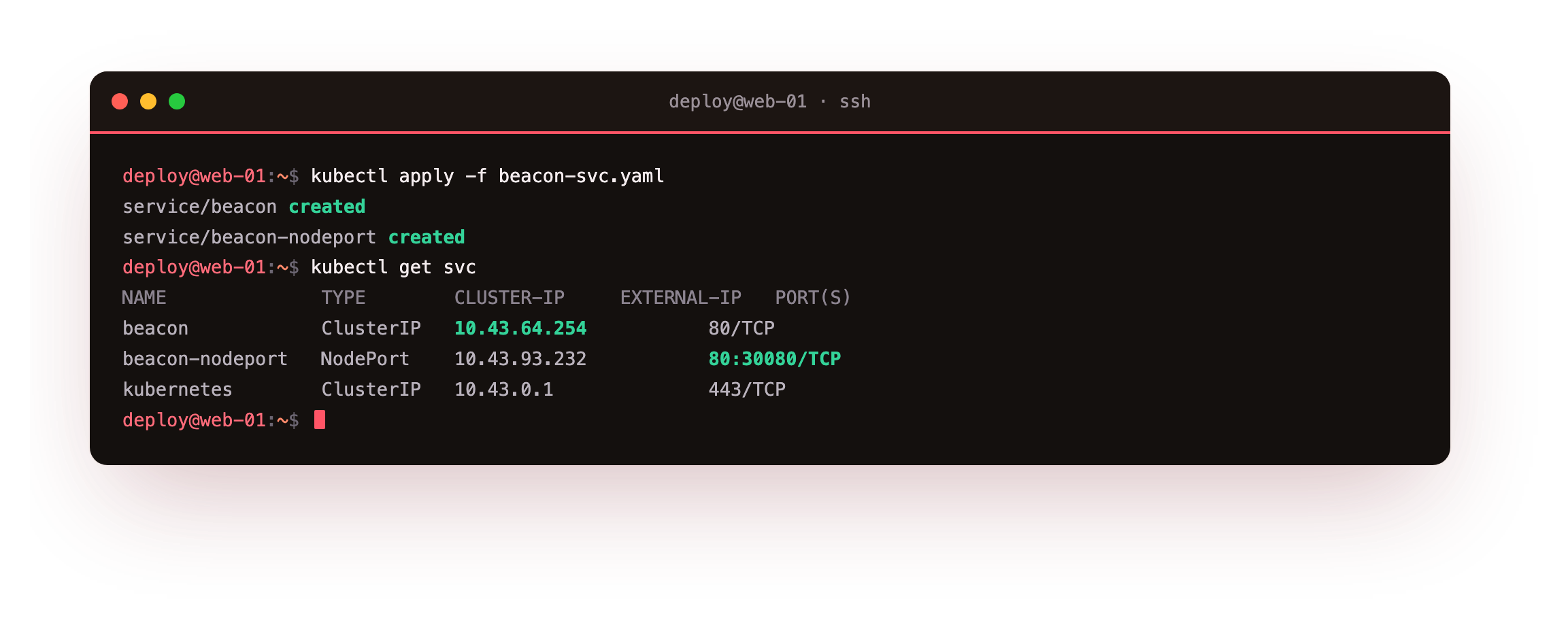
kubectl get svc shows both Services with their cluster IPs from the 10.43.0.0/16 range k3s uses, alongside the built-in kubernetes Service. The NodePort line reads 80:30080/TCP, meaning port 80 inside the cluster is also reachable on port 30080 of the node. A ClusterIP is internal only. A NodePort is how you let something outside the cluster in without an ingress yet.
You should see a beacon Service with a ClusterIP in the 10.43 range and a beacon-nodeport reading 80:30080/TCP. That ClusterIP is now the one fixed address for the app, no matter how often its pods are replaced.
See the endpoints behind the Service
A Service is not a proxy you configure by hand. It watches for pods that match its selector and keeps their addresses as endpoints.
kubectl get endpointslices -l kubernetes.io/service-name=beacon
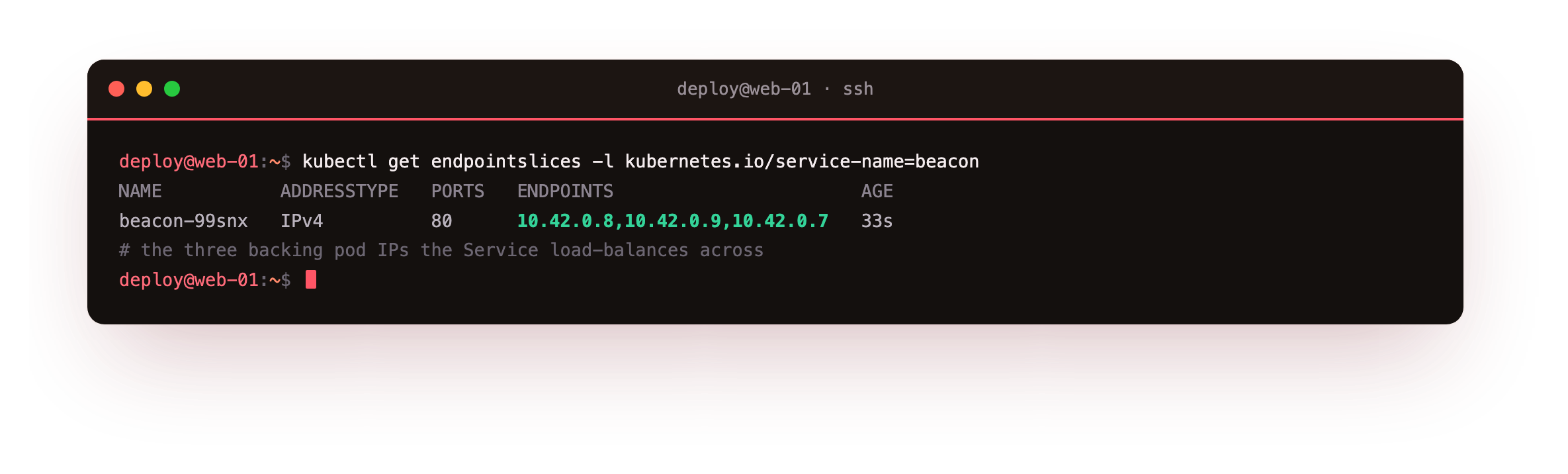
The EndpointSlice lists the three pod IPs on port 80, the exact set the Service load-balances across. Scale the Deployment up or down, or delete a pod, and this list updates on its own within a second or two. That automatic membership is the whole trick: the Service always points at the pods that exist right now, not the ones that existed when you created it.
Reach the Service by name
Inside the cluster, pods find each other by Service name rather than IP. CoreDNS resolves beacon to the Service's ClusterIP, and from there traffic spreads across the pods. Prove it from a throwaway pod.
kubectl run tmp --rm -i --restart=Never --image=busybox:1.36 -- \
  sh -c 'nslookup beacon.default.svc.cluster.local; wget -qO- http://beacon/'
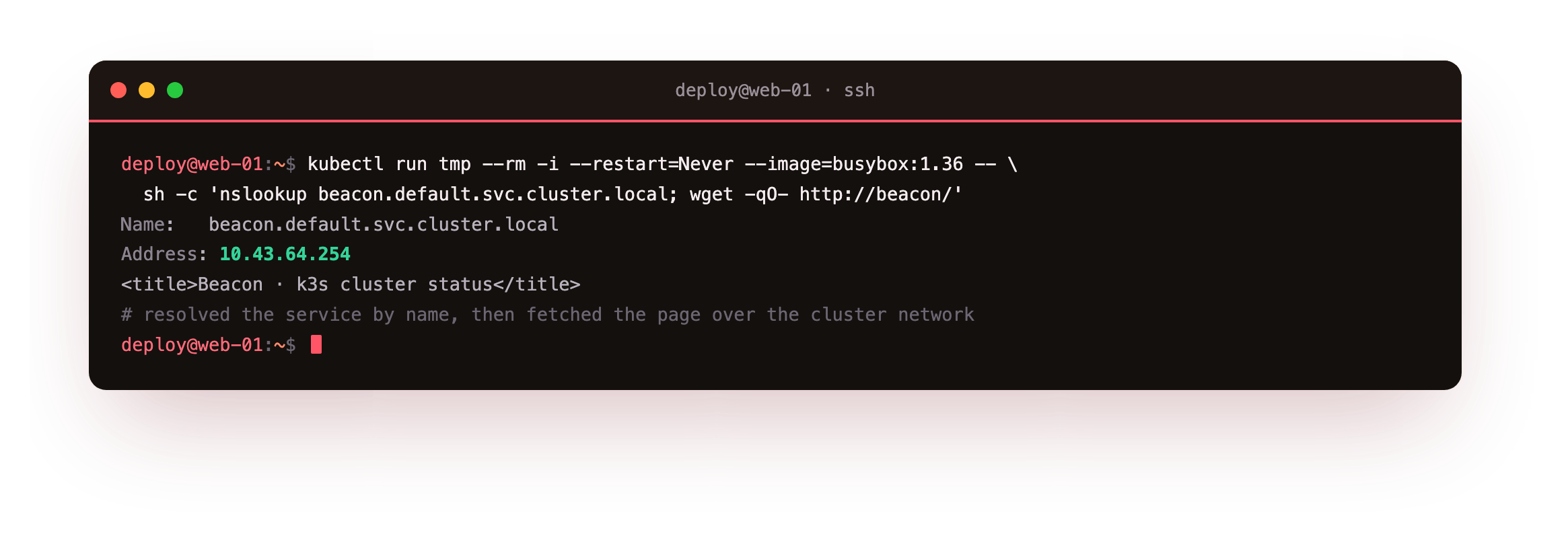
nslookup resolves the full service name to the ClusterIP, and wget -qO- http://beacon/ fetches the page over the cluster network using only the short name. The --rm flag deletes the temporary pod when it exits. This is service discovery: one pod reached another through a name that stays constant while the pods behind it change. A real frontend talks to http://beacon and never learns a single pod IP.
You should see nslookup return the ClusterIP and the Beacon page title come back from wget. That is the app answering by name over the cluster network, which is the exact plumbing the ingress will stand in front of next.
Going further: the NodePort shortcut and its limits
You can also hit the NodePort from the node itself with curl -s http://127.0.0.1:30080/, which returns the same page through the fixed node port. That path is handy for a quick internal check. It is a blunt tool for the public, though: a NodePort is one high-numbered port per Service, with no hostnames, no paths, and no TLS.
That is why real web traffic arrives through an ingress, which routes many hostnames over ports 80 and 443 and is the subject of the next chapter. Keep the NodePort for testing, and let the ingress carry the front door.
Frequently asked questions
When should I use a NodePort versus an Ingress?
A NodePort is a quick way to expose one Service on a fixed high port, useful for testing or internal access. An Ingress routes many hostnames and paths through one entry point on ports 80 and 443, which is what you want for real web traffic. Most production apps sit behind an Ingress.
How does the Service pick which pod gets a request?
kube-proxy programs the node so traffic to the ClusterIP is spread across the current endpoints, roughly evenly. Because the endpoint list tracks healthy pods, requests only go to pods that are up. You do not configure the balancing; the Service does it from the selector.
What name does a Service get in DNS?
Inside its own namespace a Service answers to its short name, such as beacon. The fully qualified name is beacon.default.svc.cluster.local. Pods in other namespaces use beacon.<namespace>. CoreDNS handles all of these from the moment the Service exists.
Why is the ClusterIP in the 10.43 range?
k3s assigns Service cluster IPs from 10.43.0.0/16 and pod IPs from 10.42.0.0/16 by default. These are internal ranges that never leave the cluster, separate from your node's own network. You can change them at install time, but the defaults are fine for a single node.
What you have, and what comes next
You put a ClusterIP and a NodePort in front of three pods, read the endpoints the Service tracks, and fetched Beacon by name from another pod. The Service is the stable address that lets pods change underneath it without breaking anything.
A NodePort on a high number is not how you want the public to reach a web app. The next chapter adds an Ingress so a real hostname routes to this Service, and opens Beacon in a browser served entirely by the cluster.