The connection count that quietly kills a small box
proxysql connection pooling puts a broker between your application and MariaDB so that a flood of short client connections rides on a small, reused set of backend ones. This chapter installs ProxySQL on a live Ubuntu 24.04 server, registers the MariaDB backend and an application user, routes traffic through port 6033, and reads the pool stats to confirm the multiplexing is real.
- Every MariaDB connection is an operating system thread that holds memory even while idle, so raw connection count, not query load, is what tips a small VPS over.
- ProxySQL listens on 6033 for client traffic and 6032 for its admin interface, and keeps runtime config separate from the copy saved to disk.
- The pooling win is visible in stats_mysql_connection_pool: many client queries served against a handful of backend connections held warm.
- A backend app account must exist as 'app'@'127.0.0.1', because ProxySQL reaches MariaDB over TCP, not the local socket.
The trouble with database connections is that they look free. An idle connection runs no query and burns no visible CPU, so it feels like nothing. Under the hood each one is a thread MariaDB holds open, with a stack and per-connection buffers reserved whether or not it does any work. Count them in the tens and no one notices. Count them in the hundreds on a small box and memory disappears before a real user arrives.
This is the exact shape of modern app deployment. Ten application workers each keep a pool of twenty connections. A batch of serverless functions each open their own. None of them are busy, yet the backend carries hundreds of threads it will mostly never use. Raising max_connections to make room only removes the guardrail: it lets more threads pile up without giving the box the memory to hold them.
ProxySQL breaks that link. Clients connect to it, freely and in large numbers, while it forwards their work over a much smaller set of connections it keeps warm to MariaDB. You accept the flood at the front and keep the real backend count low. Let's build.
Prerequisites
- An Ubuntu 24.04 LTS server with MariaDB already installed and running, as set up in part 1 of this series.
- A non-root sudo user with shell access and permission to install packages with apt.
- A sample database to query through the proxy: this chapter uses shopdb with an orders table.
- The ability to create a MariaDB user, since the backend account must be reachable over TCP.
Install ProxySQL from the official package
ProxySQL is not in Ubuntu's repositories, so pull the official .deb built for 24.04 and hand it to apt, which resolves its dependencies for you.
curl -sLO https://github.com/sysown/proxysql/releases/download/v3.0.9/proxysql_3.0.9-ubuntu24_amd64.deb
sudo apt install -y ./proxysql_3.0.9-ubuntu24_amd64.deb
sudo systemctl enable --now proxysql
Once it starts, ProxySQL is listening on two ports with distinct jobs. Port 6032 is the admin interface, a MySQL-protocol console where you change configuration with SQL statements. Port 6033 is where clients send real traffic, and it is the address your application uses in place of 3306. Keeping the two apart means you tune the proxy without touching the path that serves queries.
Configure proxysql connection pooling through the admin interface
Now register the backend and a user. You talk to the admin interface with the mariadb client over TCP, pointing it at 127.0.0.1 on port 6032. A fresh install uses admin as both the username and the password, so connect with:
sudo mariadb -u admin -p -h 127.0.0.1 -P 6032 --protocol=tcp
Inside, tell ProxySQL where the backend lives and which user may pass through it.
INSERT INTO mysql_servers (hostgroup_id, hostname, port) VALUES (0, '127.0.0.1', 3306);
LOAD MYSQL SERVERS TO RUNTIME;
SAVE MYSQL SERVERS TO DISK;
INSERT INTO mysql_users (username, password, default_hostgroup) VALUES ('app', 'a-strong-password', 0);
LOAD MYSQL USERS TO RUNTIME;
SAVE MYSQL USERS TO DISK;
ProxySQL keeps two copies of its configuration: a runtime copy that is actually in force, and a saved copy on disk that survives a restart. An INSERT alone changes neither. LOAD ... TO RUNTIME promotes your change into the live config, and SAVE ... TO DISK writes it down so a reboot does not lose it. Skip the LOAD and nothing happens, which is the most common early mistake.
The mysql_users row is the account clients present to ProxySQL. ProxySQL then reuses backend connections to MariaDB under the same name, so the app user must also exist on MariaDB itself.
Route application traffic through port 6033
With the backend and user in place, point a client at ProxySQL instead of at MariaDB. The only change from a normal connection is the port: 6033 rather than 3306. Run one query that reads data and one that reports where it ran.
mariadb -u app -p -h 127.0.0.1 -P 6033 --protocol=tcp shopdb -e "SELECT COUNT(*) FROM orders;"
mariadb -u app -p -h 127.0.0.1 -P 6033 --protocol=tcp -e "SELECT @@hostname, @@port;"
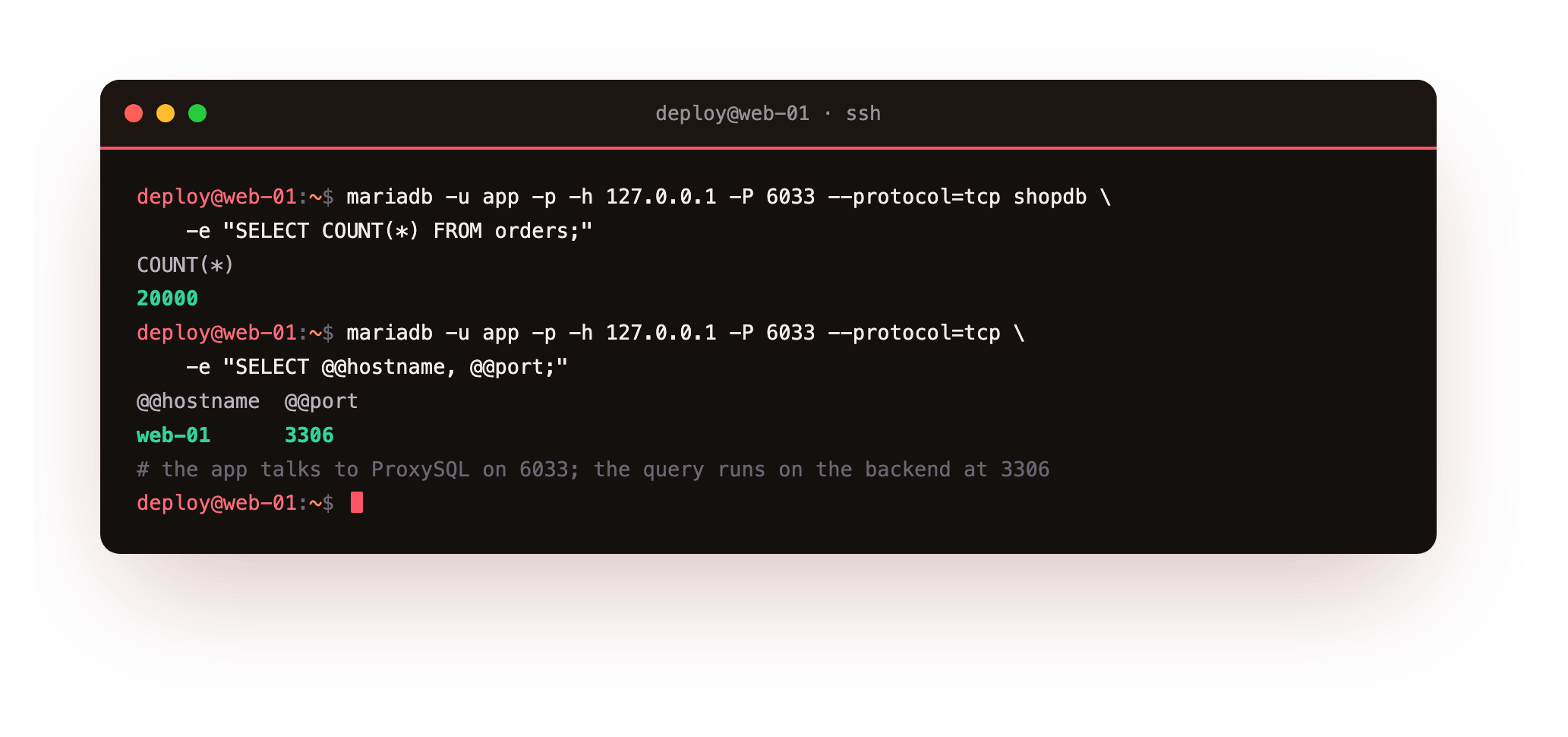
The count comes back as 20000, so the query reached real data. The second line is the tell: @@hostname reports web-01 and @@port reports 3306. The client connected to ProxySQL on 6033, but the query itself ran on the MariaDB backend on 3306. The proxy is invisible to the result and present in the path, which is exactly what you want.
Read the pool stats and see the gap
The payoff lives in the admin interface. ProxySQL tracks every backend connection it manages in stats_mysql_connection_pool, so query that table to see how many real connections it is holding against the work it has served.
mariadb -u admin -p -h 127.0.0.1 -P 6032 --protocol=tcp -e "SELECT hostgroup, srv_host, srv_port, status, ConnUsed, ConnFree, Queries FROM stats_mysql_connection_pool;"
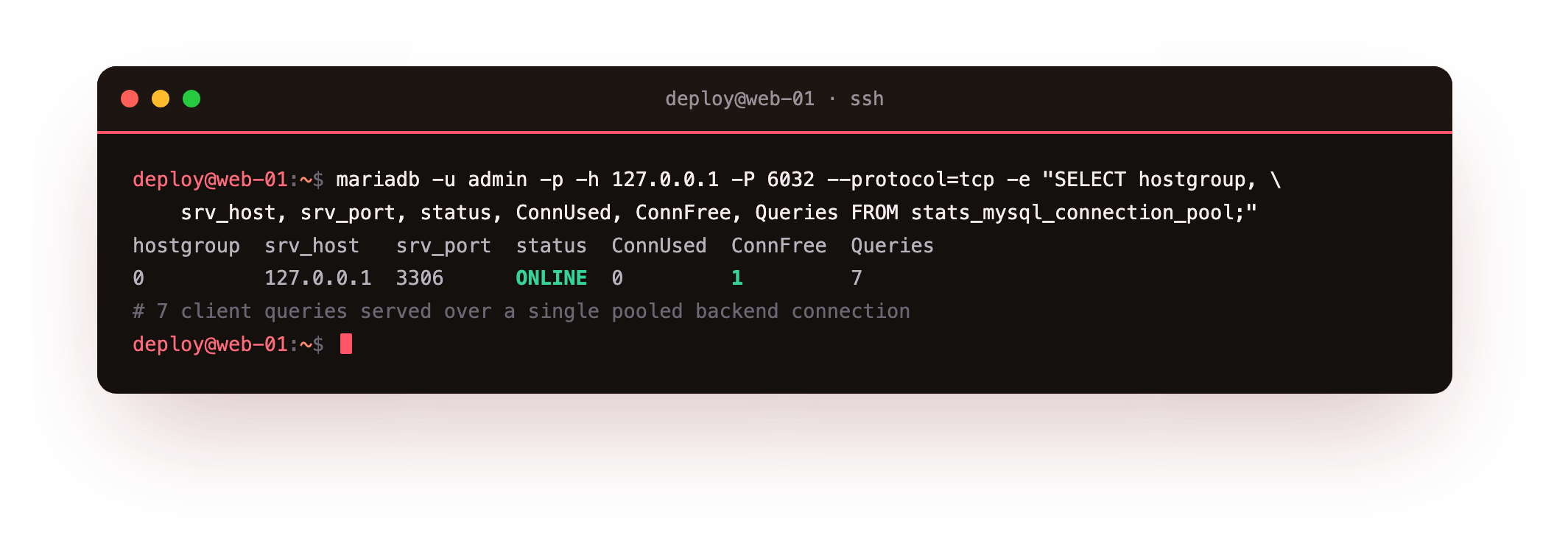
One row comes back: hostgroup 0, srv_host 127.0.0.1, srv_port 3306, status ONLINE, ConnUsed 0, ConnFree 1, Queries 7. Read the last numbers together. Seven client queries have been served, yet ProxySQL kept just one backend connection, and right now it sits idle in the free pool. Seven pieces of work, one reused connection. That gap between client demand and backend cost is the whole benefit.
Now scale the numbers in your head. Replace seven queries with a busy app opening and closing thousands of short connections, and ProxySQL still holds a small, steady set of backend connections rather than one per client. On a 1.9 GB box that is the difference between a database that stays up and one that runs out of memory holding idle threads. Raising max_connections would only invite more of them; pooling removes the need.
In the pool stats the backend should read ONLINE, with a Queries count larger than the handful of connections in ConnUsed plus ConnFree. A backend stuck at SHUNNED, or a Queries count of zero, means traffic never reached MariaDB, so recheck the monitor credentials and the app account before you move on.
Troubleshooting ProxySQL
A backend shows status SHUNNED in the pool stats. ProxySQL has marked the server unhealthy, usually because its monitor user cannot connect to MariaDB. Confirm the monitor credentials in the admin interface match a real MariaDB account, fix them, and ProxySQL brings the backend back to ONLINE on its own.
Queries through 6033 fail with access denied. Either the mysql_users row is wrong, or the backend account does not exist for TCP. Check that the username and password in mysql_users match, and that 'app'@'127.0.0.1' exists on MariaDB with a password, not only 'app'@'localhost'.
A configuration change had no effect. You almost certainly forgot to promote it. An INSERT or UPDATE in the admin interface only touches the main tables. Run the matching LOAD ... TO RUNTIME to make it live, then SAVE ... TO DISK to keep it across a restart.
ProxySQL will not accept admin connections. Confirm you are using --protocol=tcp against 127.0.0.1 on port 6032. Without the flag the client may try a socket path that the admin interface does not serve, and the connection is refused before authentication.
Frequently asked questions
Does ProxySQL replace raising max_connections in MariaDB?
In most cases yes. Raising max_connections lets more threads exist without adding memory to hold them, so it removes a guardrail without solving the problem. ProxySQL keeps the backend connection count small by reusing connections, which addresses the actual pressure on a small server.
Why must the app user exist as 'app'@'127.0.0.1'?
ProxySQL connects to MariaDB over TCP, and in MariaDB the host 'localhost' means a Unix socket while '127.0.0.1' means a network connection. An account granted only for localhost does not match the proxy's TCP login, so you create the account for 127.0.0.1 as well.
What is the difference between ports 6032 and 6033?
Port 6032 is the admin interface, where you change configuration with SQL through the mariadb client. Port 6033 is the traffic port your application connects to in place of 3306. Keeping them separate lets you reconfigure the proxy without disturbing live queries.
Do I still need LOAD and SAVE for every change?
Yes. ProxySQL separates its main tables, the runtime config, and the on-disk copy. LOAD ... TO RUNTIME applies a change to the live proxy, and SAVE ... TO DISK persists it across restarts. A change that skips both edits nothing that matters and vanishes on the next reboot.
What you have, and what comes next
You now have ProxySQL in front of MariaDB on Ubuntu 24.04, with the backend registered, an app user routed through port 6033, and pool stats that prove many client queries ride on a single reused backend connection. The connection flood that used to reach the database directly now stops at the proxy.
The next question is what those pooled queries are actually doing. A proxy hides the connection cost, but a slow query is still slow underneath it. The next chapter, Monitoring and Slow Queries, turns on the tools that show which statements are expensive and where the time goes, so you tune the work, not just the connections.