The copy that keeps itself current
Setting up mariadb replication means giving one server a running copy of another, kept up to date by streaming the primary's binary log to a replica that replays it. This chapter builds that link on a live Ubuntu 24.04 server and proves it with a real write that lands on both sides.
- The primary writes every change to a binary log, and the replica connects, pulls that log, and replays it to stay current.
- Every server in a topology needs a unique server-id, so the primary is 1 and the replica is 2 here.
- The replica starts from a consistent snapshot plus the exact binlog coordinates it was taken at, so it never misses or repeats a change.
- Replication is asynchronous by default, so a replica can sit a moment behind the primary under load, which you watch with Seconds_Behind_Master.
A replica earns its keep in three ways. It is a read scale-out target for heavy read traffic. It is a warm standby you can promote if the primary fails. And it is a place to run slow reporting queries without dragging on the server that answers your app.
To keep this hands-on on one learning server, we run two MariaDB instances on a single host: the primary on port 3306, the one from earlier chapters, and a second replica instance on port 3307 with its own data directory. In production the replica lives on a separate server. The mechanics are identical, only the host and address change.
Let's build.
Prerequisites
- An Ubuntu 24.04 LTS server with MariaDB 10.11 installed and secured, as built in the first chapter of this series.
- The
shopdbdatabase from the earlier chapters, with acustomerstable to replicate. - Sudo access, and enough free disk for a second data directory under
/var/lib. - Comfort reading a
SHOWstatement and its output, since verification here is all reading state back.
Turn on the binary log on the primary
A replica reads the primary's binary log, so the first job is to switch that log on and give the primary an identity. Drop a small config file into the MariaDB config directory rather than editing the shipped files, so upgrades leave it alone.
[mariadb]
server-id     = 1
log-bin       = mariadb-bin
log-basename  = primary
binlog-format = ROW
sudo systemctl restart mariadb
Three settings do the work. server-id must be unique for every instance in the topology, and the primary takes 1. log-bin turns on the binary log the replica will read. binlog-format = ROW records the actual row changes rather than the SQL text, the safe default because it replays identically even for non-deterministic statements.
After the restart, ask the server to read those values back. A setting you assumed is one you never tested.
sudo mariadb -e "SHOW VARIABLES WHERE Variable_name IN ('server_id','log_bin','binlog_format');"
This reports server_id as 1, log_bin as ON, and binlog_format as ROW. The primary now has an identity and a log for the replica to follow.
Create a login the replica can use
The replica connects to the primary as a real database user that needs one privilege and nothing more. Create it bound to the loopback address, since both instances live on this host.
CREATE USER 'repl'@'127.0.0.1' IDENTIFIED BY 'a-replication-password';
GRANT REPLICATION SLAVE ON *.* TO 'repl'@'127.0.0.1';
FLUSH PRIVILEGES;
Now read the primary's current log position. The replica needs to know which file and byte offset to start from, so its first change is the one right after the snapshot.
sudo mariadb -e "SHOW MASTER STATUS;"
This returns File as primary-bin.000001 and Position as 802. Those two values are the coordinates marking the exact spot in the binary log where the replica should begin, so note them for the snapshot step.
DELETE, within a second. It saves you from a dead server, not from a mistake, so you still need the dumps from the backups chapter.
Bring up the second instance on port 3307
In production you would install MariaDB on a second host and stop here. On one box, we start a second server process with its own config, data directory, socket, and port, written to its own file.
[mariadb]
user       = mysql
datadir    = /var/lib/mysql-replica
socket     = /run/mysqld/mysqld-replica.sock
bind-address = 127.0.0.1
port       = 3307
server-id  = 2
pid-file   = /run/mysqld/replica.pid
log-error  = /var/lib/mysql-replica/replica.err
skip-log-bin
Then create the second data directory and launch a process against it. mariadb-install-db initialises the system tables there, and systemd-run starts a transient server on port 3307 without a permanent unit.
sudo mariadb-install-db --user=mysql --datadir=/var/lib/mysql-replica
sudo systemd-run --unit=mariadb-replica /usr/sbin/mariadbd --defaults-file=/etc/mysql/replica.cnf
Notice server-id is 2 here, the value that keeps the two instances distinct. On this shared host the replica sets skip-log-bin, since nothing reads its log; a replica you plan to chain further would keep its own binary log on.
Confirm both instances are listening
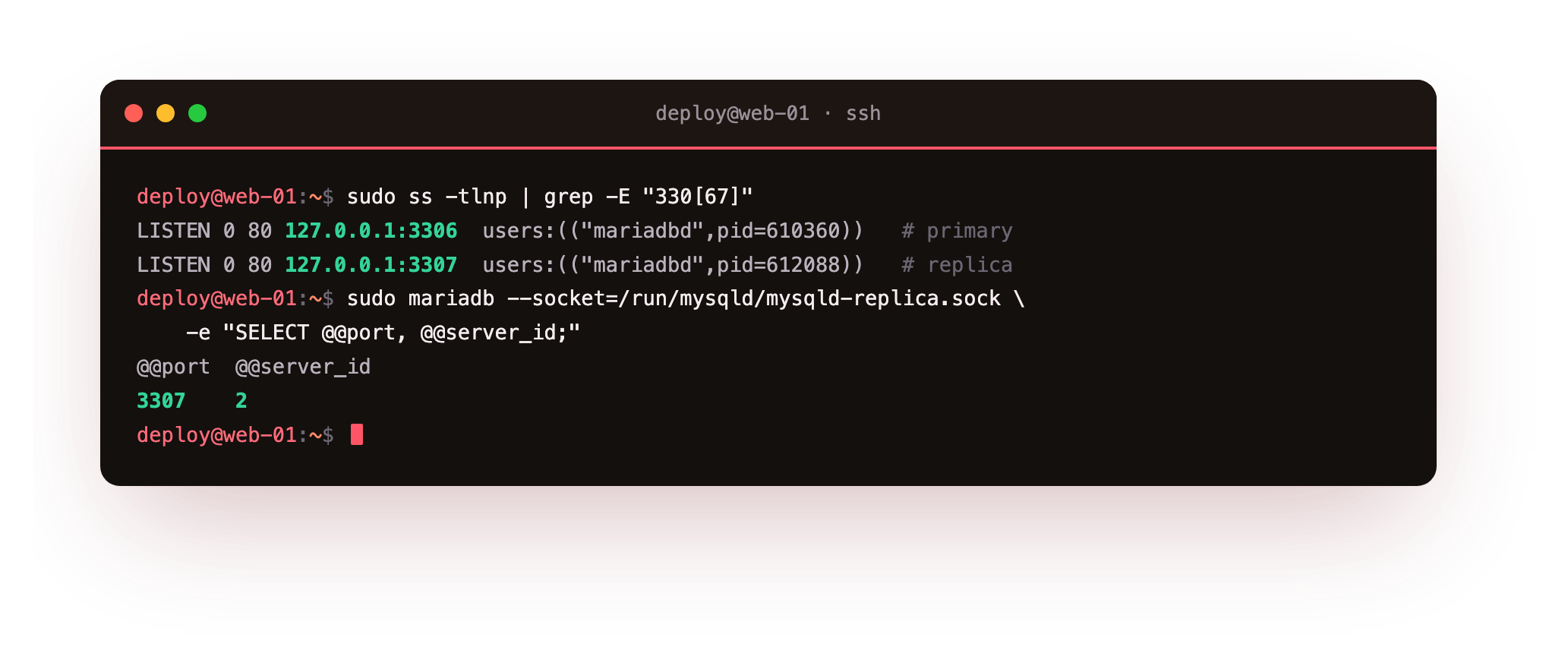
Two MariaDB processes now run side by side. Check the sockets, then ask the replica what port and identity it thinks it has.
sudo ss -tlnp | grep -E "330[67]"
sudo mariadb --socket=/run/mysqld/mysqld-replica.sock -e "SELECT @@port, @@server_id;"
The primary listens on 127.0.0.1:3306 and the replica on 127.0.0.1:3307, both on loopback only, so neither is reachable from the network here. The replica reports @@port as 3307 and @@server_id as 2, two servers with two identities on one host.
Seed the replica and point it at the primary
A replica cannot start from nothing, it needs the primary's data as of a known log position. Snapshot the primary with a consistent dump that also records the binlog coordinates.
sudo mysqldump --single-transaction --master-data=2 --databases shopdb > /tmp/shopdb-repl.sql
--single-transaction takes the dump in one transaction, so the data is consistent without locking writers. --master-data=2 writes the File and Position into the dump as a comment, the same coordinates SHOW MASTER STATUS reported. Load that dump into the replica over its socket, then tell the replica where the primary is and where to start reading.
CHANGE MASTER TO
  MASTER_HOST='127.0.0.1',
  MASTER_PORT=3306,
  MASTER_USER='repl',
  MASTER_PASSWORD='a-replication-password',
  MASTER_LOG_FILE='primary-bin.000001',
  MASTER_LOG_POS=802;
START REPLICA;
MASTER_LOG_FILE and MASTER_LOG_POS are the coordinates from SHOW MASTER STATUS and the dump header. On a real two-server setup, MASTER_HOST would be the primary's private IP and MASTER_PORT would stay 3306.
Verify mariadb replication is running
The link is configured; now prove it is alive. Ask the replica for its status.
sudo mariadb --socket=/run/mysqld/mysqld-replica.sock -e "SHOW REPLICA STATUS\G"
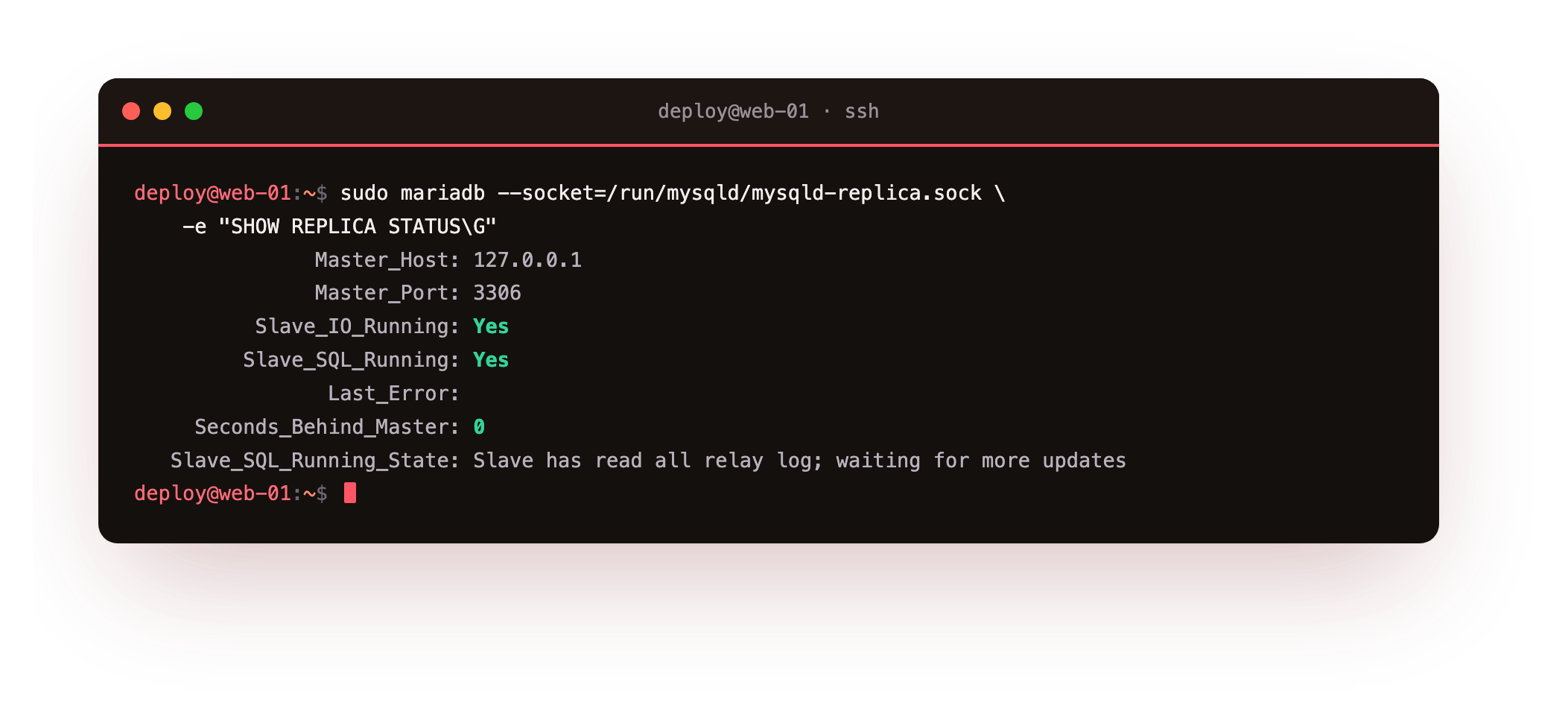
Two lines matter most. Slave_IO_Running is Yes, so the thread that pulls the binary log from the primary is connected. Slave_SQL_Running is Yes, so the thread that replays those changes is working. Seconds_Behind_Master is 0 and Last_Error is blank. Both threads must read Yes for replication to flow. MariaDB keeps the historic Slave_ column names even though the command is now SHOW REPLICA STATUS.
Prove a real write replicates
Status output is a claim. The honest test is to write a row on the primary and watch it appear on the replica, with no write sent to the replica.
sudo mariadb shopdb -e "INSERT INTO customers (email, full_name, city) VALUES ('[email protected]','Replication Test','Chennai');"
sudo mariadb --socket=/run/mysqld/mysqld-replica.sock shopdb -e "SELECT id, email, city FROM customers WHERE email='[email protected]';"
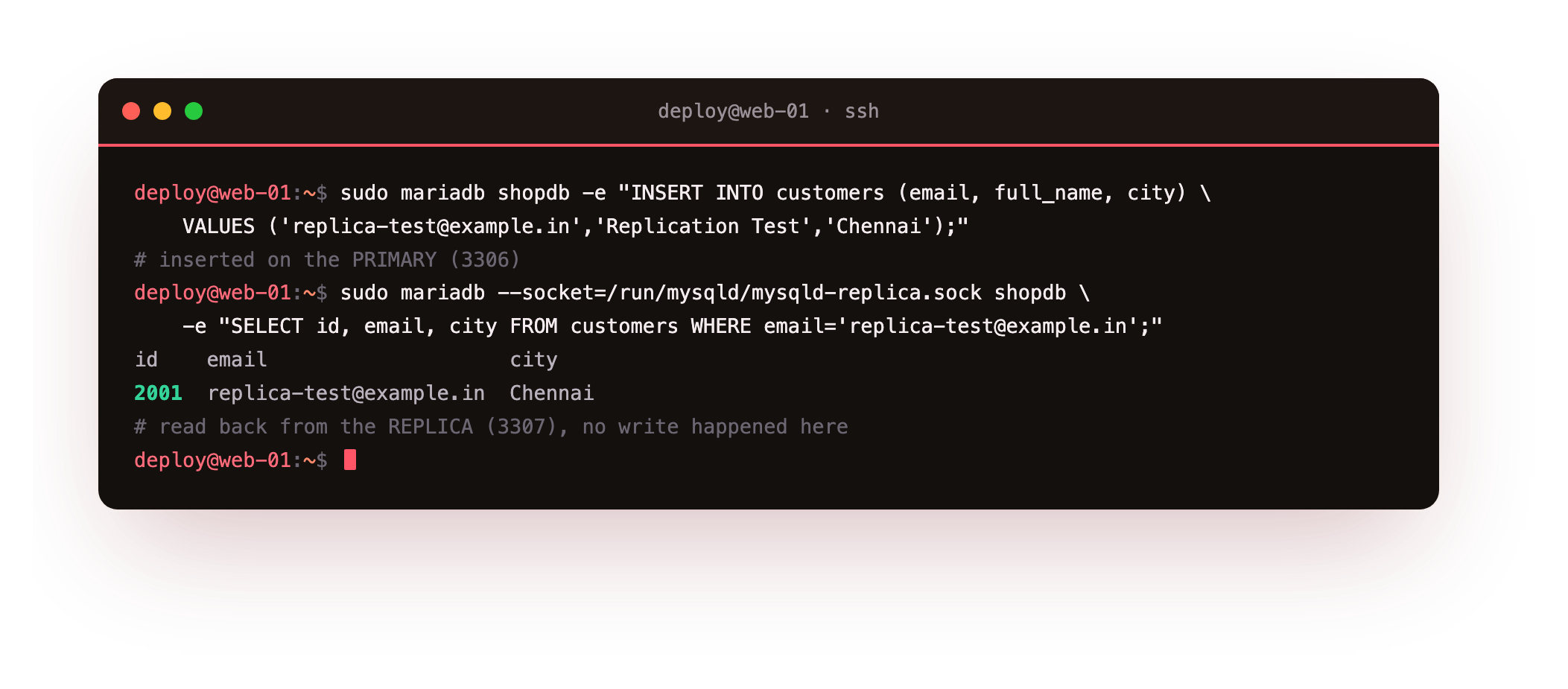
The row inserted on the primary, id 2001, appears on the replica moments later. No write ever touched the replica; it received the change through the binary log and replayed it. That log is the same one the backups chapter uses for point-in-time recovery, so this stream and your restore path share one mechanism.
The row you wrote on 3306 should appear when you read it back from the replica on 3307, with no write ever sent to the replica. If the row is missing, recheck that both threads read Yes in the status output above, since a stopped SQL thread accepts the change but never applies it.
Troubleshooting replication
Slave_IO_Running: No. The IO thread cannot reach the primary. It is either a network or firewall block on the primary's port, or the repl login failed. Read Last_IO_Error, then confirm the host, port, user, and password in your CHANGE MASTER TO line, and that the repl grant exists on the primary.
A duplicate server-id breaks replication. If two servers share an id, the primary drops connections and the log fills with errors about a slave with the same server_id. Give every instance its own number; the 1 and 2 here are local, so a third server takes 3.
Seconds_Behind_Master keeps climbing. The replica cannot apply changes as fast as the primary produces them. It is usually a slow disk on the replica or a single long transaction the SQL thread is stuck replaying. Give the replica hardware at least equal to the primary.
Slave_SQL_Running: No after an error. The SQL thread hit a statement it could not apply, often a row that already exists because the snapshot and coordinates did not line up. Read Last_Error, fix the drift, and reseed from a fresh dump rather than skipping the event blindly.
Frequently asked questions
Is a replica the same as a backup?
No. A replica copies every change within about a second, including a mistaken delete, so it cannot protect you from a bad statement. It protects you from a dead server. Keep real backups alongside replication, since the two solve different failures.
Why run two instances on one server here?
Only to keep the lesson on one learning box. In production the replica sits on a separate server with its own hardware and IP. The config, the replication user, and the CHANGE MASTER TO command are identical; you swap 127.0.0.1 for the primary's private address.
What does asynchronous replication mean for my reads?
The primary does not wait for the replica before confirming a write, so the replica can trail by a fraction of a second under load. A read sent to the replica right after a write may not see it yet. For reads that must be current, send them to the primary.
Why ROW format instead of statement based?
ROW records the actual before and after of each changed row, so it replays identically even for statements whose result depends on time, a function, or row order. Statement based logs the SQL text, which can drift on the replica. ROW is the safe default for most workloads.
What you have, and what comes next
You have a primary on Ubuntu 24.04 streaming its binary log to a live replica, both threads reading Yes, and a real row proven to cross from one to the other on its own. That is a genuine standby and a read target, not a slide that says it should work.
A replica gives you somewhere to send reads, but your application still has to open connections, and at scale opening one per request wastes the server. The next chapter puts a pooler in front of MariaDB so connections are reused and routed: Connection Pooling with ProxySQL.