The login that can do anything is the login you will regret
Getting mariadb privileges right means handing each login only the powers its job needs and nothing more. This chapter creates two accounts on a live shopdb database, an application login and a read-only reporting login, then proves the limits hold by watching the server refuse a schema change and a write it was never granted.
- An application account needs SELECT, INSERT, UPDATE and DELETE on one database, never DDL rights and never GRANT ALL.
- A reporting login with SELECT alone can read production data yet cannot alter a single row.
- SHOW GRANTS reads back the exact rights an account holds, and USAGE ON *.* simply means no privileges.
- GRANT ... ON shopdb.* fences an account to one database, so a leaked password cannot reach the rest of the server.
This is the account behind the destination from chapter one: the login that read its orders and was refused a DROP. Now you build it and watch both halves happen for real.
An application account only ever runs the queries the application ships with. It reads rows, inserts orders, updates a status, deletes a cart item. It never creates a table or drops one, because your migrations do that under a separate, trusted account. So the app login has no business holding those powers in the first place.
The trap is the shortcut. GRANT ALL is one line, it makes the permission error go away, and it quietly hands a public-facing account the keys to the whole server. On a fresh Ubuntu 24.04 box we can do better in about the same number of lines, and then we can prove it held.
Let's build.
Prerequisites
- A running MariaDB you can reach as the database root, from part one of this series.
- A shopdb database with a few tables, including orders and customers, holding sample rows.
- Shell access to run mariadb as the system root through sudo on Ubuntu 24.04.
- Two passwords chosen for the new accounts, kept out of shared notes and scripts where you can.
Two logins, one database, no more
Create both accounts as the database root. The app account gets the four statements an application actually runs: SELECT, INSERT, UPDATE, DELETE. The reporting account gets SELECT alone. Both are scoped with ON shopdb.*, so neither can touch another database on the server. Notice what is absent: no CREATE, no DROP, no ALTER, and no GRANT ALL.
CREATE USER 'app'@'localhost' IDENTIFIED BY 'a-strong-password';
GRANT SELECT, INSERT, UPDATE, DELETE ON shopdb.* TO 'app'@'localhost';
CREATE USER 'reporting'@'localhost' IDENTIFIED BY 'another-password';
GRANT SELECT ON shopdb.* TO 'reporting'@'localhost';
FLUSH PRIVILEGES;
The 'app'@'localhost' form binds each login to connections from the server itself, which is where the application and the reporting jobs run. The ON shopdb.* clause is the fence: it grants those rights on every table in shopdb and nothing outside it. The app never needs DDL rights, so leaving CREATE, DROP and ALTER off the list is deliberate, not an oversight.
Read back the mariadb privileges you granted
A grant you did not verify is a guess. SHOW GRANTS asks the server to list exactly what an account can do, in its own words. Run it for both accounts and compare the output against what you meant to give.
sudo mariadb -e "SHOW GRANTS FOR 'app'@'localhost';"
sudo mariadb -e "SHOW GRANTS FOR 'reporting'@'localhost';"
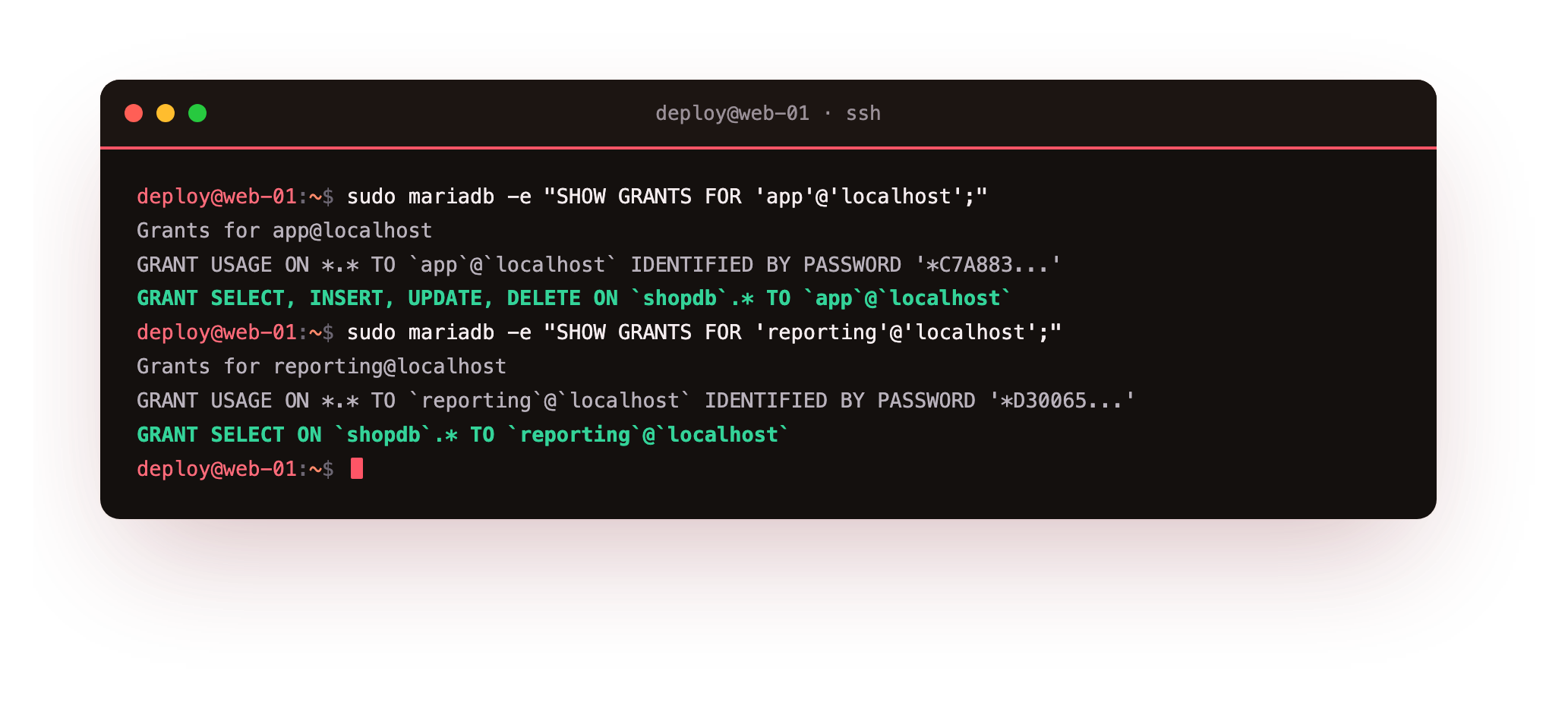
The app account shows two lines: GRANT USAGE ON *.* and GRANT SELECT, INSERT, UPDATE, DELETE ON shopdb.* to the account. The reporting account shows GRANT USAGE ON *.* and GRANT SELECT ON shopdb.* only. USAGE means no privileges at all. MariaDB always lists it, because every account exists at the server level even when it can do nothing there.
Read the second line for each account as the whole story. app can move data around inside shopdb, and reporting can only look. Neither line mentions CREATE, DROP, ALTER, or any other database, so neither account can reach past the fence you set with shopdb.*.
Watch the app account refuse a schema change
Now stop reading grants and start testing them. Log in as app and try three things: a normal read the application needs, then two operations it should never be able to run. The -p flag prompts for the password you set a moment ago.
mariadb -u app -p shopdb -e "SELECT COUNT(*) FROM orders;"
mariadb -u app -p shopdb -e "CREATE TABLE secret_backdoor (id INT);"
mariadb -u app -p shopdb -e "DROP TABLE orders;"
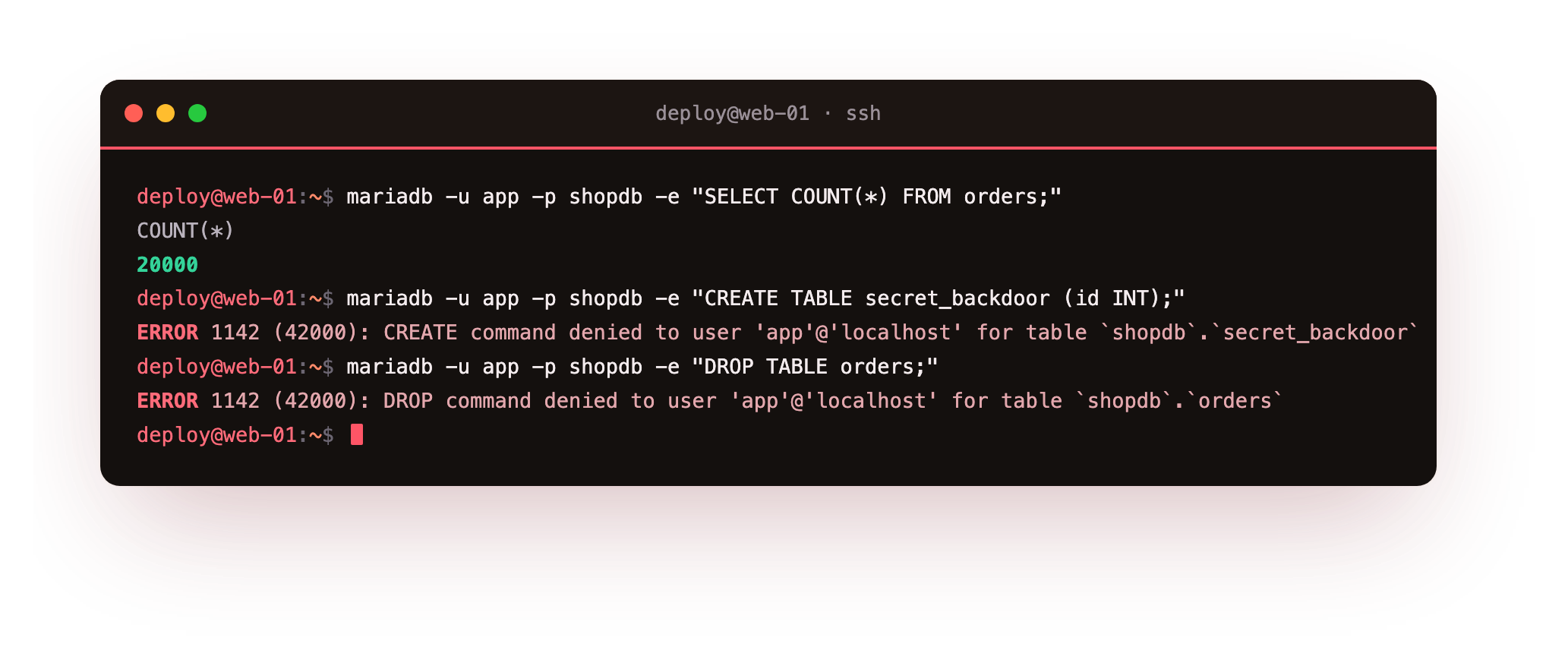
The first command returns 20000, the row count in orders, so the account does its real job without friction. The second is refused with ERROR 1142 (42000): CREATE command denied to user 'app'@'localhost' for table shopdb.secret_backdoor. The third is refused the same way, with ERROR 1142 (42000): DROP command denied.
This is the whole point of least privilege, and it is the payoff the series was pointed at: the app uses its data and cannot destroy it. Suppose the app password leaks tomorrow. An attacker holding it can read and change rows, which is serious, and yet they cannot add a hidden table to live in, and they cannot drop orders to wreck the business. The blast radius is bounded by the grant, not by the attacker's intent.
You should see the SELECT return its count while both the CREATE TABLE and the DROP TABLE come back as ERROR 1142 ... command denied. If either destructive statement succeeds, the account holds more than it should, so run SHOW GRANTS again and REVOKE anything beyond SELECT, INSERT, UPDATE and DELETE.
Prove the reporting login cannot write
The reporting account exists for dashboards, exports, and the quick look in production that everyone runs sooner or later. It should be unable to change data as a matter of fact, not policy. Log in as reporting and try a single insert into a real table.
mariadb -u reporting -p shopdb -e "INSERT INTO customers (email, full_name, city) VALUES ('[email protected]','X','Pune');"
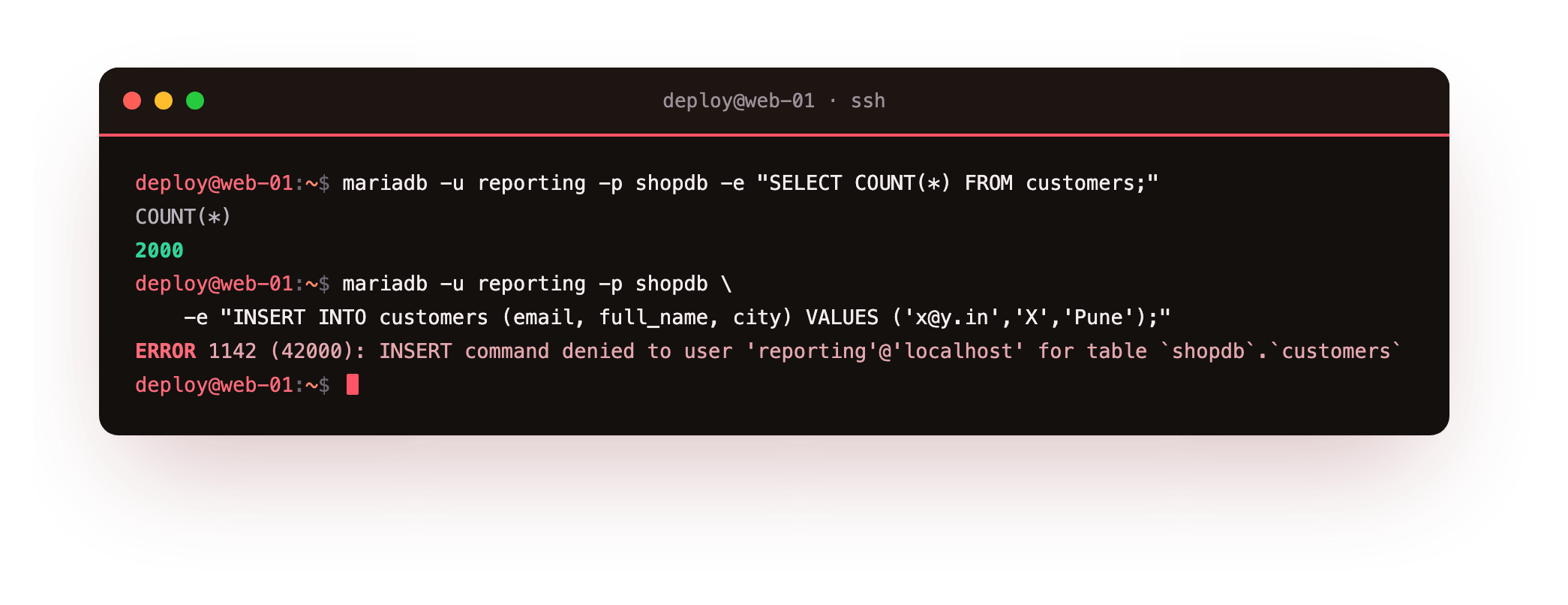
The server refuses it with ERROR 1142 (42000): INSERT command denied to user 'reporting'@'localhost' for table shopdb.customers. There is no way to phrase the insert that slips around this, because the account was never granted the INSERT privilege on anything at all. Analytics and ad-hoc sessions against production physically cannot corrupt data, so a mistyped query costs you a wrong answer and never a lost row.
Troubleshooting privilege errors
A grant does not seem to take effect. MariaDB applies GRANT immediately, but a client that connected before the change keeps its old rights until it reconnects. Close the session and open a fresh one. Run FLUSH PRIVILEGES only if you edited the mysql tables by hand rather than through GRANT.
A command is denied for a query you expected to work. Read the error closely, because it names the exact command, account, and table. Match that against SHOW GRANTS for the account. Usually the query needs a privilege you did not grant, or it touches a table in a database outside the shopdb.* fence.
The app connects from another host and is refused. The 'app'@'localhost' account only matches connections from the server itself. An app on a different VM arrives from an IP address, so you need a matching account such as 'app'@'203.0.113.5' with the same scoped grant, plus a firewall rule and a bind_address change.
You granted too much and want to walk it back. Use REVOKE with the same privilege list you granted, for example REVOKE CREATE ON shopdb.* FROM 'app'@'localhost';. Then run SHOW GRANTS again and confirm only the intended rights remain.
Frequently asked questions
Why not just point my application at the root account?
Root can do anything on every database, so a leak of its credentials is a total loss. An application account scoped to SELECT, INSERT, UPDATE and DELETE on one database limits the damage of a leak to that database's rows, and it still cannot reshape or destroy the schema.
What does GRANT USAGE ON *.* mean in SHOW GRANTS?
USAGE means the account exists but holds no privileges at the server level. MariaDB always lists it, so seeing only USAGE plus your scoped grant is a clean signal that the account has nothing beyond what you intended to give it.
Should the app account be allowed to run migrations?
No. Keep schema changes on a separate, trusted account that your migration tool uses during a deploy. The running application never needs CREATE, DROP or ALTER, so leaving those off its grant removes a whole class of risk from the login that faces the internet.
How do I let reporting read tables I add later?
A grant of SELECT ON shopdb.* already covers every current and future table in shopdb, so a table you create tomorrow is readable by reporting with no extra step. You only need a fresh grant when the new data lands in a different database.
What you have, and what comes next
You now have two accounts that can only do their job. The app login moves data but cannot reshape the schema, and the reporting login reads and nothing else. You proved both by watching the server refuse the operations you never granted, which is the only proof worth trusting.
With the account model bounded, the next question is the shape of the data those accounts touch. The next chapter, InnoDB, schema and indexing, covers the storage engine, how to model tables, and the indexes that keep those SELECT and UPDATE queries responsive as shopdb grows.