The full table scan hiding behind a fast-looking query
This chapter shows innodb indexing in action on a live table: an orders table with 20,000 rows where one filter reads all of them, and the same filter reads ten after a single line of DDL. You will run EXPLAIN before and after, add one index, and watch the rows examined fall from about 19,840 to 10. Along the way we cover why InnoDB is the engine you want and what the buffer pool does for it.
- EXPLAIN describes a query's plan without running it, so you can see a full table scan before your users feel it.
- An index on the filtered column turns a scan of every row into a lookup of only the matching rows.
- InnoDB is the default engine on MariaDB 10.11, and its buffer pool caches table and index pages in memory.
- Index the columns you filter or join on, not every column, because each index costs write time and disk space.
A query that returns in a few milliseconds on a small table feels fine. But "fine on 200 rows" and "fine on 20,000 rows" are different claims. A filter with no index does the same thing at both sizes: it reads every row and discards the ones that do not match. That work grows with the table, so a query that shipped quick gets slower each week.
EXPLAIN is how you see this before your users do. It asks MariaDB to describe the plan for a query without running it, and the answer tells you whether the server will scan the whole table or jump to the rows it needs. On Ubuntu 24.04 with MariaDB 10.11 the output is the same shape you read in production.
We work against shopdb, a database with an orders table of 20,000 rows. The goal is narrow: filter orders for one customer, watch the plan, fix it, and watch it again. Let's build.
Prerequisites
- A MariaDB server on Ubuntu 24.04, set up as in part 1 of this series, with a database you can query.
- A table with at least a few thousand rows, since an index makes no visible difference on a tiny one. We use orders in shopdb.
- Permission to run mariadb as the system root through sudo, and to run CREATE INDEX.
- Comfort reading a SELECT and an EXPLAIN row, no more than that.
See the full table scan with EXPLAIN
Start by asking the server how it plans to find one customer's orders. EXPLAIN prints the plan without touching the data, so it is safe to run against a busy table. Read the type, key, and rows columns first.
sudo mariadb shopdb -e "EXPLAIN SELECT * FROM orders WHERE customer_id = 42;"
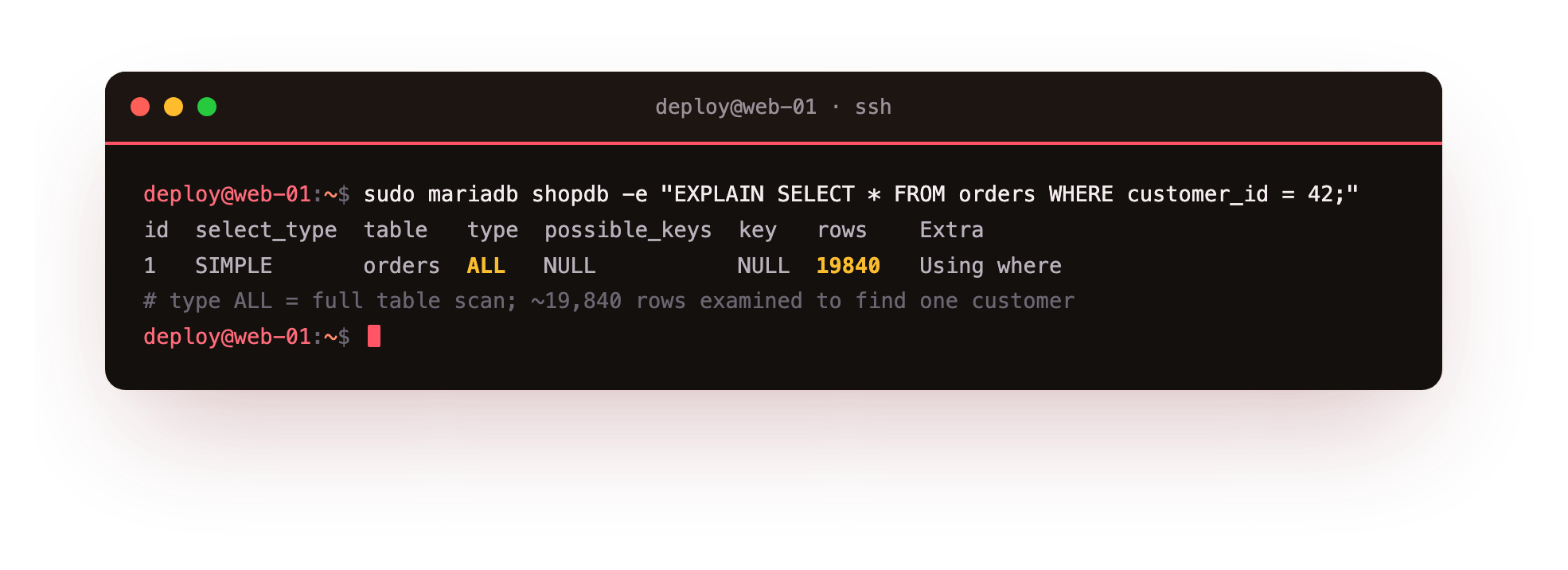
The type column reads ALL, which is the plain name for a full table scan. possible_keys and key are both NULL, so the server has no index to use for this filter. The rows estimate is 19,840, essentially the whole table. To return one customer's handful of orders, MariaDB expects to examine every row and keep the matches. The Extra column shows Using where, the filter applied after each row is read.
Add the index and measure innodb indexing
An index is a sorted lookup structure that InnoDB builds and maintains on a column you name. Instead of walking rows in table order, the server can binary-search the sorted keys and jump to the matching rows. Create one on customer_id, the column in the WHERE clause.
CREATE INDEX idx_orders_customer ON orders (customer_id);
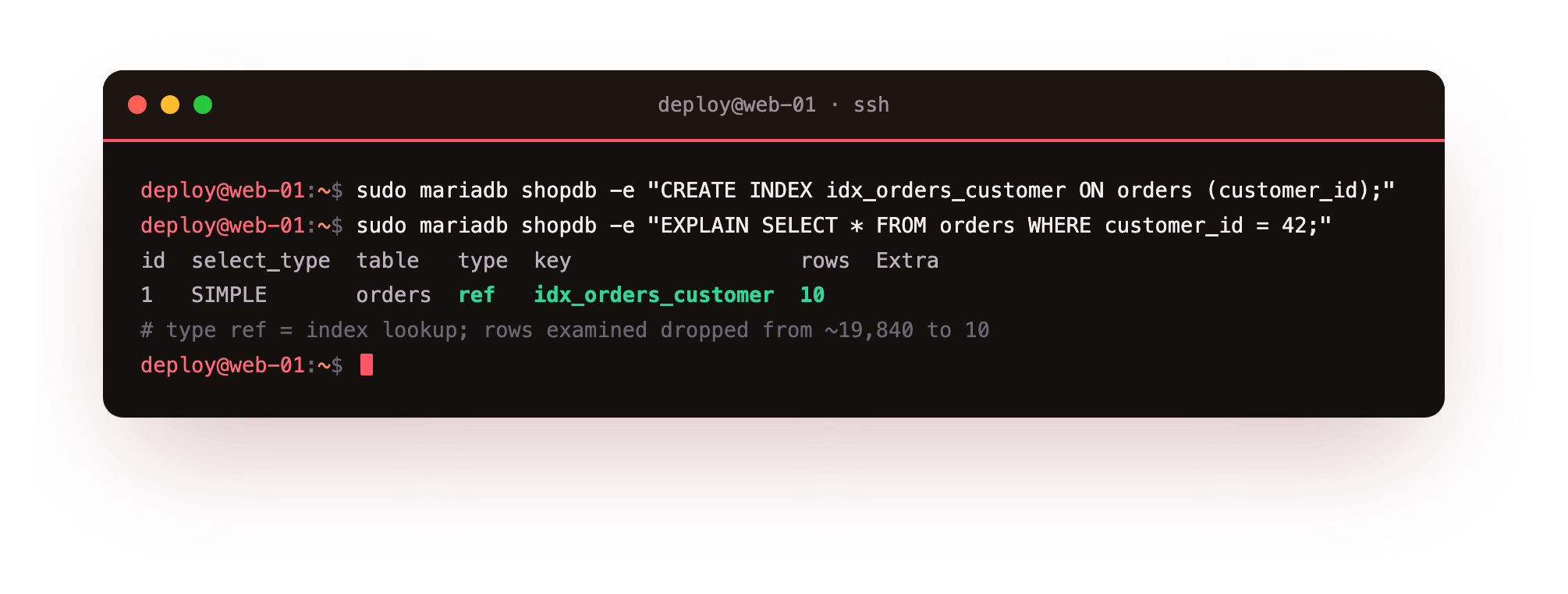
InnoDB writes the index once and keeps it current on every insert, update, and delete that touches customer_id. Now run the exact same EXPLAIN and compare the plan to the one you saw a moment ago.
sudo mariadb shopdb -e "EXPLAIN SELECT * FROM orders WHERE customer_id = 42;"
The type column now reads ref, an index lookup rather than a scan. key names idx_orders_customer, the index the planner chose. rows drops from about 19,840 to 10. Same query, same data, same server, and one line of DDL cut the rows examined by roughly 2,000 times. That ratio is the whole case for innodb indexing: you pay a little on writes so a filter reads the rows it needs instead of all of them.
Your second EXPLAIN should now show type: ref and a rows figure in the low tens, not the full-table count. If it still reads ALL, the planner did not take the index, so confirm the WHERE clause filters the bare customer_id column and not a function wrapped around it.
InnoDB as the default engine, and the buffer pool
Indexes live inside a storage engine, and InnoDB is the one MariaDB uses by default. Two settings are worth reading straight from the server: which engine is default, and how much memory InnoDB has for its cache.
sudo mariadb -e "SELECT ENGINE, SUPPORT FROM information_schema.ENGINES WHERE ENGINE='InnoDB';"
sudo mariadb -e "SHOW VARIABLES LIKE 'innodb_buffer_pool_size';"
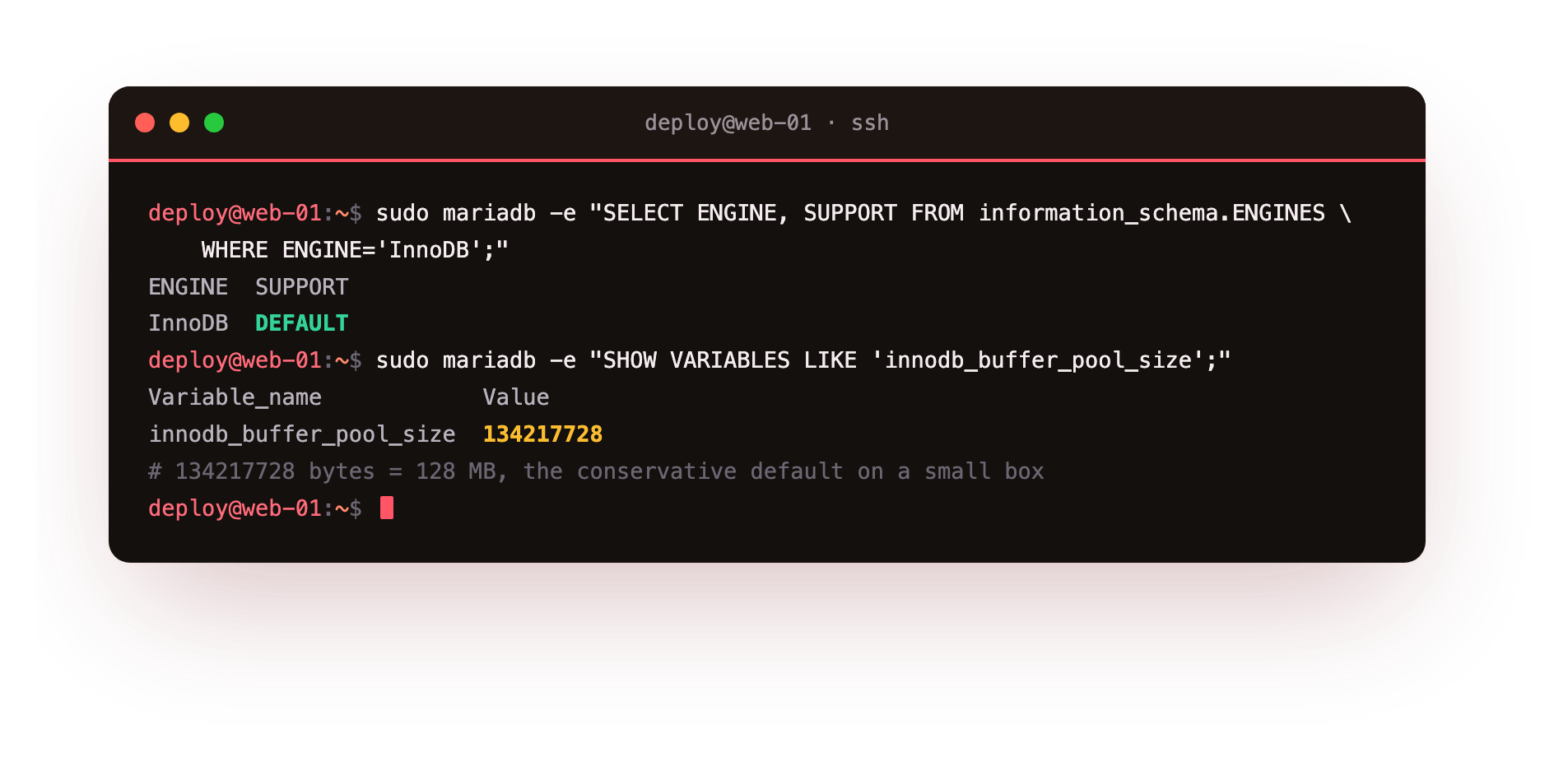
The first query shows InnoDB with SUPPORT set to DEFAULT, so new tables use it unless you ask for something else. The second shows innodb_buffer_pool_size at 134217728, which is 128 MB, the conservative default on a small box. The buffer pool is InnoDB's in-memory cache of table and index pages. Once a page is read from disk it stays here, so repeat reads skip the disk.
An index also lives in the buffer pool once read, which is part of why the indexed query is cheap: after the first lookup its sorted keys are already in memory. On a database-only VPS you often raise the pool toward 50 to 70 percent of RAM. On this 1.9 GB shared box, where the web app wants memory too, the 128 MB default is a safe start.
Prefer InnoDB over the older MyISAM engine for anything that takes writes. InnoDB locks a single row when it updates, so concurrent writers do not block the whole table. It recovers cleanly after a crash by replaying its log, and it enforces foreign keys. MyISAM has none of these, which is why it is rare on new production tables.
Troubleshooting slow queries and indexes
EXPLAIN still shows type ALL after you added an index. The planner may judge a scan cheaper on a small or low-variety column, or your WHERE clause may not match the indexed column exactly. Wrapping the column in a function, like WHERE YEAR(created_at) = 2026, hides the index. Filter on the bare column instead.
The index exists but a different query is still slow. An index on customer_id does nothing for a filter on order_status. Read that query's EXPLAIN on its own and index the column it filters or joins on. SHOW INDEX FROM orders lists what the table already carries.
Writes got slower after you added indexes. That is the cost side showing up. Every insert and update maintains each index on the table. Count how many indexes the table now has, and remove any that no EXPLAIN chooses.
Disk reads are high and the buffer pool looks too small. Check innodb_buffer_pool_size against your data size and free RAM. Raising it helps only if the box has memory to spare after its other work, so measure before you change it on a shared server.
Frequently asked questions
Does an index make every query faster?
No. An index helps queries that filter, join, or sort on the indexed column. A query that reads most of the table, or filters on a different column, gets no benefit and still pays the write cost of maintaining the index. EXPLAIN tells you whether a given query actually uses one.
What does type ALL mean in EXPLAIN?
type ALL is a full table scan: the server reads every row and applies the filter afterward. It is acceptable on small tables and a warning sign on large ones. For a selective filter you want type ref or type eq_ref, which are index lookups that read only the matching rows.
Should I use InnoDB or MyISAM?
Use InnoDB, which is the default on MariaDB 10.11. It offers row-level locking, crash recovery, and foreign keys, none of which MyISAM has. MyISAM survives mainly for read-only or legacy tables, and a new production table rarely has a reason to choose it.
How large should innodb_buffer_pool_size be?
On a dedicated database server, roughly 50 to 70 percent of RAM is a common starting point. On a shared box like this 1.9 GB VPS, the 128 MB default leaves room for the web app and other services. Raise it only after measuring memory pressure and disk reads.
What you have, and what comes next
You have watched a query fall from about 19,840 rows examined to 10 by adding one index, confirmed InnoDB is the default engine, and read the buffer pool size that caches your hot pages. More than the numbers, you have the loop: run EXPLAIN, read the plan, change one thing, run EXPLAIN again.
An indexed, well-shaped schema is worth little if you cannot get the data back after a failed disk or a bad migration. The next chapter, Backups That Actually Restore, builds a backup you have proven by restoring it, not one you hope works.