What is a socket, really?
When a service on your server accepts a connection, it does so through a socket. A socket is one endpoint of a network conversation, identified by an IP address and a port number together, for example 10.0.2.15 on port 443. The linux ss command lists these sockets, and reading its output tells you which services are listening and where they can be reached from. ss stands for socket statistics and ships in the iproute2 package, so it is present on a stock Ubuntu 24.04 server.
- A socket is one endpoint of a connection, named by an IP address and a port together.
- `sudo ss -tlnp` lists every listening TCP socket with the process that owns it.
- A socket on 0.0.0.0 faces every interface and the outside world; one on 127.0.0.1 is reachable only from the server itself.
- `ss` reads socket data straight from the kernel and replaces the deprecated `netstat`.
Two ends make a connection. A client socket reaches out, and a server socket waits for it. The waiting side sits in a state called LISTEN, which means it has claimed a port and is ready for incoming connections. Everything you host, a web server, a database, an SSH daemon, appears as a listening socket while it waits for clients.
Listing listening sockets with the linux ss command
sudo ss -tlnp
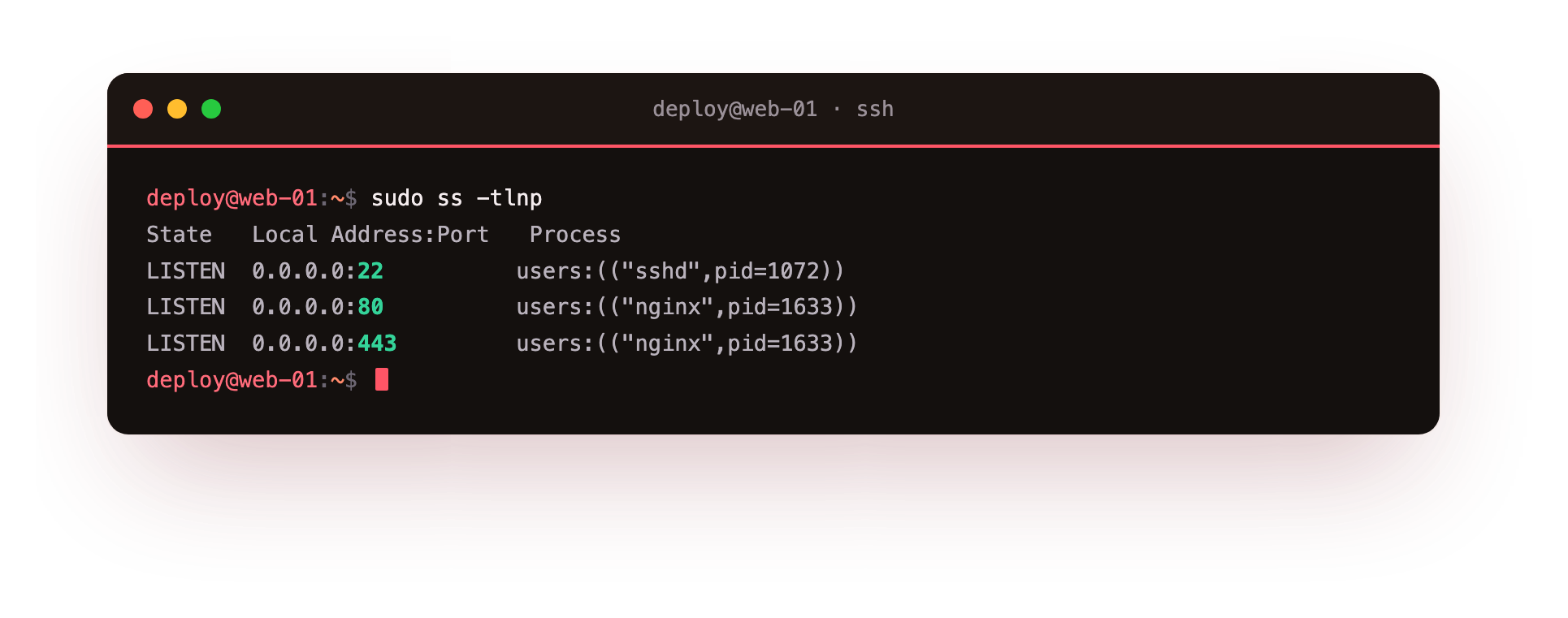
Each flag shapes the output:
-tlimits results to TCP sockets, the protocol behind HTTP, SSH, and most databases.-lshows only listening sockets, the services waiting for connections, and hides established sessions.-nprints numeric ports and addresses instead of resolving them to names likehttps, which keeps the view quick and unambiguous.-pshows the process holding each socket, so you can tie a port back to a program and its PID.
The sudo matters for -p. Without root the kernel will not tell you which process owns a socket that belongs to another user, so you would see blanks in the process column. Running the linux ss command with sudo fills that column in.
The local address column, written as address:port, is the part to study. The address half tells you which interfaces the service is bound to, and that single detail decides whether the outside world can reach it.
0.0.0.0 versus 127.0.0.1
You will see two addresses again and again, and the difference between them is a security decision, not a cosmetic one.
| Local address | Meaning | Reachable from |
|---|---|---|
| 0.0.0.0:port | Bound to every interface | The internet, if a firewall allows it |
| 127.0.0.1:port | Bound to the loopback interface | The server itself only |
An address of 0.0.0.0 means the service listens on all of the machine's interfaces, including its public one, so a client anywhere can attempt to connect. An address of 127.0.0.1 is the loopback address, reachable only from processes on the same server. A database bound to 127.0.0.1:5432 cannot be dialled from another machine at all, which is usually what you want for a backend component.
Why binding to localhost is safer
Binding to localhost is the safer default for anything that does not need outside access. If your application server and database run on the same box, keep the database on 127.0.0.1 so no port sits exposed on the public interface. When you do need a service reachable, bind it to 0.0.0.0 on purpose and put a firewall in front of it. The linux ss command is how you audit these choices, one line per socket, before someone else does.
A short checklist for reading each listening line:
- Is the address
0.0.0.0? Confirm you meant to expose it and that a firewall guards the port. - Is it
127.0.0.1? Then it is private to the server, which is the safe case. - Does the process column match what you expect on that port? An unfamiliar program on an open port is worth investigating.
Why ss replaced netstat
Older guides reach for netstat from the net-tools package. That package is deprecated and is not installed by default on current Ubuntu releases. ss reads socket data straight from the kernel and stays responsive on busy servers with thousands of connections, and it accepts richer filters. The linux ss command covers everything netstat did for socket inspection, so there is no reason to install the older tool. If muscle memory still types netstat -tlnp, the direct translation is ss -tlnp.
Troubleshooting ss output
The process column is empty. You ran ss without root, so the kernel hid the owner of sockets that belong to other users. Re-run with sudo ss -tlnp and the PID and program name fill in.
A service you started is not in the list. Either it failed to bind to its port, or it is listening on UDP rather than TCP. Swap -t for -u to check UDP with sudo ss -ulnp, and read the service's own logs to confirm it started cleanly.
You see [::]:port or *:port instead of 0.0.0.0. [::] is the IPv6 wildcard, the v6 equivalent of 0.0.0.0, and on a dual-stack host it often accepts IPv4 connections too. Treat it as publicly reachable and put a firewall in front of it.
Frequently asked questions
What is the difference between ss -tlnp and ss -tnp?
The -l flag limits the output to listening sockets, the services waiting for connections. Without -l you also see established connections, the live sessions in progress. Use -l to audit what is exposed, and drop it to see who is connected right now.
How do I see which process is on a specific port?
Filter by port, for example sudo ss -tlnp 'sport = :443', which prints only the socket listening on 443 and its owning process. That is quicker than reading the whole table when you already know the port.
Can a service on 127.0.0.1 ever be reached from outside?
Not directly. The loopback address is reachable only from processes on the same machine. It can be reached deliberately through an SSH tunnel, which relays a local port through your login, but nothing on the network can dial it on its own.
Why prefer numeric output with -n?
Without -n, ss resolves ports and addresses to names, which adds lookups and can hang when resolution is slow. -n prints raw numbers, so the command returns at once and each port is unambiguous.
Recap
A socket is one end of a connection, named by an address and a port. Use sudo ss -tlnp to list TCP listening sockets with numeric addresses and the owning process. Read the local address to judge exposure: 0.0.0.0 faces every interface and the outside world, while 127.0.0.1 stays on the server. Bind internal services to localhost, put a firewall in front of anything on 0.0.0.0, and treat ss as the current replacement for netstat.