When two machines cannot reach each other
A deploy fails, a webhook never arrives, or a database client just hangs, and the first question is always the same: can these two machines even reach each other across the network? Before you read application logs or suspect the code, you test the path itself, and the two tools you reach for first are ping and traceroute.
- ping tells you whether packets reach a host and return, and how long the round trip takes.
- traceroute maps the route packets follow and shows the hop where they stop.
- Both use ICMP, which many hosts and firewalls drop on purpose, so a silent host is not proof it is down.
- mtr merges ping and traceroute into one live table that makes a flaky middle hop obvious.
ping tells you whether packets get to a host and come back, and how long the round trip takes. traceroute shows the route those packets follow and the point along it where they stop. You are logged in as deploy, and both run without sudo for ordinary checks.
ICMP, and why some hosts stay silent
Both tools use a protocol called ICMP, the Internet Control Message Protocol. ICMP carries small status and error messages that sit apart from your real application traffic. ping sends an ICMP echo request and waits for an echo reply, a deliberately tiny exchange whose only job is to confirm the round trip.
The point worth knowing before you trust the result: ICMP is optional, and plenty of hosts and firewalls drop it on purpose. A server that ignores your ping can be perfectly healthy and still serving traffic on port 443. So read a silent host as "not answering ICMP", not automatically as "down".
How do you read ping output?
Start with ping. The -c flag, short for count, sets how many packets it sends before it stops on its own. Without -c, ping runs until you press Ctrl+C, which is fine by hand but awkward in a script:
ping -c 3 1.1.1.1
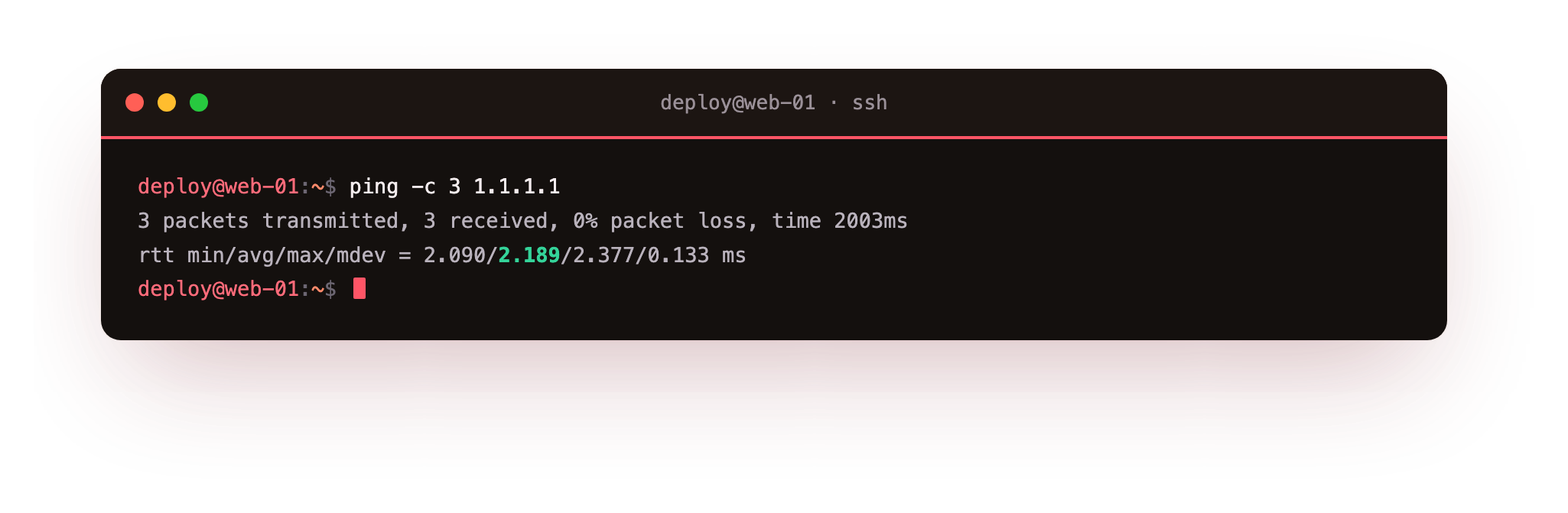
Here 1.1.1.1 is a public DNS resolver, a dependable target for checking whether your server reaches the wider internet at all. Three things in the result matter. Each reply line carries a time= value in milliseconds, the round-trip time for that packet. The summary line reports packet loss as a percentage, and 0% is what you want. The final line gives the minimum, average, and maximum times, so you can see whether the link is steady or jumpy.
- 0% loss with a low, steady time: the path is healthy.
- 0% loss but times that swing widely: the link works but is congested or distant.
- Partial loss, say 33%: packets are being dropped somewhere on the way.
- 100% loss: nothing came back, so the host is either down or dropping ICMP.
Mapping the path with ping and traceroute together
ping tells you whether the far end answers. It does not tell you where a broken path fails, and that is traceroute's job. It sends packets with a small time-to-live, or TTL, a counter of how many hops a packet may cross before a router discards it and reports back. traceroute uses those reports to name every hop between you and the target, in order.
The -m flag sets the maximum hop count to probe, short for max-ttl. Capping it keeps the output short when you only care about the first few hops near your own server:
traceroute -m 4 1.1.1.1
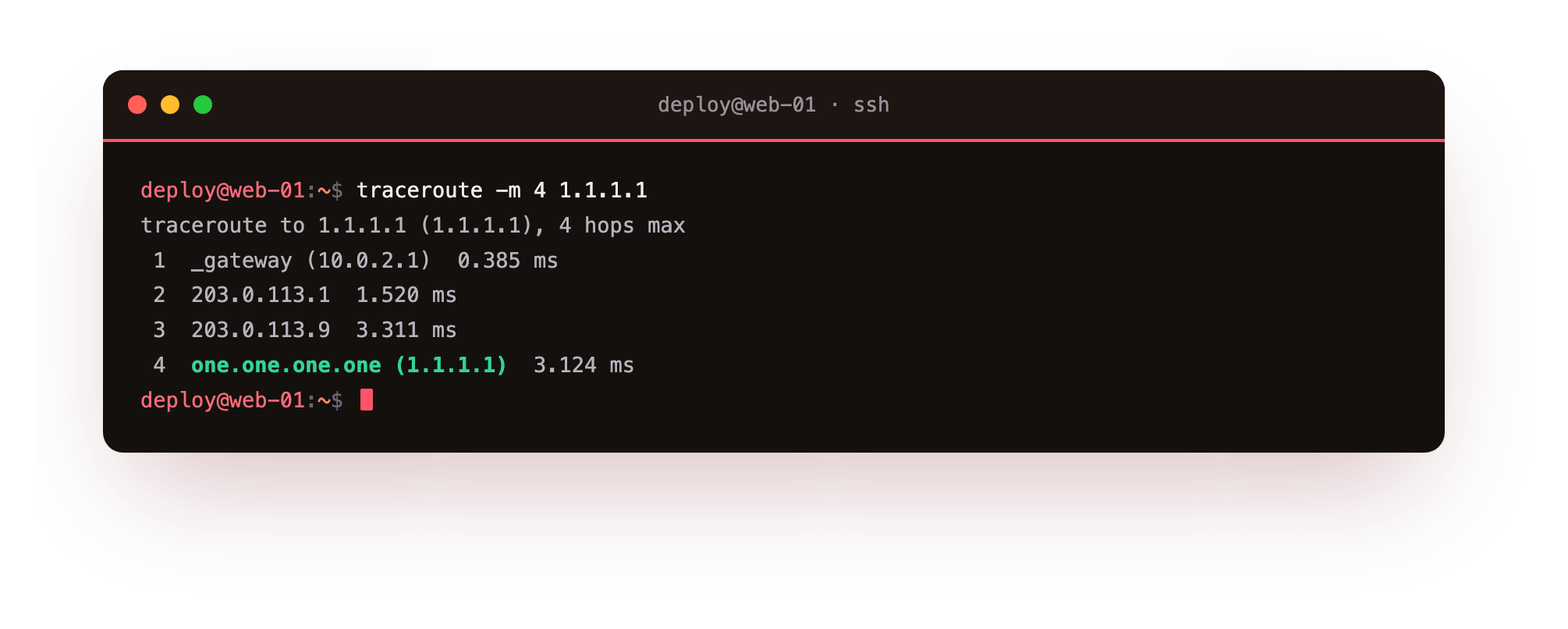
Read the list from the top down. Line 1 is usually your own gateway, for example 10.0.2.1 on an internal network, and each line below is one hop further out. traceroute probes each hop three times, so you see three timing values per line.
When hops answer in sequence and then you hit a run of * * * lines that never recovers, the path is breaking there, and the last hop that did answer tells you how far your packets got. A few scattered stars mid-path are normal, because some routers deprioritise these probes. A solid wall of stars to the end is the signal that matters.
mtr, a live ping and traceroute in one view
Running ping and traceroute separately answers two questions in two commands. The mtr tool merges them into one screen that keeps updating. Install it from the mtr-tiny package, the command-line build without graphical dependencies, with sudo apt install mtr-tiny, then run mtr 1.1.1.1. mtr traces the path once, then keeps pinging every hop and refreshes a table in place.
The column that earns its keep is Loss% per hop. If loss starts at one middle hop and shows on every hop after it, that hop is where trouble begins. If loss shows at a middle hop but the hops beyond it stay clean, that router is only rate-limiting its own replies and you can ignore it. Press q to quit.
Troubleshooting ping and traceroute
traceroute: command not found. Unlike ping, traceroute is not installed by default on Ubuntu 24.04. Add it with sudo apt install traceroute, then run the command again.
ping reports 100% loss but the site loads in a browser. The host is answering on its service port while dropping ICMP echo, a common firewall policy. Test the real port instead, for example curl -sI https://example.com, before you conclude the host is down.
traceroute ends in a wall of * * *. Packets stopped getting through past the last hop that answered, which points at where the path breaks. A few scattered stars in the middle are normal, since some routers deprioritise these probes; only an unbroken run of stars to the end is the signal.
Frequently asked questions
Why does a host reply to a browser but not to ping?
ping uses ICMP, a separate protocol from the TCP that carries web traffic. Many operators drop ICMP to cut noise while leaving port 443 open. A host that ignores ping can be healthy, so confirm with the real port before calling it down.
What do the three times on each traceroute line mean?
traceroute probes each hop three times and prints the round-trip time for each attempt. Three similar values mean a steady hop; one high value among two low ones is a single slow probe, usually not a real problem.
Should I read loss at a middle hop as a fault?
Only if the loss continues on every hop after it. Loss that shows at one middle hop but clears on the hops beyond means that router is rate-limiting its own replies, not dropping your traffic. mtr's per-hop Loss% column makes this easy to see.
What is the difference between mtr and traceroute?
traceroute maps the path once and stops. mtr traces the path, then keeps pinging every hop and refreshes a table in place, so it catches intermittent loss that a single traceroute run would miss.
Recap
When a connection is in doubt, test the network before the application. ping sends ICMP echo packets, -c sets how many, and the output tells you round-trip time and loss, so you can separate a healthy link from a lossy one, keeping in mind that a silent host may just be blocking ICMP. traceroute maps the route hop by hop and -m caps how far it probes, so a wall of stars shows where the path breaks.
mtr from the mtr-tiny package runs ping and traceroute together as a live table that makes a flaky middle hop obvious. On Ubuntu 24.04 all three are one apt install away, and together they turn "the network feels broken" into a specific hop you can name.