When no package exists for the thing you need
Most days on Ubuntu you install software with apt and never think about how it was compiled. Sometimes the program you want is in no repository, or the version apt offers is older than the one you need, and then you build from source on Linux yourself.
- Install build-essential first; it provides the GCC compilers, make, and the standard headers a build needs.
- Fetch a released tarball with wget or the live code with git clone, then unpack a tarball with tar xzf.
- Most C projects follow the same three steps: ./configure to check dependencies and write a Makefile, make to compile, sudo make install to place the binary.
- apt does not track anything installed this way, so keep hand-built software under /usr/local or use checkinstall so it can be removed cleanly.
That means you download the program's source code, unpack it, and compile it into a working binary on the machine. It sounds involved, but for many command line tools it comes down to three commands run in order, shown here on a live Ubuntu 24.04 server where you are logged in as deploy.
Prerequisites
- A user with
sudorights on an Ubuntu 24.04 LTS server, since installing the compiler and the built binary both touch system paths. - Outbound internet access to download the source, plus
wgetandgit(git installs withsudo apt install gitif it is missing). - A little free disk space, since a build unpacks the source and writes compiled objects alongside it.
- Basic comfort at the shell: changing directory, listing files, and reading an error message.
Getting the compiler in place
Source code is text. To turn it into a program the CPU can run you need a compiler and the tools that go with it. On Ubuntu these arrive in one bundle called build-essential, which pulls in the GCC C and C++ compilers, the make command, and the standard header files. Install it once with sudo, because adding system packages is an administrative action:
sudo apt install build-essential
Without this package a build stops almost immediately with an error about a missing compiler or a missing header. Installing build-essential first saves you from reading that error and guessing what it means.
Getting the source code onto the server
With the compiler ready, the next part of building from source on Linux is getting the code onto the server. Source usually arrives one of two ways. A released version comes as a compressed archive, a tarball, that you fetch with wget:
wget https://ftp.gnu.org/gnu/hello/hello-2.12.tar.gz
wget downloads the file at that address and saves it in the current directory. The other way is to clone a project's live repository with git, which you use when you want the newest code rather than a tagged release:
git clone https://git.savannah.gnu.org/git/hello.git
git clone copies the whole repository, its files and its history, into a new folder. Either way the source is now on the server. A tarball needs one more step, unpacking, before you can work with it.
Unpacking and reading what you got
A .tar.gz file is a folder that has been bundled into one file with tar and then compressed with gzip. Unpack it and list the result:
tar xzf hello-2.12.tar.gz && ls hello-2.12
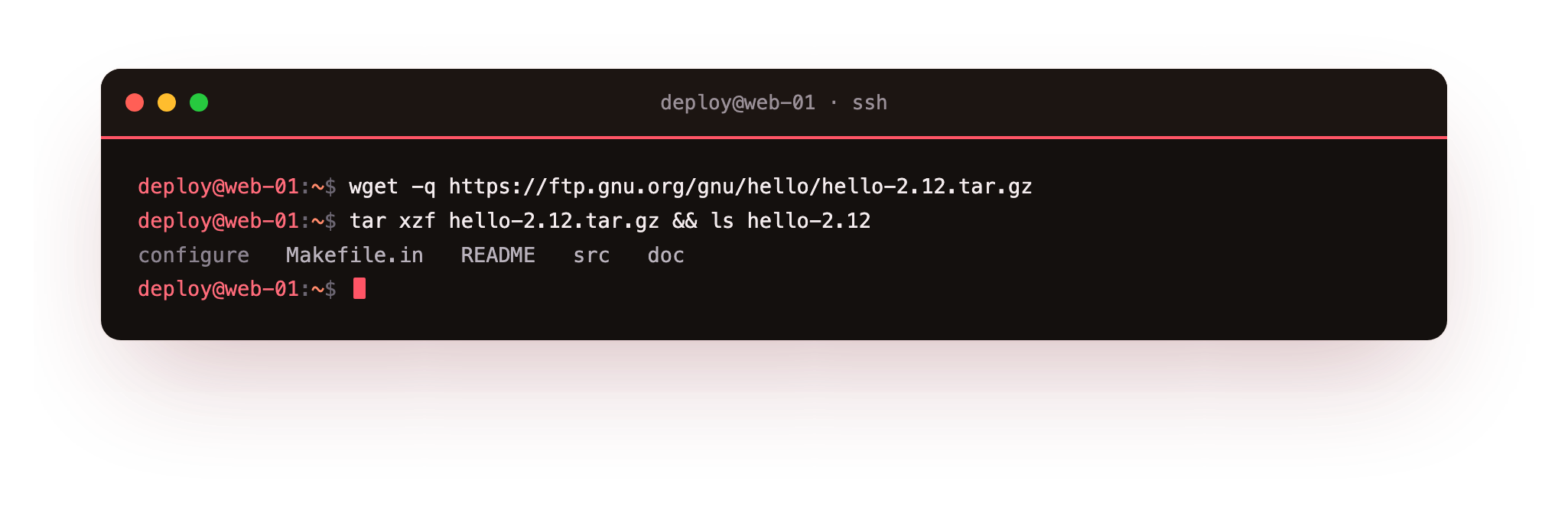
Read that command in parts. tar is the archive tool. x means extract, z means run it through gzip to decompress, and f names the file to work on. The && then runs ls on the new folder only if the extraction succeeded, so you see the files that came out.
In the screenshot you can see the unpacked project, and the names to look for are configure, a Makefile template, and a README or INSTALL file. Those INSTALL notes are worth reading, because they list anything unusual a given project needs before it will build.
The build from source on Linux pattern: configure, make, make install
With the source unpacked, most C projects follow the same three steps. Run them from inside the project folder:
cd hello-2.12
./configure
make
sudo make install
Each step has a clear job:
- ./configure inspects your system, checks that the libraries and tools the program depends on are present, and writes a Makefile tailored to this machine. If a dependency is missing it stops here with a named error, which tells you exactly what to install before trying again.
- make reads that Makefile and compiles the source into a binary. This is the step that does the real work, and on a large project it is the one that takes time.
- sudo make install copies the finished binary, along with any manual pages and data files, into system directories so you can run the program by name. It needs sudo because it writes into system paths an ordinary user cannot touch.
Run those in order and, for the hello example, you finish with a working hello command on your PATH.
The catch: apt does not know this software exists
Here is the honest downside of choosing to build from source on Linux. apt keeps a database of everything it installed, which is how apt list, apt upgrade, and apt remove know what is on the machine. Software you compiled and installed by hand never enters that database. apt cannot upgrade it, cannot remove it, and will not even report that it is there. Six months later you can be left wondering where a binary came from.
Two habits keep this manageable:
| Habit | What it buys you |
|---|---|
| Install under /usr/local | Keeps hand built files in one place, separate from apt's /usr, so you always know what you added |
| Use checkinstall instead of make install | Builds a real .deb package and installs that, so apt tracks it and can remove it cleanly later |
checkinstall is a small tool you run in place of the final step. It watches what the install writes and wraps those files in a Debian package, so apt can remove it later. On a server you plan to keep, that record is worth the extra command.
Troubleshooting a source build
./configure fails with "no acceptable C compiler found in $PATH". build-essential is not installed, so there is no compiler. Run sudo apt install build-essential, then run ./configure again.
./configure stops on a missing library or header. The project needs a development package you do not have, usually one whose name ends in -dev. The error names what it looked for; install the matching -dev package with apt and re-run ./configure.
sudo make install succeeds but the command is "not found". The binary landed under /usr/local/bin, which is missing from some minimal PATHs. Check the path in the install output, and add /usr/local/bin to your PATH if it is not already there.
You cannot cleanly remove software you compiled. make install does not register with apt. Rebuild with checkinstall in place of the final step, which wraps the install in a .deb apt can remove, or delete the files dpkg -L cannot account for by hand.
Frequently asked questions
Do I need build-essential for every source build?
For C and C++ projects, yes: it provides the compilers, make, and headers those builds assume. Software written in another language needs that language's own toolchain instead, for example the Go or Rust compiler, but the configure and make pattern in this chapter is specific to C-style projects.
configure says a library is missing. What do I install?
Install the development package for that library, which on Ubuntu usually ends in -dev. The error message names the library it could not find; search for it with apt search, install the -dev package, then re-run ./configure.
Should I run make install with sudo?
Yes when installing into system directories such as /usr/local, because an ordinary user cannot write there. To avoid sudo entirely, pass ./configure a prefix you own, for example --prefix=$HOME/.local, and the install writes under your home directory instead.
How do I uninstall something I built from source?
If the project ships a make uninstall target, run it from the source folder. Otherwise use checkinstall next time so apt can remove the package, since a plain make install leaves no record for apt to track.
Recap
When no package exists, you build from source on Linux by fetching the code, unpacking it, and compiling it. Install build-essential first for the compiler and make. Fetch a tarball with wget or a repository with git clone, unpack a tarball with tar xzf, then run ./configure to check dependencies and write a Makefile, make to compile, and sudo make install to place the binary. apt does not track anything installed this way, so keep hand built software under /usr/local or use checkinstall so it can be removed cleanly.