systemctl enable and mask, two separate switches
New administrators trip over one distinction constantly: starting a service and enabling it are not the same thing. Start controls what runs right now. Enable controls what runs after the next reboot. systemctl enable and mask sit at two ends of a range of control that decides, for each service, whether it comes back on boot and whether it may run at all. Getting this straight saves you from the classic surprise of a service you "stopped" reappearing after a reboot.
- Start and stop change what runs now; enable and disable change what runs at boot.
enablecreates a symlink in the target's.wantsdirectory; that link is the whole mechanism.disableremoves the boot link, but the service can still start by hand or as a dependency.maskpoints the unit at/dev/nullso it cannot start by any route until youunmaskit.
Picture two independent switches on every unit. One is the live state, running or stopped, changed by start and stop. The other is the boot preference, wanted at boot or not, changed by enable and disable. They do not move together. A service can be running now but not enabled, so it will be gone after a reboot, and a service can be enabled but stopped right now.
Prerequisites
- An Ubuntu 24.04 LTS server with a systemd service to work on, such as
sc-demo. - sudo rights, since enable, disable, mask, and unmask change system state.
- Familiarity with reading a unit file (see systemd Services Explained, part 4).
Checking and setting the boot state
is-enabled answers the boot question without changing anything:
systemctl is-enabled sc-demo
sudo systemctl enable sc-demo
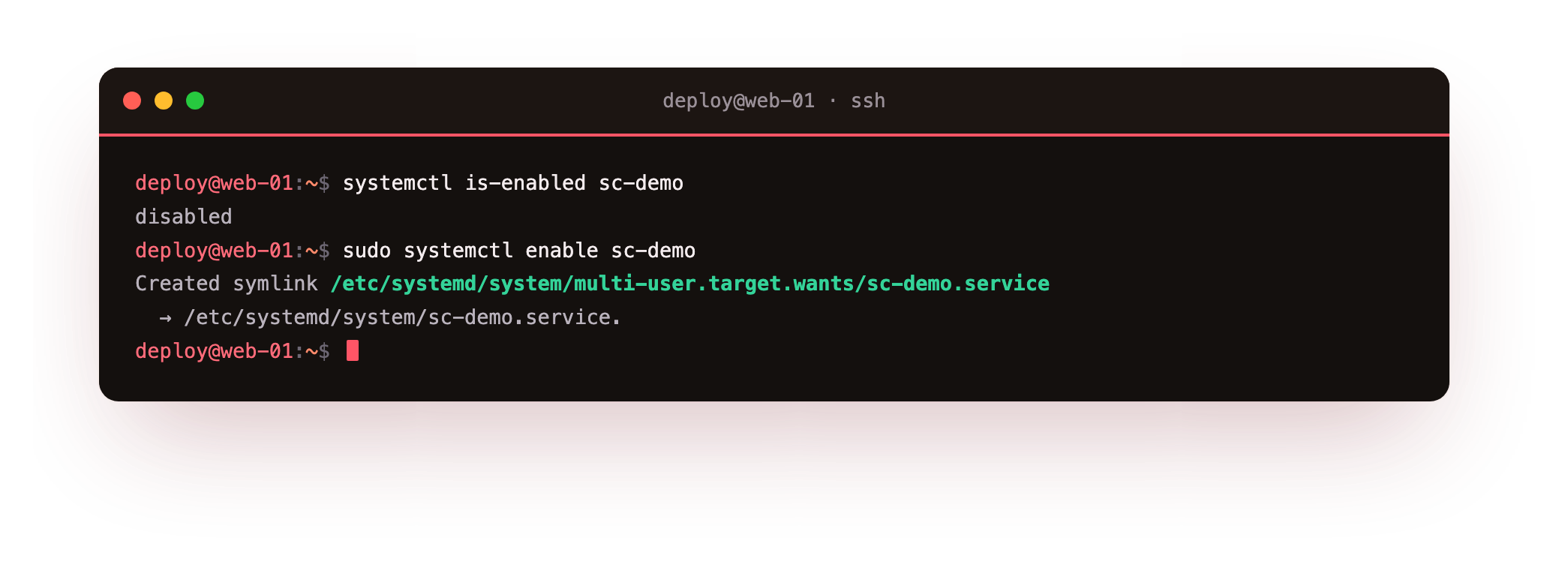
The first line prints one word, usually enabled, disabled, or masked, so you know where the service stands. The second line creates the boot time link that makes the service start on every boot. enable works by reading the WantedBy line in the unit, here WantedBy=multi-user.target, and creating a symlink from that target's .wants directory to the unit file. On Ubuntu 24.04 that link appears under /etc/systemd/system/multi-user.target.wants/, and its presence is the whole mechanism: it means "start this at boot".
Because enable only writes a symlink, it does not start the service now. If you want both at once, either run start as well or use the combined form:
sudo systemctl enable --now sc-demo
--now tells enable to also start the service immediately, and disable --now stops it as it removes the link.
Disable versus mask
The gap between systemctl enable and mask is really a gap in how firmly a service is held down. disable is the plain opposite of enable. It deletes the boot symlink, so the service no longer starts on its own at boot:
sudo systemctl disable sc-demo
A disabled service can still be started, though: by you with systemctl start, or automatically because another unit lists it as a dependency. disable only removes the boot symlink. It does not forbid the service from running.
mask is the stronger tool. It replaces the unit with a symlink to /dev/null, which makes the service impossible to start by any route:
sudo systemctl mask sc-demo
Once masked, systemctl start sc-demo fails with an error, and any other unit that pulls sc-demo in as a dependency is refused too. That is the difference that matters between disable and mask:
| Command | Starts at boot | Can be started by hand | Can be pulled in as a dependency |
|---|---|---|---|
| enable | yes | yes | yes |
| disable | no | yes | yes |
| mask | no | no | no |
To reverse a mask, unmask removes the /dev/null link and returns the unit to its earlier state:
sudo systemctl unmask sc-demo
After unmasking, the service is back to whatever its enable state was before, so check with is-enabled and enable it again if you want it at boot.
When is masking the right tool?
Reach for mask, not disable, when you need a guarantee that something stays down:
- A package ships a service you never want to run, such as a bundled database on a server that talks to a remote one.
- Two services want the same port and you need to be certain the wrong one cannot start, even through a dependency.
- You are debugging and want to hold a service fully out of the way until you deliberately unmask it.
For a service you are only pausing for a few minutes, stop is enough. For one you do not want at boot but might run by hand, disable fits. mask is for "do not let this run at all", and it is worth remembering that a masked unit will not start no matter how you ask, which can itself be a confusing symptom if you forget you masked it.
Troubleshooting enable, disable and mask
A service you disabled came back after a reboot. Another unit lists it as a dependency, or it is still linked through an alias. disable only removes its own boot symlink. Use mask to keep it down no matter who pulls it in.
enable fails with "no installation config". The unit has no [Install] section with a WantedBy line, so there is no target to link into. Add WantedBy=multi-user.target, or start the service another way.
A masked unit will not start and you forgot why. systemctl start fails on a masked unit by design. Check with systemctl is-enabled name; if it reads masked, run sudo systemctl unmask name.
enable did not start the service. enable only writes the boot symlink. Use sudo systemctl enable --now name to enable and start it in one step.
Frequently asked questions
What is the difference between disable and mask?
disable removes the boot symlink but still allows manual and dependency starts. mask replaces the unit with a link to /dev/null so it cannot start by any route. Use mask when off has to mean fully off.
Does enabling a service also start it?
No. enable only creates the boot symlink, so the service starts on the next boot but not now. Use enable --now to do both at once.
How do I check whether a service starts at boot?
Run systemctl is-enabled name. It prints one word, usually enabled, disabled, or masked, without changing anything.
How do I undo a mask?
Run sudo systemctl unmask name. That removes the /dev/null link and returns the unit to its earlier state, so check is-enabled and enable it again if you want it at boot.
Recap
systemctl enable and mask sit at opposite ends of unit control. start and stop change what runs now, while enable and disable change what runs at boot by adding or removing a symlink from the WantedBy target. is-enabled reports where a unit stands.
disable stops a service starting itself at boot but still allows manual or dependency starts, whereas mask points the unit at /dev/null so it cannot start at all until you unmask it. Use mask when "off" has to mean off, and disable when you just want it off the boot list.