What is a signal?
When you want a process to stop, you do not reach in and delete it from memory. You send it a signal. A signal is a small, numbered message the kernel delivers to a process on your behalf, and learning the common linux kill signals is what lets you stop work cleanly instead of yanking the power on it. Each signal has a number and a name, and each one has a default behaviour that the process follows unless it has been written to handle that signal differently.
- A signal is a small, numbered message the kernel delivers to a process for you.
- SIGTERM (15) asks a process to stop and clean up; it is what plain
killsends. - SIGKILL (9) forces removal with no cleanup and can never be caught or blocked.
- Use
killwith a PID,pkillorkillallby name, and try TERM before KILL.
The two you will reach for most often are SIGTERM and SIGKILL:
SIGTERM, number 15, means "please stop". The process receives it and can run its shutdown code first: finish the current job, flush data to disk, close files, then exit. This is the polite request and the default thatkillsends.SIGKILL, number 9, means "stop now". The kernel removes the process immediately. The process cannot catch it, block it, or clean up. Anything half-written stays half-written.
That difference is the whole reason you try SIGTERM before SIGKILL. A well-behaved worker like the sc-demo service will hear SIGTERM, finish the job it is holding, and exit tidily. Reaching for SIGKILL first can leave temp files, partial writes, or a stale lock behind.
Let me demonstrate on some throwaway sleep processes so nothing important is at stake. First start a couple in the background, where the & on each line runs the sleep without holding your prompt:
sleep 300 &
sleep 300 &
Now count them, send the polite stop signal to them by name, then count again to confirm they are gone. pgrep -c sleep counts processes whose name matches sleep and prints just the number. pkill -TERM -f "sleep 300" sends SIGTERM to every process whose full command line matches sleep 300: the -TERM picks the signal, and -f matches against the whole command line rather than the short name. The final pgrep -c sleep should report a lower count.
pgrep -c sleep
pkill -TERM -f "sleep 300"
pgrep -c sleep
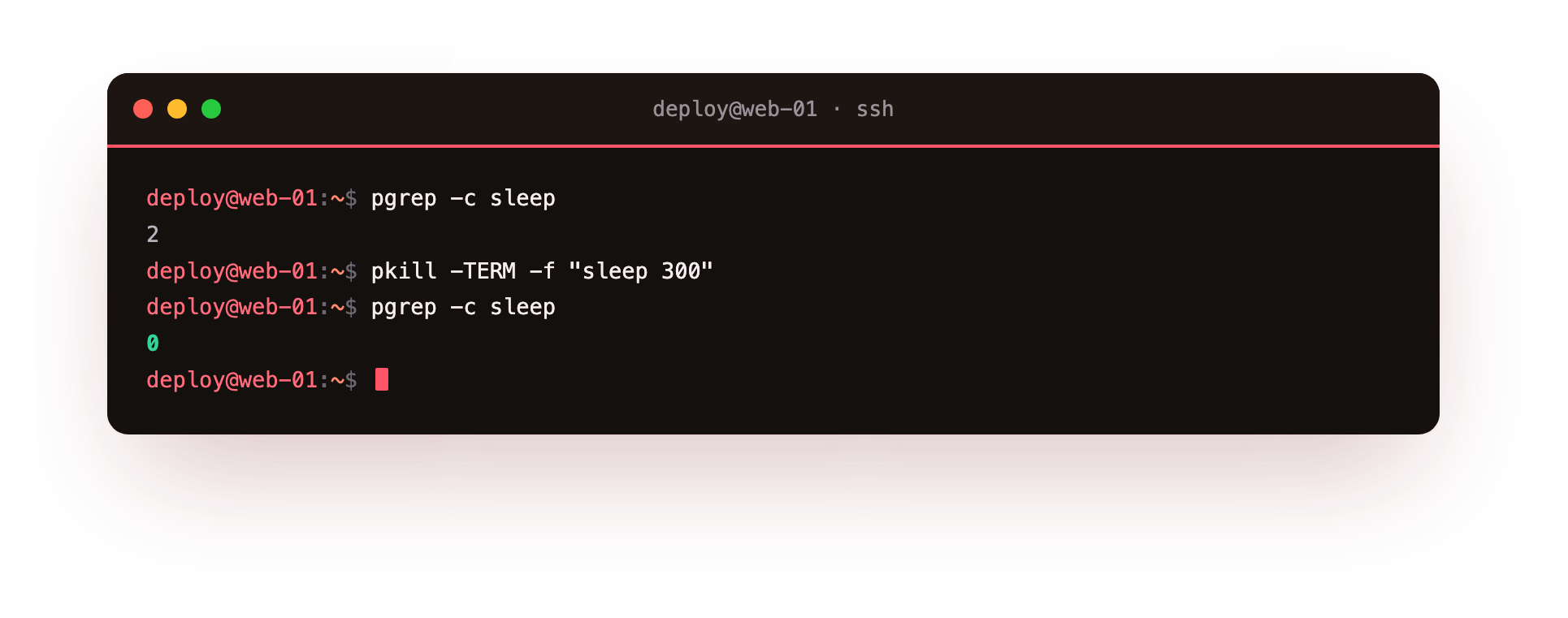
The count drops because the sleep processes accepted SIGTERM and exited. sleep has no special handler, so for it SIGTERM and SIGKILL look the same from outside, but on a real service the difference matters.
Killing by PID with kill
When you already know a PID, kill is the direct tool. On its own, kill 4321 sends SIGTERM to process 4321, because SIGTERM is the default. To choose a signal, name it: kill -TERM 4321 is the same request written out, and kill -HUP 4321 sends the hangup signal. If the process ignores the polite request and stays stuck, escalate with kill -9 4321, which sends SIGKILL. The order matters: try SIGTERM, give it a few seconds, and only then use SIGKILL on something that refuses to leave.
Killing by name with pkill and killall
You will not always have a PID handy. Two commands act on processes by name:
pkillmatches by pattern.pkill workersignals processes whose name containsworker, and adding-fwidens the match to the full command line, which is how you targetedsleep 300above.killallmatches the exact process name.killall sleepsendsSIGTERMto every process named exactlysleep. Likekill, it takes a signal flag, sokillall -9 sleepforces them.
Both are quicker than copying PIDs, but they are blunt. pkill -f python would hit every Python process on the box, not the one you meant. Check first with pgrep -a <name> to see exactly what matches before you send anything.
Common linux kill signals worth knowing
You do not need all 60-odd signals. These linux kill signals are the ones that come up in day-to-day work:
| Number | Name | Default action | When you use it |
|---|---|---|---|
| 1 | SIGHUP | Terminate | Hangup on terminal close; many daemons reload their config on it |
| 2 | SIGINT | Terminate | The interrupt from pressing Ctrl-C in a terminal |
| 9 | SIGKILL | Terminate (forced) | Last resort for a process that will not stop |
| 15 | SIGTERM | Terminate | The polite stop, and the default for kill |
| 18 | SIGCONT | Continue | Resume a process that was stopped |
| 19 | SIGSTOP | Stop | Pause a process without killing it |
Two notes on that table. SIGHUP is doing double duty: historically it meant your terminal line dropped, but many services now treat it as "reload your configuration without restarting". SIGKILL and SIGSTOP are the only two signals a process can never catch or ignore, which is exactly why SIGKILL always works when nothing else will. You can see the full list on Ubuntu 24.04 with kill -l.
Troubleshooting signals that do not land
The process ignores SIGTERM and stays up. Some programs catch TERM to run shutdown code and can hang partway through it. Give it a few seconds, then escalate with kill -9 PID, which sends SIGKILL and cannot be blocked.
kill reports "Operation not permitted." You do not own the target process. Signal it with sudo, or log in as its owner. A normal user can only signal processes it owns.
pkill -f matched more than you meant. The pattern matched other command lines too. Preview the matches first with pgrep -a pattern, then narrow the pattern until only the target shows.
kill says "No such process." The PID already exited, or you typed the wrong number. Re-check with pgrep -a name before you signal anything.
Frequently asked questions
What is the difference between SIGTERM and SIGKILL?
SIGTERM asks a process to stop and lets it run its own shutdown code first. SIGKILL is enforced by the kernel with no cleanup, so try SIGTERM first and keep SIGKILL for a process that refuses to leave.
Which signals can a process not ignore?
Only SIGKILL (9) and SIGSTOP (19). Every other signal can be caught, handled, or blocked by the program, which is why SIGKILL always works when nothing else does.
When should I use pkill instead of kill?
Use kill when you already have the PID, and pkill or killall when you only have a name. Check the match with pgrep -a first, since name matching can hit more processes than you intend.
What does sending SIGHUP to a service do?
Historically it meant the terminal line closed, but many daemons now treat SIGHUP as "reload your configuration without restarting", so it is a common way to apply a config change with no downtime.
Recap
Signals are how you talk to running processes. SIGTERM (15) asks a process to stop and clean up, and it is what plain kill sends. SIGKILL (9) forces the kernel to remove a process that will not cooperate, with no cleanup. SIGHUP (1) and SIGINT (2) show up from terminal closes and Ctrl-C. Use kill PID when you have the number, pkill or killall when you have the name, and always try SIGTERM before reaching for SIGKILL. Working through the linux kill signals in this order keeps your services shutting down cleanly instead of leaving a mess behind.