A scheduler built into init
systemd timers run a command on a schedule by pairing a timer unit that sets the time with a service unit that does the work. You build one on a live server here, read when it will next fire, and see where it earns its place next to cron.
- A systemd timer is a pair: a timer unit sets the schedule, a service unit does the work.
- A timer and its service share a base name, which is how systemd pairs them.
systemctl list-timers name.timershows the next and last fire times.OnCalendarsets a wall-clock schedule;Persistent=truecatches runs missed while the box was off.
cron is not the only way to run work on a schedule. systemd, the init system that starts and supervises services on Ubuntu 24.04, has its own scheduler built from two pieces: a service unit that does the work, and a timer unit that decides when the service runs.
systemd timers are the modern counterpart to a cron entry, and on a server that already uses systemd to manage its daemons they fit in without adding anything new to learn about process supervision. You have a demo service on this box called sc-demo, paired with a timer called sc-demo.timer, so you can watch the mechanism on something real.
The design is a clean split of duties. The file sc-demo.service describes what to run, exactly as any other service does. The file sc-demo.timer describes when to run it, and when the moment arrives the timer starts the matching service by name. A timer and its service share a base name, here sc-demo, which is how systemd knows to pair them without you wiring anything together.
Start by asking systemd when the timer will next fire. Run this:
systemctl list-timers sc-demo.timer
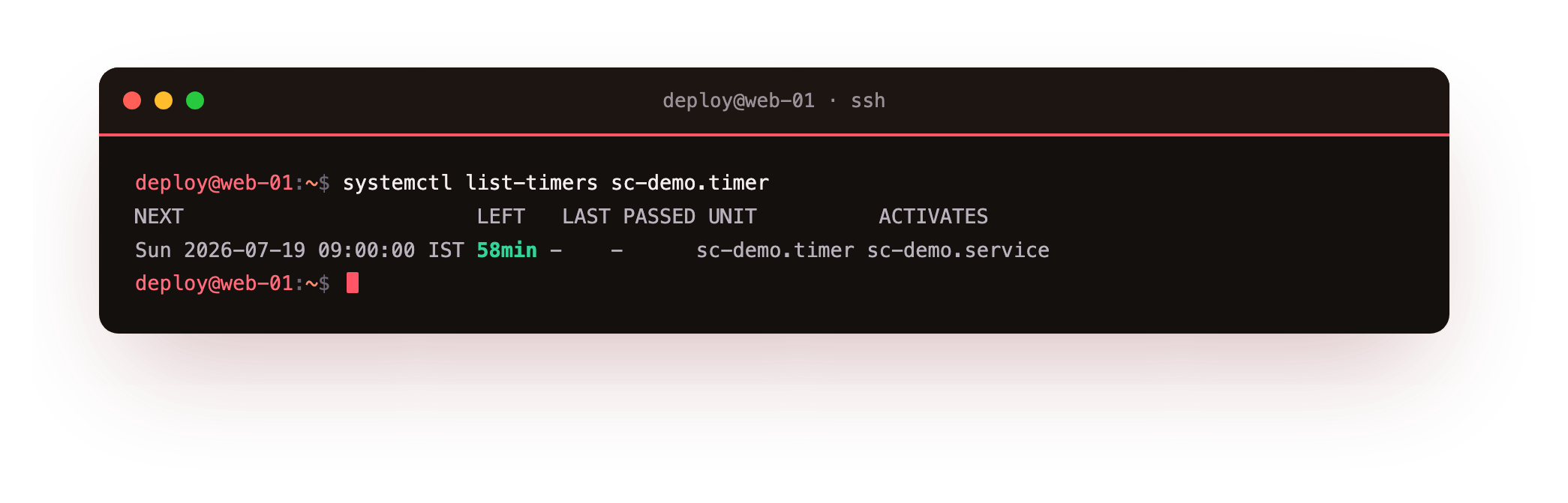
The systemctl list-timers command shows active timers, and naming sc-demo.timer narrows the output to just that one. In the screenshot you will see a row with the next time the timer is due to fire, how long from now that is, the last time it fired, and the unit it activates. This is the first view to reach for when a scheduled job did not seem to run, because it tells you plainly whether systemd intends to run it at all and when.
How do you tell a timer when to fire?
A timer sets its schedule with one of a few keys in its [Timer] section, and two of them cover most needs.
OnCalendar takes a wall-clock schedule, similar in spirit to a cron line but written in words and numbers you can read back. OnCalendar=*-*-* 02:30:00 means half past two every morning. OnCalendar=Mon *-*-* 09:00:00 means nine o'clock every Monday. There are shorthands too, like daily, weekly, and hourly. Because the format spells the parts out, an OnCalendar line is harder to misread than five bare numbers.
OnBootSec measures time from when the machine finished booting. OnBootSec=5min runs the service five minutes after every boot. This suits warm-up work that should happen after each start but has no fixed clock time, and it has no clean equivalent in cron, which offers only the coarse @reboot marker.
Catching runs you missed
A server is not always powered on at the exact minute a job is due. It might be rebooting, or switched off overnight. Plain cron simply skips a job whose moment passed while the machine was down, and you never hear about it. systemd handles this with Persistent=true in the timer's [Timer] section.
With it set, systemd records when the timer last ran, and if a scheduled run was missed while the machine was off, it runs the job once as soon as the machine is back and the timer is active again. For a nightly backup on a server that sometimes reboots, that single line is the difference between a skipped backup and a slightly late one.
How systemd timers compare to cron
Both cron and systemd timers run commands on a schedule, so the choice comes down to what else you need around the job. A few differences settle it in practice:
- Logging. A timer starts a service, and everything that service prints goes to the systemd journal. You read it with
journalctl -u sc-demo.service, timestamps and exit codes already recorded. cron only mails its output, which you then have to capture and store yourself. - Dependencies. A service unit can declare that it runs after the network is up, or after the database, using the same
After=andRequires=keys as any other unit. cron has no idea of one job waiting on another service being ready. - Status.
systemctl status sc-demo.timershows whether the timer is healthy and when it last ran, and a failed run appears as a failed unit. A failed cron job is silent unless you built your own alerting. - Effort. A cron job is a single line and quicker to write. systemd timers take two small files, which is more to set up but buys the logging and dependency handling above.
None of this makes cron wrong. For a lone job with no dependencies, a crontab line is less to manage. When a job needs ordering against other services, or you want its history in the same journal as everything else on the box, systemd timers earn their extra file.
To read the whole picture of a scheduled job you look at two units together, the timer for the schedule and the service for the work. systemctl cat sc-demo.timer prints the timer file and systemctl cat sc-demo.service prints the service it starts, so you can confirm both the when and the what in one place.
Troubleshooting a timer that does not fire
list-timers does not show your timer. A timer only appears once it is enabled and started. Run sudo systemctl enable --now sc-demo.timer, then check systemctl list-timers again.
The timer fires but nothing happens. The timer starts the service, so the fault is in the service. Read journalctl -u sc-demo.service, and confirm the service runs on its own with systemctl start sc-demo.service.
systemd rejects your OnCalendar line. The calendar expression is malformed. Test it with systemd-analyze calendar "Mon *-*-* 09:00:00", which prints the next elapse or an error.
A scheduled run was skipped while the server was off. Plain timers skip a missed run. Add Persistent=true to the [Timer] section so systemd runs the job once when the machine is back.
Frequently asked questions
What is the difference between a timer unit and a service unit?
The service unit describes what to run, exactly like any other service. The timer unit describes when to run it and starts the matching service by name when the moment arrives.
How do I enable a systemd timer?
Run sudo systemctl enable --now name.timer. You enable and start the .timer, not the .service, since the timer is what triggers the service on schedule.
When should I use a timer instead of cron?
When the job needs its output in the journal, must run after another service is ready, or should report status through systemctl. For a lone job with no dependencies, a single crontab line is less to manage.
How do I make a timer catch up on a run it missed?
Set Persistent=true in the [Timer] section. systemd records the last run and, if a scheduled time passed while the machine was off, runs the job once as soon as the timer is active again.
Recap
systemd runs scheduled work as a pair: a service unit does the job and a timer unit fires it. systemctl list-timers sc-demo.timer shows the next and last run times. OnCalendar sets a wall-clock schedule and OnBootSec counts from boot. Persistent=true makes systemd run a job that was missed while the machine was off. Next to cron, systemd timers log to the journal, can depend on other units, and report status through systemctl, at the cost of two files instead of one line.