Running work while you sleep
A server has jobs that belong on a clock rather than on your keyboard: rotate a log at midnight, take a backup at two in the morning, clear a cache every few minutes. cron is the old and dependable Unix scheduler that handles exactly this, and linux cron jobs are how most recurring work on a server gets defined.
- cron is a background service that wakes once a minute and runs any job due that minute.
crontab -llists your jobs andcrontab -eedits them; each user has a separate table.- A job line is five time fields (minute, hour, day-of-month, month, day-of-week) then a command.
- cron runs with a minimal PATH, so use absolute paths and redirect output to a file yourself.
You are logged in as deploy, and there is already a backup.sh script sitting in your home directory, so by the end of this chapter you will have a real task to put on a schedule. cron itself runs quietly as a background service: it wakes once a minute, checks whether any job is due in that minute, and runs the ones that are.
Start by looking at what your own account already has scheduled. Run this:
crontab -l
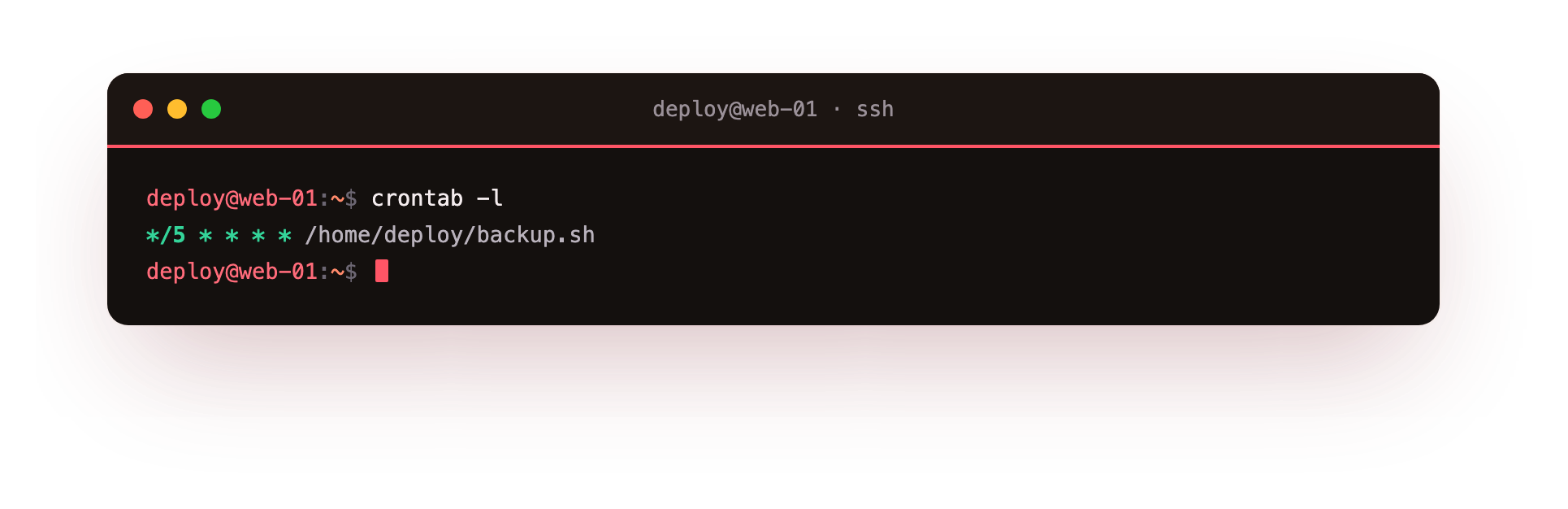
The crontab -l command lists the crontab, meaning the "cron table", that belongs to the current user, which here is deploy. The -l flag stands for list, and it prints your schedule to the screen without opening any editor.
In the screenshot you will either see the jobs you have defined or a short line saying no crontab exists for the user, which just means you have not added one yet. Every account keeps its own separate crontab, so a job scheduled by deploy does not touch what root or any other user has scheduled.
Editing your linux cron jobs
To add or change a job you use crontab -e, where -e stands for edit. This opens your crontab in a text editor, and on Ubuntu 24.04 that editor is usually nano unless you have changed it. When you save and close the file, cron installs the new schedule right away.
You do not edit the underlying file by hand, because crontab -e checks the format as you save and reloads the scheduler for you. A crontab is plain text: blank lines and lines beginning with # are ignored as comments, and every other line describes one job.
Each job line has two parts. First come five time fields that say when the job runs, and after them comes the command that says what to run. The five fields always appear in the same order, separated by spaces.
The five time fields
Read the fields left to right. A * in any field means "every value", so a * in the hour field means every hour. Here is what each field controls:
| Field | Range | Meaning |
|---|---|---|
| Minute | 0 to 59 | Minute within the hour |
| Hour | 0 to 23 | Hour on a 24-hour clock |
| Day of month | 1 to 31 | Day within the month |
| Month | 1 to 12 | Month of the year |
| Day of week | 0 to 7 | Weekday, where 0 and 7 both mean Sunday |
Put the fields together and a line reads as one instruction. Two examples show the pattern:
| Schedule | Meaning |
|---|---|
30 2 * * * |
At 02:30 every day |
0 9 * * 1 |
At 09:00 every Monday |
So to run your backup at half past two each morning, the time part is 30 2 * * * followed by the path to the script.
The step syntax for regular intervals
When you want a job to repeat inside an hour rather than once a day, the step syntax helps. Writing */5 in the minute field means "every fifth minute", so the full line */5 * * * * runs a job at minute 0, 5, 10, 15 and on through the hour. The / introduces a step, and the * before it means "across the whole range". You can step any field the same way: */2 in the hour field runs something every two hours. This is cleaner than listing 0,5,10,15 by hand and harder to get wrong.
Where the output goes
A job that runs while you are asleep still produces output, and you need to know where it lands. By default cron captures whatever a job prints to standard output or standard error and mails it to the local user. On a plain server with no mail configured, that mail usually goes nowhere you will look, so the sensible habit is to redirect output to a file yourself.
A backup line in your crontab might read 30 2 * * * /home/deploy/backup.sh >> /home/deploy/backup.log 2>&1. The >> appends standard output to a log file, and 2>&1 sends standard error to the same place, so both ordinary messages and errors land in one file you can read the next morning.
Why do absolute paths matter?
One trap catches almost everyone with their first linux cron jobs. cron does not run your job with the same environment your login shell has. In particular it starts with a minimal PATH, often just /usr/bin and /bin, without the extra directories your .bashrc adds. A command that works when you type it can fail under cron because cron cannot find it.
The fix is plain: write the full path to every program and file, /home/deploy/backup.sh rather than backup.sh, and do not assume any variable is set. If a job needs a variable, set it explicitly at the top of the crontab.
Once the five fields, the step syntax, and the minimal environment are clear in your head, linux cron jobs stop being mysterious. You write one line per task, stating precisely when it runs and exactly what to run, with output going somewhere you can find it.
Troubleshooting a cron job that does not run
The job never runs at all. Confirm you edited the right user's table with crontab -l, and that the five time fields are valid. cron reads each user's table separately, so a job added as deploy will not appear under root.
The command works by hand but fails under cron. cron starts with a minimal PATH and no login profile. Write the full path to every program and file, and set any variable the job needs at the top of the crontab.
You never see the job's output. By default cron mails output to the local user, which goes nowhere readable on a plain server. Redirect it with >> /home/deploy/job.log 2>&1 so both output and errors land in one file.
A script runs but does nothing. It may lack the execute bit or a shebang line. Run chmod +x on the script and confirm the first line is #!/usr/bin/env bash or similar.
Frequently asked questions
What do the five fields in a crontab line mean?
In order they are minute, hour, day of month, month, and day of week, followed by the command. A star in a field means every value, so 30 2 * * * runs at 02:30 every day.
Why does my cron job fail when the same command works by hand?
cron does not load your login shell environment and starts with a minimal PATH. Use absolute paths for every program and file, and do not rely on variables your .bashrc sets.
How do I run a job every few minutes?
Use the step syntax in the minute field. */5 * * * * runs at minute 0, 5, 10 and on through the hour, which is cleaner than listing 0,5,10 by hand.
Does each user have their own crontab?
Yes. Every account keeps a separate table, so a job scheduled by deploy does not touch what root or another user has scheduled. Edit yours with crontab -e.
Recap
cron is a background service that checks once a minute for due jobs. crontab -l lists your jobs and crontab -e edits them, each user having a separate table. A job line is five time fields (minute, hour, day of month, month, day of week) followed by a command, with * meaning every value and */5 meaning every fifth. Output is mailed by default, so redirect it to a file with >> and 2>&1. cron runs with a minimal PATH, so always give absolute paths.