Turning a column of a CSV into a count
A CSV file is text with commas between the fields, and Linux gives you small tools that read that text one field at a time. The linux cut sort uniq combination is the everyday way to answer a question like "how many orders came from each city" without opening a spreadsheet.
- cut takes columns, sort orders lines, uniq collapses or counts repeats, and tr swaps or deletes characters.
- cut -d, -f2 pulls the second field; the default delimiter is a tab, so state -d, for CSVs.
- uniq only compares adjacent lines, which is why you always sort before uniq -c.
- Piped together, these small tools count how often each value appears in a file.
You are logged in as deploy in ~/data-demo, and there is an orders.csv file sitting there with one order per line. By the end of this chapter, on your Ubuntu 24.04 server, you will pull one column out of that file, put its values in order, and count how often each one appears, all in a single line.
Each tool does one job. cut takes columns out of each line. sort puts lines in order. uniq collapses or counts repeated lines. tr swaps or removes characters. Joined with the pipe you met earlier, they read like a sentence.
cut selects fields by a delimiter
cut splits each line on a delimiter and keeps the fields you ask for. Two flags do the work:
-dsets the delimiter, the character that separates fields. For a CSV that is a comma, written-d,.-fchooses which field or fields to keep, counting from 1. So-f2keeps the second field.
Running cut -d, -f2 orders.csv prints the second column of every line, which in this file is the city. The default delimiter is a tab, so you must state -d, for comma-separated data, or cut will treat each whole line as one field. You can ask for several fields at once, for example -f1,3 for the first and third, or a range like -f2-4.
One detail matters here: the first line of orders.csv is a header row with the word city in it, not a real order. You do not want to count the header, so you drop it with tail -n +2, which you saw in an earlier chapter. tail -n +2 file prints the file starting from line 2, skipping line 1.
sort puts lines in order
sort reads lines and prints them in order. On its own, sort file sorts alphabetically. A few flags change how it compares:
| Flag | What it does |
|---|---|
-n |
sort numerically, so 2 comes before 10 |
-h |
sort human sizes, so 2K comes before 1M |
-r |
reverse the order |
Without -n, sort compares text, and text sorting puts 10 before 2 because it reads character by character. Use -n when the field is a number and -h when it is a size like 4K or 2G from a command such as du -h. -r flips whichever order you chose, which is useful for showing the largest or most common value first.
Why does uniq need sorted input?
uniq looks at adjacent lines. If two identical lines sit next to each other, uniq treats them as one. With the -c flag, uniq -c prints each distinct line once with a count of how many times it repeated in front of it.
The catch is in the word "adjacent". uniq only compares each line with the one directly above it, so it cannot see that two matching lines are separated by others. That is why you sort first: sorting brings every identical value together into one block, and only then can uniq -c count each block correctly. Running uniq -c on unsorted data gives wrong counts, and it is a common mistake people make with this tool.
The linux cut sort uniq pipeline
Now put the pieces together. This is the linux cut sort uniq pattern, the one you will reach for again and again:
cut -d, -f2 orders.csv | tail -n +2 | sort | uniq -c
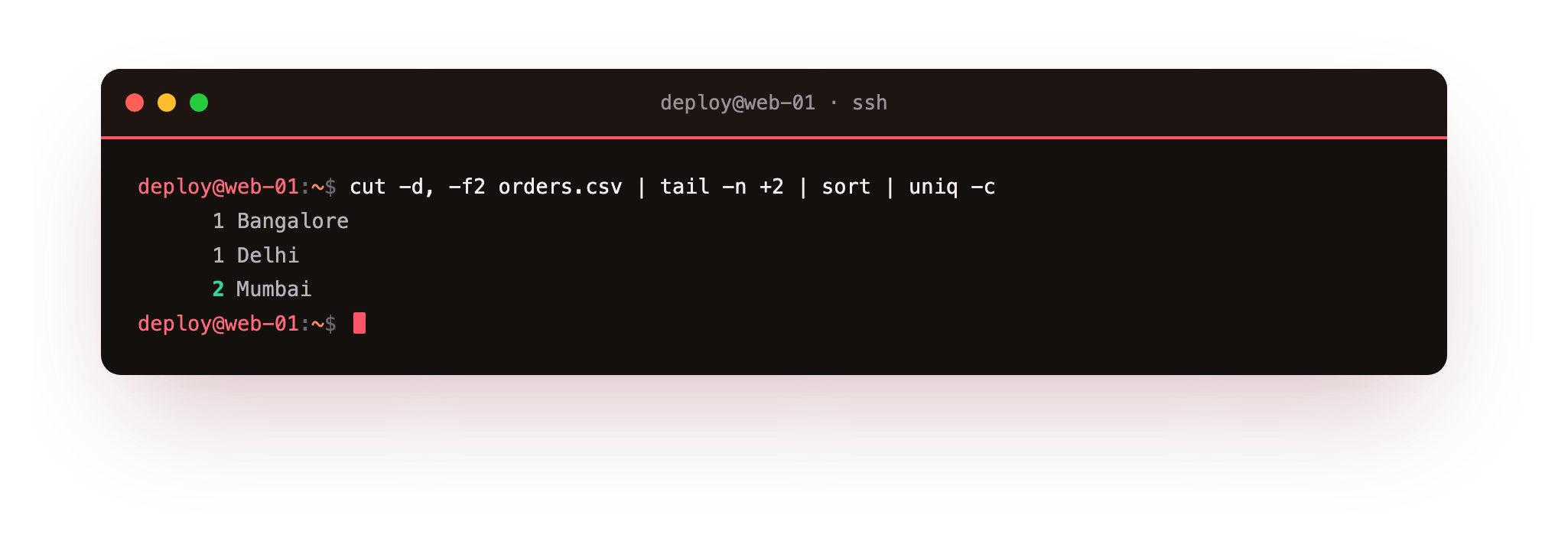
Read it left to right. cut -d, -f2 orders.csv pulls out the city column. tail -n +2 drops the header line so city is not counted as a city. sort groups identical city names together. uniq -c collapses each group to one line and prints the count in front of it.
The screenshot shows each city with the number of orders next to it, which is the answer you wanted from a plain text file and four small tools. Add | sort -nr on the end and the busiest city rises to the top, since -n reads the leading count as a number and -r puts the largest first.
tr translates or deletes characters
tr, short for translate, works on single characters rather than whole fields. You give it a set of characters to change and what to change them into. Two common uses:
tr 'a-z' 'A-Z'turns lowercase letters into uppercase as text streams through it.tr -d '\r'deletes carriage return characters, the stray\rthat Windows-made CSV files leave at the end of each line.
tr reads from standard input and writes to standard output, so it lives inside a pipe. A file exported from a Windows machine often needs tr -d '\r' early in the pipeline to clean those line endings before cut and sort see them, otherwise the same city can appear twice, once with a hidden \r and once without.
Frequently asked questions
Why does uniq -c give wrong counts?
uniq only compares each line with the one directly above it, so matching lines must be adjacent. Run sort first to group identical values, then uniq -c counts each group correctly.
How do I sort so the busiest value is on top?
Add | sort -nr after uniq -c. The -n reads the leading count as a number and -r puts the largest first.
Why is the same value counted twice?
The file likely came from Windows and carries a hidden carriage return on some lines. Strip it early with tr -d '\r' so the values match before cut and sort see them.
What delimiter does cut use by default?
A tab. For comma-separated data you must pass -d, or cut treats the whole line as a single field.
Recap
You now have the linux cut sort uniq pipeline in hand. cut -d, -f2 pulls a field out of each line using a delimiter you set with -d and a field number you set with -f. sort orders lines, with -n for numbers, -h for sizes, and -r to reverse. uniq -c counts repeated lines but only when they are adjacent, which is why sort always comes first.
tr translates or deletes single characters, handy for uppercasing text or stripping the \r from Windows files. Piped together, these small tools count how often each value appears in a file, which is one of the questions you will ask most on a server.