Reading text as columns
The linux awk command reads text one line at a time and splits each line into columns you can pick out by number. Where other tools see a line as one blob, awk sees fields: the first column is $1, the second is $2, the third is $3, and so on.
- awk reads each line as columns reached by number: $1, $2, $3 and so on.
- -F sets the field separator; use -F, for a comma-separated CSV.
- NR is the current row number, so NR>1 skips a header row.
- An awk rule is a pattern followed by an action in braces, and either part can be left out.
That makes it a natural fit for anything laid out in columns, such as a CSV or the output of a system command. On this Ubuntu 24.04 server awk is already installed as part of the base system, so you can run it right away in your ~/data-demo folder.
Your orders.csv has three columns, id, region and amount, with a header row on top and four rows of data below. awk can read that structure directly once you tell it how the columns are separated.
How do you set the field separator?
By default awk splits on spaces, but a CSV uses commas. The -F option sets the field separator, so -F, tells awk that a comma ends one field and starts the next. Print the region and amount from every data row like this:
awk -F, 'NR>1 {print $2, $3}' orders.csv
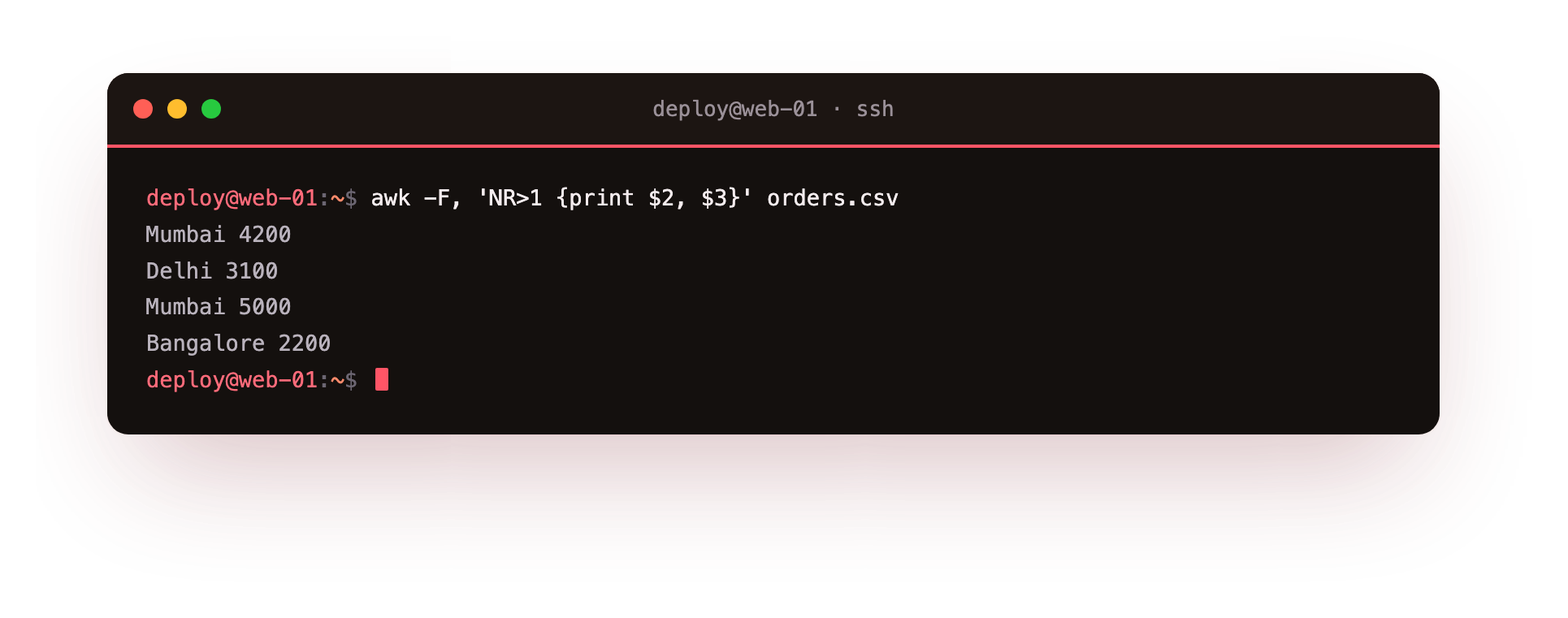
Take it apart piece by piece. -F, sets the comma as the separator. The single quotes hold the awk program so the shell leaves it alone. NR>1 is a condition, and {print $2, $3} is the action. Because $2 is the region column and $3 is the amount column, awk prints those two fields from each line, with a space between them since the comma in print $2, $3 inserts awk's output separator.
NR and skipping the header
NR is a built in counter that holds the current row number. On the first line NR is 1, on the second it is 2, and so on. Your CSV has a header row you do not want in the output, so NR>1 means "only act on rows after the first". That one condition drops the header cleanly without any special handling. If you wanted every row including the header, you would leave the condition off.
Pattern then action
Every awk program is a set of rules, each shaped as a pattern followed by an action in braces:
- The pattern decides which lines the rule runs on.
NR>1is a pattern. So is/ERROR/, which matches lines containing ERROR. - The action in
{ }says what to do on those lines, usually printing or adding up a value.
You can drop either part. A pattern with no action prints matching lines, so awk -F, '/Mumbai/' orders.csv prints every line mentioning Mumbai. An action with no pattern runs on every line, so awk -F, '{print $2}' orders.csv prints the region column for all rows including the header. Understanding this pattern then action shape is most of what you need to read any linux awk command you come across.
Summing a column
awk keeps its own variables and does arithmetic, which is where it goes past simple selection. To total the amount column, add each row's $3 into a running variable, then print it at the end:
awk -F, 'NR>1 {sum = sum + $3} END {print sum}' orders.csv
The first rule, NR>1 {sum = sum + $3}, runs on every data row and keeps adding the amount into sum. The special END pattern runs once after the last line is read, and there {print sum} prints the final total. awk treats $3 as a number automatically because you used it in arithmetic, so there is no separate conversion step. This is a common use of the linux awk command in reporting: read a column of numbers and hand back one figure.
When the linux awk command beats cut
You might reach for cut to pull out columns, and for the simplest cases it works: cut -d, -f2 orders.csv prints the second field using a comma delimiter. The linux awk command is the better fit once you need more than a straight slice:
| Task | Reach for |
|---|---|
| Print one fixed column, nothing else | cut |
| Skip a header or filter by a condition | awk |
| Reorder or combine columns | awk |
| Do arithmetic, like a sum or average | awk |
cut cannot skip the header row or add numbers, while awk does both in the same short program. So use cut when you want a plain column and awk when the job also involves choosing rows or computing a value.
Troubleshooting awk
A field prints blank or the wrong value. awk split on its default separator, whitespace, instead of your delimiter. Add -F, for a CSV so the commas mark the field boundaries.
A CSV field containing a comma splits into two columns. awk -F, treats every comma as a separator, including one inside a quoted value like "Mumbai, West". Plain awk has no CSV quoting rules, so clean the data first or use a dedicated CSV tool for that case.
The sum comes out as 0 or looks wrong. The column you are adding still holds the header word, so include NR>1 to skip it, and make sure you are summing the numeric field, $3 here, not the text one.
"awk: cannot open file". The file name landed inside the quoted program by mistake. The program in single quotes comes first, then the file name as a separate argument after it.
Frequently asked questions
What is the difference between $0 and $1?
$0 is the whole line, while $1 is only the first field. $2, $3 and the higher numbers are the later fields.
How do I skip the header row?
Add the pattern NR>1, which runs the action only on rows after the first, dropping the header cleanly with no special handling.
Can awk handle a CSV with quoted commas?
Not on its own. awk -F, splits on every comma, so a value like "Delhi, North" breaks into two fields. Use a dedicated CSV parser for that case.
When is cut enough instead of awk?
When you only need one fixed column and nothing else. As soon as you must skip a header, filter rows, reorder columns or do arithmetic, awk is the better fit.
Recap
- awk reads each line as columns, reached by number as
$1,$2,$3and so on. -Fsets the field separator; use-F,for a CSV.NRis the current row number, soNR>1skips a header row.- An awk program is a pattern followed by an action in braces; either part may be left out.
- awk can sum a column with a running variable and an
ENDblock, and it beatscutwhenever you filter rows or do arithmetic.