A bash script tutorial from a blank file
A bash script is a file of commands the shell runs in order, and this tutorial builds one from scratch. You will add a shebang, a variable, and a condition, make the file executable, and run it.
- A bash script is a file of commands the shell runs in order, saved so you can rerun them at will.
- The #!/bin/bash shebang on the first line tells the system which interpreter runs the file.
- set -euo pipefail makes the script stop early on errors, unset variables and failed pipelines.
- Set variables with name=value, read them with $name, reach arguments with $1, and quote them.
Every command you have run so far, you typed one at a time. A script is nothing more than those same commands saved in a file so the computer can run them for you, in order, as many times as you like.
This bash script tutorial takes you from a blank file to a small working script that greets whoever you name, and along the way it explains the few rules that turn a plain text file into a program you can run. You are logged in as deploy in ~/data-demo on an Ubuntu 24.04 server, and everything here runs in your own home directory with no sudo needed.
What goes in the file?
Create a file called greet.sh in a text editor such as nano. Here is the whole script, and then we will read it line by line:
#!/bin/bash
set -euo pipefail

name="$1"

if [ -f orders.csv ]; then
  echo "Hello, $name. Your orders.csv is here."
else
  echo "Hello, $name. No orders.csv found."
fi
That is a complete, working script, and it is all this bash script tutorial needs to teach the essentials. Every line earns its place, so let us go through them.
The shebang tells the system what runs it
The first line, #!/bin/bash, is called the shebang. The two characters #! at the very start of a file tell the kernel which program should interpret the rest of the file. Here that program is /bin/bash, the Bash shell. Without this line the system may not know that your file is meant for Bash, so make it the first line of every script, with no blank line or space before it.
set -euo pipefail: fail early, not silently
The second line is a habit worth forming from your first script. set -euo pipefail changes three defaults that otherwise let a broken script keep running:
-estops the script the moment any command fails, instead of carrying on to the next line.-utreats the use of an unset variable as an error, which catches typos in variable names.-o pipefailmakes a pipeline fail if any command in it fails, not just the last one.
Together they turn quiet, creeping failures into loud, early ones, which is what you want. A script that stops at the first sign of trouble is easier to trust than one that pushes on and leaves a mess behind it.
Variables and arguments
A variable holds a value under a name. You set one with name=value and no spaces around the =, and you read it back by putting a $ in front, as $name. The spaces matter: name = value is read as a command called name, not an assignment.
A positional argument is a value you pass to the script when you run it. Inside the script, $1 is the first argument, $2 the second, and so on. The line name="$1" copies the first argument into a variable called name, so the rest of the script can use a clear name instead of a number.
Notice the double quotes around "$1" and "$name". Quoting a variable keeps its value as one piece even if it contains spaces. Without quotes, a name like New Delhi would be split into two words and break the command. The rule is plain: quote your variables unless you have a specific reason not to.
Testing a condition with if
The if block checks something and acts on the answer. The test here is [ -f orders.csv ], where -f asks "does this file exist and is it a regular file?". The square brackets are actually a command that returns success or failure, so the spaces inside them are required. If the file is there, the then branch runs; if not, the else branch runs. You will use [ -f file ] often to check that a file exists before a script tries to read it.
Make it executable, then run it
A fresh script is just a text file, and the system will not run it until you give it permission. Mark it executable with chmod +x greet.sh, which adds the execute bit you read about in the permissions series. Now run it by giving its path:
./greet.sh ServerCake
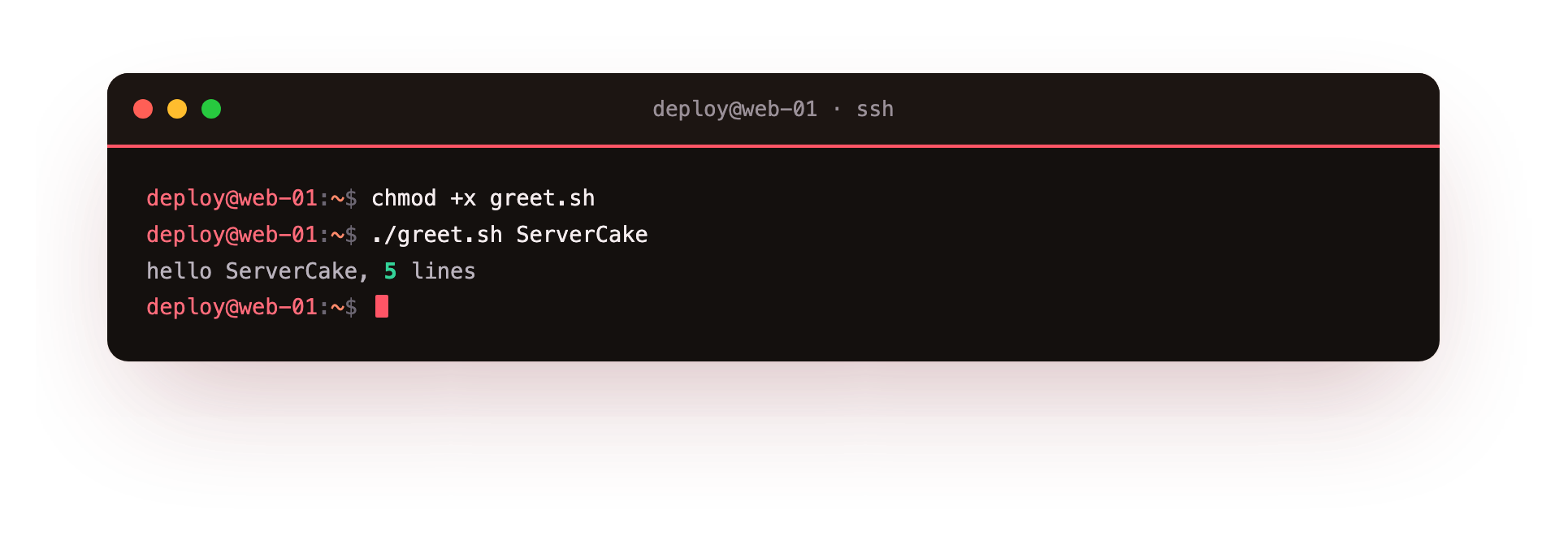
The ./ in front means "the file in the current directory", which you need because your current directory is not on the PATH, for safety reasons. The word ServerCake after the script name is the first argument, so inside the script $1 becomes ServerCake and $name follows. The screenshot shows the greeting with your argument filled in, and the second half of the line depends on whether orders.csv sits in the directory, which for you it does. You have written and run a program.
Troubleshooting your first script
"bash: ./greet.sh: Permission denied". The file is not executable yet. Run chmod +x greet.sh to add the execute bit, then run it again.
"greet.sh: command not found". The shell does not look in the current directory for programs. Run it as ./greet.sh, with the leading ./, so it finds the file where you are.
"bad interpreter: /bin/bash^M: No such file or directory". The file has Windows line endings, and the ^M is a carriage return stuck to the shebang. Fix it with sed -i 's/\r$//' greet.sh, or save the file with Unix line endings.
"$1: unbound variable". set -u treats an unset variable as an error, so running the script with no argument fails. Pass one, for example ./greet.sh ServerCake, or give the variable a default value.
Frequently asked questions
Why do I have to type ./ before the script name?
The current directory is not on the PATH, for safety, so the shell will not run a program there unless you point at it explicitly with ./.
What does set -euo pipefail actually do?
-e stops the script at the first failed command, -u errors on an unset variable, and -o pipefail makes a pipeline fail if any stage fails. Together they surface problems early.
Why must there be no spaces around the = in name=value?
With spaces, the shell reads name as a command rather than an assignment. name=value with no spaces is the assignment syntax.
Why quote variables like "$name"?
Quoting keeps the value as one piece even when it contains spaces. Without quotes, a value like New Delhi splits into two words and breaks the command.
Recap
That is the whole shape of a Bash script, and the rest is more of the same. A script is a file of commands. The #!/bin/bash shebang says which interpreter runs it. set -euo pipefail makes it stop early on errors, unset variables, and failed pipelines. You set variables with name=value, read them with $name, and reach arguments with $1. Always quote variables so values with spaces stay whole.
[ -f file ] tests that a file exists before you use it. Finally chmod +x makes the file executable and ./greet.sh runs it. This bash script tutorial gave you a working example; from here you turn any sequence of commands you type often into a script that types them for you.