Two sides of linux disk usage df and du
Running out of disk space is one of the quieter ways a server breaks, and it usually starts with not knowing where the space went. The pair of tools for linux disk usage df and du answer two different questions: df tells you how much room is left on a filesystem, and du tells you which files and directories are taking that room. In this chapter you are deploy on an Ubuntu 24.04 server inside ~/data-demo, which holds a file called orders.csv, a logs directory, and a large file named big.bin.
- df reports free and used space for a whole filesystem; du measures what individual files and directories use.
- Use df to notice a filesystem filling up, then du to find the files responsible.
- du -sh * | sort -h lists the current directory's contents from smallest to largest.
- A filesystem at 100 percent stops writes and can take services down, so act on df early.
The distinction matters because the two tools look at storage from opposite ends. df looks at the filesystem as a whole and reports its capacity and free space. du walks through actual files and adds up how many blocks they occupy. You use df to notice a filesystem is filling up, then du to find what is responsible.
df answers how much is free
Start with the filesystem view. df reports free and used space per mounted filesystem:
df -h /
The -h flag prints sizes in human-readable units such as G and M, and / asks about the filesystem mounted at the root directory, which is where ~/data-demo lives. The output gives the total size, used space, available space, and percent used. When that percent climbs toward 100, df has done its job: it has told you there is a problem, but not where it is.
du answers what is using the space
To find the cause, switch to du, which measures the space used by files and directories. Run it in ~/data-demo to size each item in the current directory and sort the results:
du -sh * | sort -h
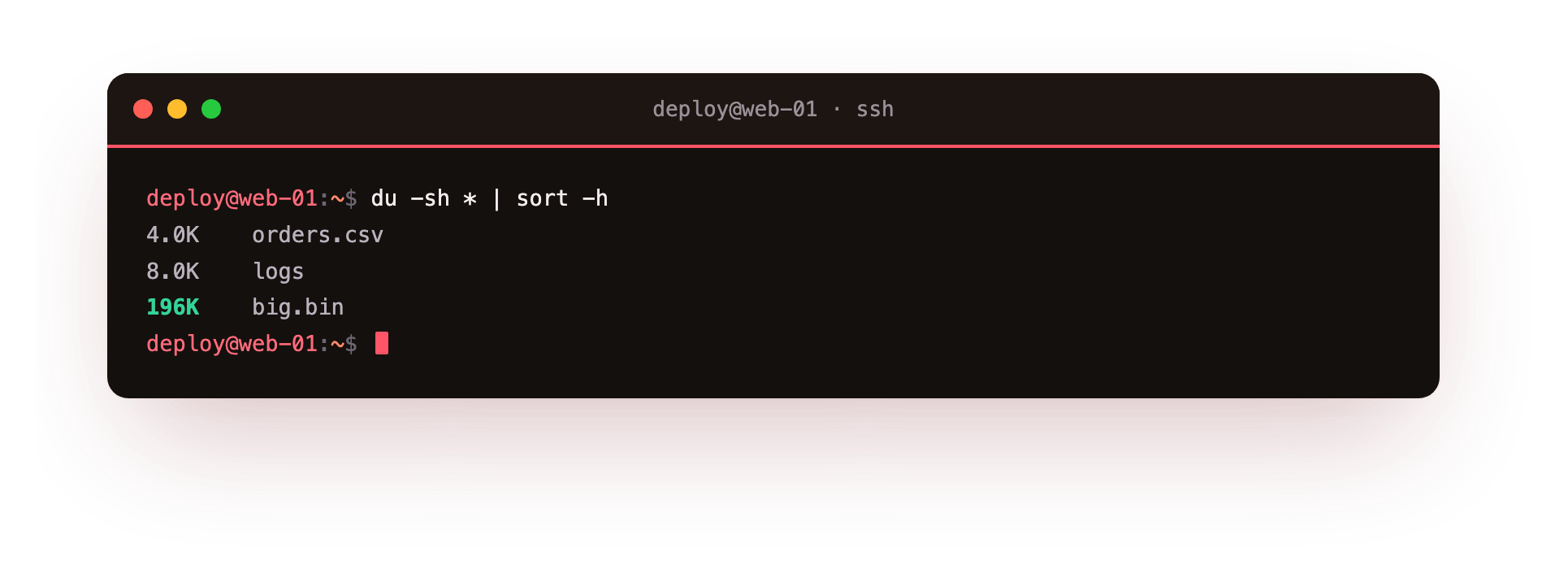
This one line combines three parts. du -sh * runs du over every item in the current directory: the * expands to each file and directory name, -s asks for a summary total per item rather than a line for every file inside, and -h prints those totals in human-readable units. The pipe | sends that list into sort -h, where -h means sort by human-readable sizes, so 2K is correctly placed below 500M. The result is your directory contents ordered from smallest to largest, which puts the biggest item, big.bin here, at the bottom where it is easy to spot.
This is the core of linux disk usage df and du in practice: df points at a full filesystem, and this du pipeline points at the files filling it.
Finding the biggest directories
The same idea scales to a whole tree. To find which directories under a path are largest, size them, sort them, and keep only the last few lines:
du -h --max-depth=1 /var | sort -h | tail
Here du -h --max-depth=1 /var reports the size of /var and each directory one level inside it, without listing every nested file. sort -h orders them by size, and tail prints only the last ten lines, which are the largest. Running this from / downward, one level at a time, is how you track a space problem to the directory causing it. /var is a common place to check because logs and package caches collect there.
ncdu for an interactive view
When you would rather explore than type pipelines, ncdu, short for "NCurses disk usage", gives a browsable version of the same information. Install it first:
sudo apt install ncdu
After installing, you run ncdu /var and it scans the directory, then shows a list you can move through with the arrow keys, opening whichever directory is largest and deleting from inside the tool if you choose. It covers the same ground as the du pipeline with less typing, which helps during an incident when you are trying to free space quickly.
Why does a full disk take services down?
A filesystem at 100 percent is not a slow server, it is often a stopped one. Programs that need to write cannot: a database cannot record new rows, a web server cannot write its logs, and package updates fail partway. Some services crash outright when a write returns "no space left on device".
This is why the df percentage is worth watching before it becomes urgent, and why finding large files with du early is easier than recovering a service after the disk is full. Log files and caches are the usual cause, since they grow quietly until something stops.
Troubleshooting df and du
df says the disk is full but du finds nothing. A deleted file is still held open by a running process, so its space is not freed until that process closes it. Find it with lsof | grep deleted, then restart the service holding the file.
du prints "Permission denied" lines. You are reading directories your user cannot enter, so those sizes are missing from the total. Run it with sudo to size the whole tree, for example sudo du -sh /var/*.
du and df report different totals for the same place. They count differently: du adds up the file sizes it can see, while df counts allocated blocks including reserved space and open deleted files. A gap between them usually points to the open-file case above.
ncdu returns "command not found". It is not installed by default. Add it with sudo apt install ncdu, then run ncdu /var.
Frequently asked questions
Why is df fast but du slow on a big directory?
df reads one number the filesystem already tracks, while du walks every file under the path and adds up their sizes, which takes time on a large tree.
What does the -h flag mean?
Human-readable. It prints sizes as G and M instead of raw block counts, and with sort -h it orders those readable sizes correctly so 2K sits below 500M.
How do I find just the biggest directories, not every file?
Use du -h --max-depth=1 /path | sort -h | tail, which sizes only one level down and puts the largest at the bottom where it is easy to spot.
Is it safe to delete files from inside ncdu?
Yes, ncdu removes the file you select, but it is a permanent deletion like rm, so confirm you have picked the right item before you delete.
Recap
- linux disk usage df and du split the job:
dfreports free space per filesystem,dureports what files and directories use. df -h /shows total, used, and available space on the root filesystem in readable units.du -sh * | sort -hsizes each item in the current directory and orders them smallest to largest.du -h --max-depth=1 <path> | sort -h | tailfinds the largest directories under a path, andncdudoes the same interactively.- A filesystem at 100 percent stops writes and takes services down, so watch
dfand act withduearly.