Where linux access control lists (ACL) help
The standard Linux permission model gives every file exactly three sets of rights: one for the owner, one for the owning group, and one for everyone else. That works until the day you need to grant a single extra user access to one file without opening it to a whole group or to the world. Linux access control lists, ACL for short, solve exactly that gap.
- ACLs add per-user and per-group rules on top of the owner, group, and other bits.
- setfacl -m u:appsvc:rw- grants one user access; getfacl reads the full rule set back.
- The mask entry caps what any named user or group rule can actually receive.
- A plus sign after the mode in ls -l signals that a file carries an ACL.
They attach per-user and per-group rules to a file on top of the classic owner, group, and other bits, so reports/q1.txt can stay owned by deploy while appsvc alone gains read and write.
Consider the wall you hit without them. Your file reports/q1.txt is owned by deploy. You want the service account appsvc to write to it, but appsvc is not the owner and you do not want to change ownership or add it to the file's group, because the group might contain other accounts that should not see the report. The three-category model has no slot for "this one user, this one file." Linux access control lists (ACL) add that slot.
Prerequisites
- The acl package installed with sudo apt install acl, which provides setfacl and getfacl.
- The reports/q1.txt demo file and the appsvc account from earlier parts of this series.
- A filesystem mounted with ACL support, which the default ext4 setup on Ubuntu 24.04 already has.
Adding and reading a rule
The tools come from a package named acl. On a fresh server you install it once with sudo apt install acl, which provides the two commands you will use constantly: setfacl to change rules and getfacl to read them. Ubuntu 24.04 ships them in its standard repositories, so installing them with apt needs no third-party source.
Add a rule that gives appsvc read and write on the report, then read the file's ACL back.
setfacl -m u:appsvc:rw- reports/q1.txt
getfacl -c reports/q1.txt
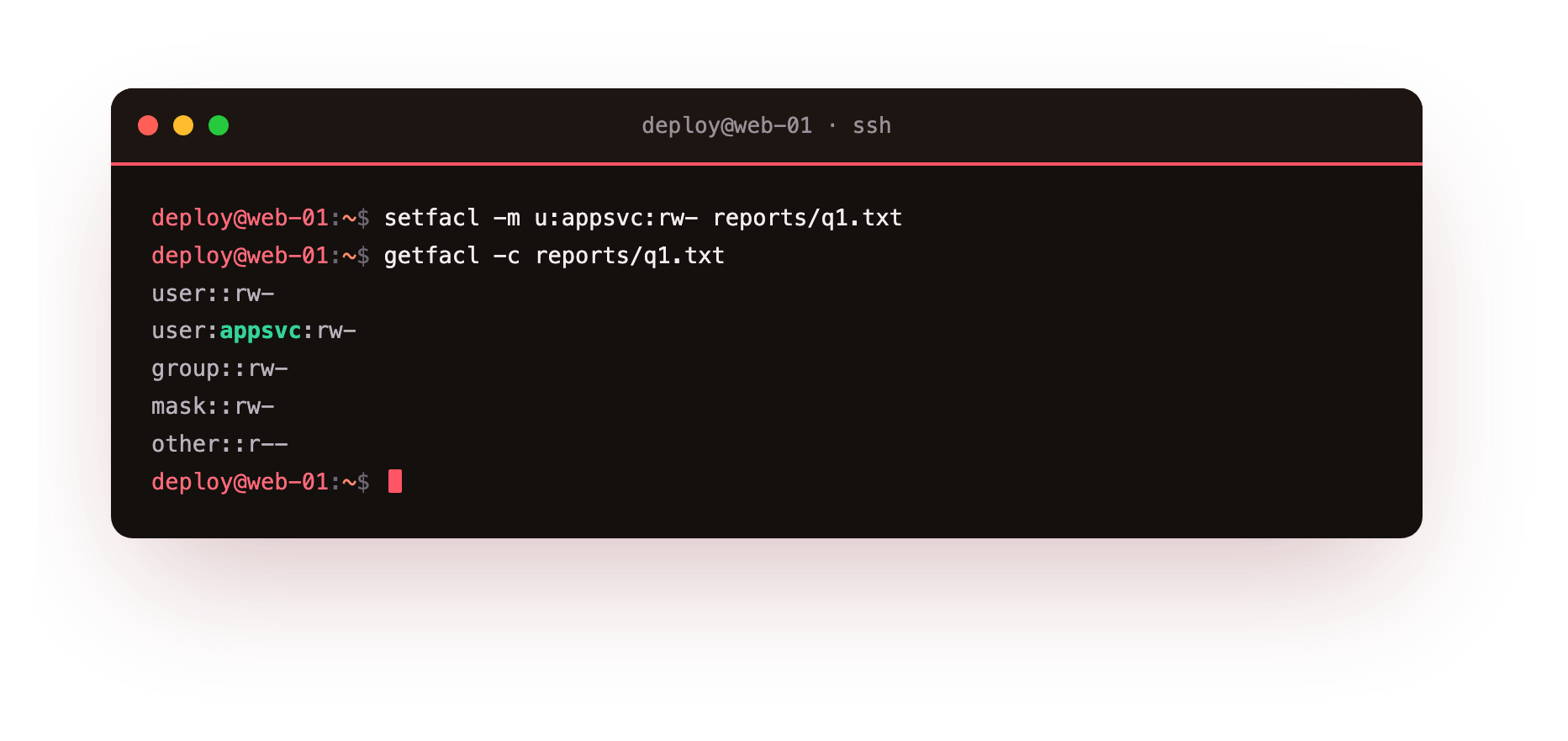
The setfacl -m flag means "modify," which adds or updates a rule. The argument u:appsvc:rw- breaks into three parts separated by colons: u for a user rule, appsvc for which user, and rw- for the permissions, read and write but not execute. After it runs, getfacl -c reports/q1.txt prints the full rule set. The -c flag drops the comment header so the output is just the entries.
You see lines for user::, the owner, then user:appsvc:rw-, your new named rule, then group::, mask::, and other::. The named entry for appsvc is the ACL doing its job.
The mask entry
That mask:: line is not decoration. The mask is a ceiling on the permissions any named user or named group entry can actually receive. If a named rule grants rw- but the mask is r--, the effective permission is only r--. getfacl shows an #effective: note beside any entry the mask reduces. When you set a rule with setfacl -m, the tool usually recalculates the mask to include the rights you asked for, so your rw- stays rw-. If a named user cannot do what its rule seems to allow, read the mask first.
How do you spot an ACL from a plain listing?
An ordinary long listing does not print ACL rules, but it does tell you a file has them. Look at the file after adding the rule.
ls -l reports/q1.txt
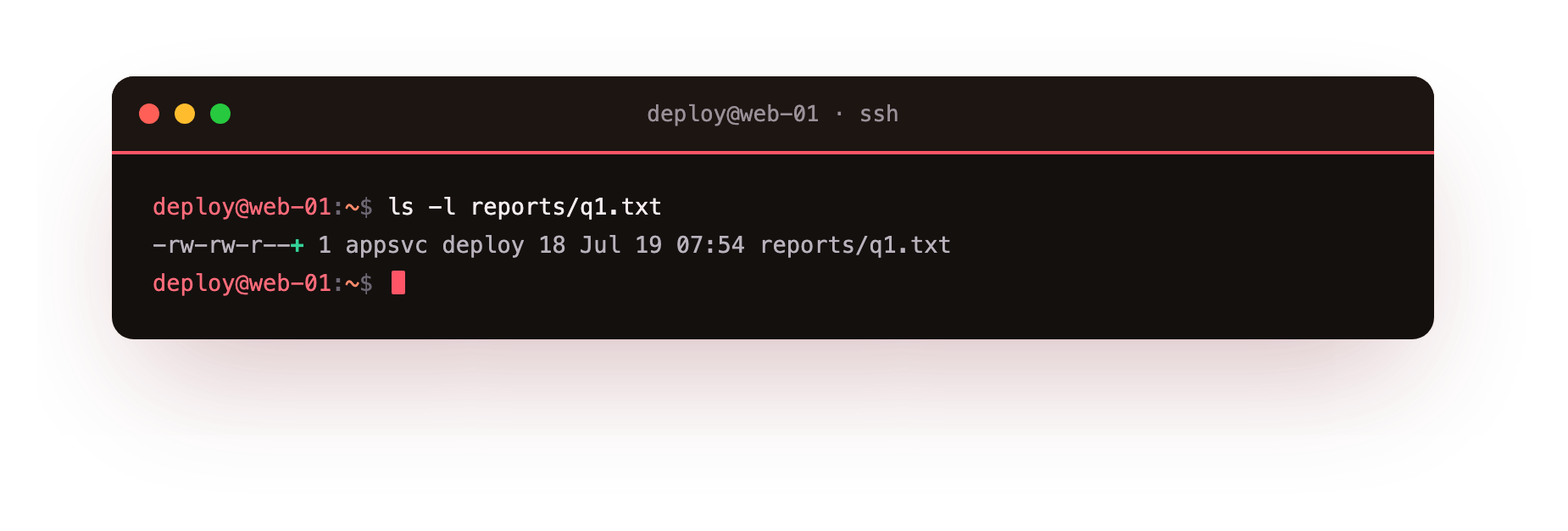
The permission string now ends with a plus sign, something like -rw-rw-r--+. That trailing + is the signal that extra ACL entries exist beyond the three standard categories. Without ACLs you would see the same ten characters and no plus. The group permission column in ls -l now reflects the mask, not the owning group's real rights, which is another reason to trust getfacl over ls when ACLs are in play.
Here is the quick map of what each piece does:
setfacl -m u:USER:PERMS FILEadds or changes a rule for one user.setfacl -m g:GROUP:PERMS FILEdoes the same for a named group, for examplewebteam.getfacl FILEprints every rule, including the mask and the base entries.setfacl -x u:USER FILEremoves one user's rule without touching the rest.setfacl -b FILEstrips every ACL entry and returns the file to plain permissions.
Removing a rule cleanly
When appsvc no longer needs the report, remove just its entry rather than wiping the whole ACL:
setfacl -x u:appsvc reports/q1.txt
The -x flag deletes a rule. You name the target as u:appsvc with no permission field, because you are removing the entry, not setting it. Run getfacl -c reports/q1.txt again and the user:appsvc line is gone. If that was the only named rule, ls -l drops the plus sign too, because the file is back to the standard three categories. To clear all ACL rules at once, setfacl -b reports/q1.txt removes every named entry and the mask in one step.
Linux access control lists are the right tool when the owner, group, and other model runs out of room, and they stay readable as long as you check getfacl rather than guessing from ls.
Troubleshooting ACL problems
setfacl fails with "Operation not supported." The filesystem is mounted without ACL support. Most ext4 systems enable it by default; if not, add the acl option to the mount in /etc/fstab and remount, then retry setfacl.
A named user's rule does not grant what it says. The mask is capping it. getfacl shows an #effective note beside any entry the mask reduces. Re-apply the rule with setfacl -m, which recalculates the mask, or set the mask directly with setfacl -m m::rw- on the file.
The ACL disappeared after copying the file. Plain cp does not carry ACLs. Use cp --preserve=mode,ownership,timestamps or, more completely, cp -a to keep the rules, and rsync with -A preserves them too.
Frequently asked questions
When should I use an ACL instead of a group?
Reach for an ACL when you need one extra user or group on a single file and the owner, group, and other model has no slot left. If several files need the same shared access, a group is usually cleaner. ACLs suit the one-user, one-file case.
How do I remove one ACL entry without clearing the rest?
Run setfacl -x u:appsvc reports/q1.txt. You name the target with no permission field, because you are deleting the entry rather than setting it. To strip every ACL at once and return to plain permissions, use setfacl -b on the file.
Why does ls -l show different group permissions once an ACL exists?
With an ACL present, the group column in ls -l reflects the mask, not the owning group's real rights. That is one reason to trust getfacl over ls when ACLs are in play. The trailing plus sign is your cue that a file has extra entries.
Recap
The classic model cannot grant one extra user access to a single file, so Linux access control lists (ACL) add per-user and per-group rules with setfacl -m and let you read them with getfacl. The mask caps what named entries can receive, a + in ls -l flags a file that carries an ACL, setfacl -x removes a single rule, and the acl package supplies both commands.