Where linux umask default permissions come from
Every file you create as deploy arrives with permissions you never typed. The linux umask default permissions rule decides that mode for you, quietly, on every touch, every redirect, every editor save. If you have ever wondered why a fresh file in ~/perms-demo is readable by group and other but not executable, the umask is the answer. On Ubuntu 24.04 the default is a value that strips just enough to keep files sane without locking you out of your own work.
- The umask sets the mode of every new file by subtracting its bits from a base mode.
- New files start at base 666 and directories at 777; the umask is taken away from those.
- A 022 umask gives 644 files and 755 directories, the Ubuntu default; 077 makes new files owner-only.
- A umask set at the prompt lasts only for that shell until you record it in a login file.
Start by reading the current setting.
umask
You see a four-digit octal number, most often 0022. The leading zero covers the special permission bits, which you can ignore here. The three digits that matter are 022. That is not the permission a file gets. It is the permission that gets removed. The umask is a mask of bits to subtract from a base mode, so you always read it as "take these away."
The base mode and the subtraction
The kernel does not start new files at 777. It starts them at a base mode that depends on the type. Files begin at 666, which is read and write for owner, group, and other, with no execute bit at all. Directories begin at 777, read, write, and execute for everyone, because a directory needs execute to be entered. Your umask is then subtracted from that base.
Work the arithmetic for a 022 mask:
- Files:
666minus022gives644, which isrw-r--r--. Owner writes, everyone reads. - Directories:
777minus022gives755, which isrwxr-xr-x. Owner has full control, others can enter and list.
This is why a new script is never executable by accident. The base of 666 has no execute bit to begin with, so no mask value can hand one out. You add execute yourself with chmod +x when a file like deploy.sh needs to run.
The subtraction is bitwise, not decimal, so it stays clean only when digits do not borrow. A mask of 022 removes the write bit (value 2) from group and other, and nothing from owner. Think of each octal digit as three switches for read, write, and execute, and the mask turns off the switches whose bits it names.
What do common umask values signal?
Two masks cover almost every server you will meet, and a third is worth knowing for private work.
| umask | New file mode | New dir mode | Effect |
|---|---|---|---|
| 022 | 644 | 755 | Group and other can read, not write. The Ubuntu default. |
| 002 | 664 | 775 | Group can also write. Used on shared group directories. |
| 077 | 600 | 700 | Only the owner can touch anything. Private by default. |
The 002 value shows up when a team like webteam shares a directory and everyone in the group needs to edit files. Because it only clears the write bit for "other" and leaves group write intact, new files stay writable by the whole group without a chmod after each save. The 022 value is stricter: group members can read but must be granted write explicitly.
Tightening to a private default
When a directory holds anything sensitive, secrets in app.env, keys, or customer data, you do not want new files defaulting to group and world readable. Set the umask to 077 so the linux umask default permissions rule strips every bit for group and other.
umask 077 && touch private && ls -l private
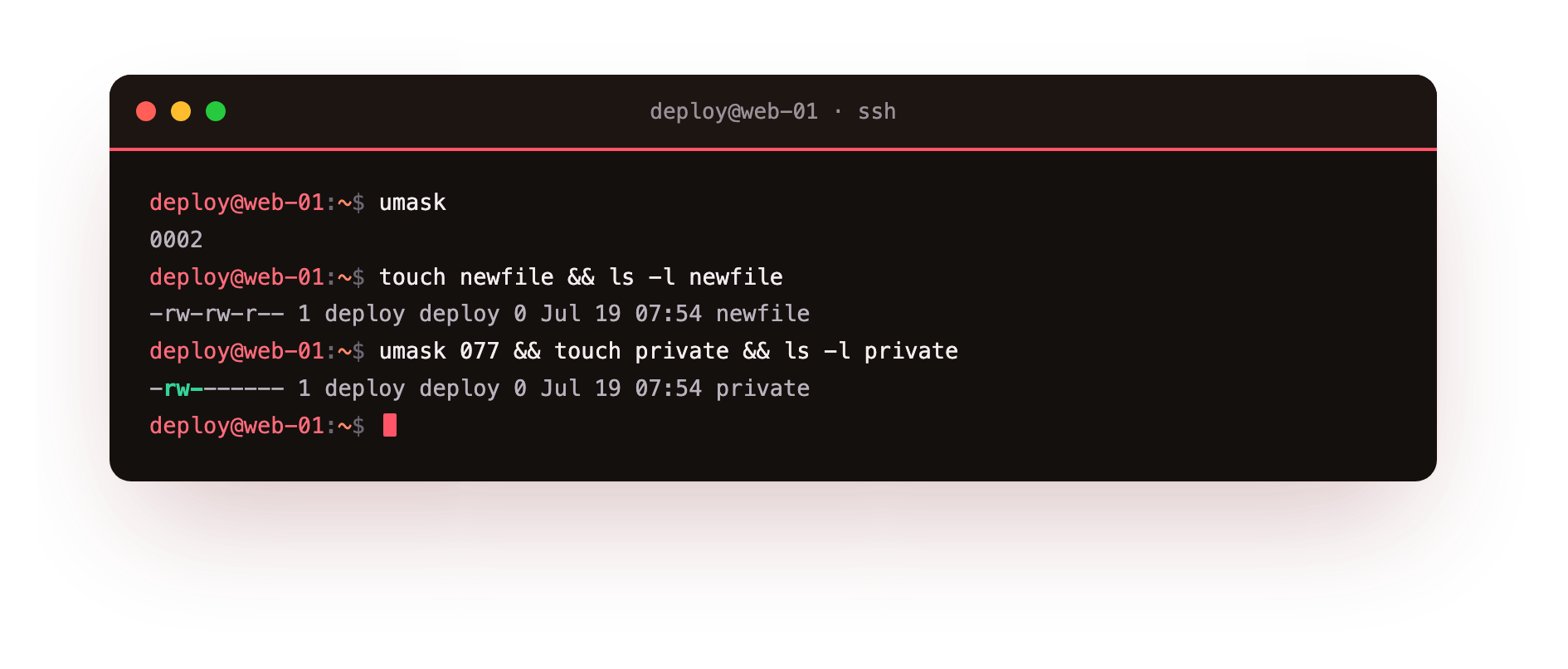
The umask 077 command changes the mask for your current shell only. The && runs the next command only if the first succeeds. touch private creates an empty file named private, and ls -l private prints its long listing. The mode column reads -rw-------, which is 600. Owner reads and writes, group and other get nothing. Compare that with the 644 you would have seen under the default mask, and the tightening is plain: the same base 666 minus 077 leaves only the owner bits.
One caveat keeps people honest. A umask set at the shell prompt lasts only for that shell session. Close the terminal and the value resets to whatever your login files define. To make 077 stick for the deploy account, add the umask 077 line to ~/.bashrc or, for a system-wide policy, to the settings under /etc/login.defs and /etc/profile. A service like appsvc gets its umask from its systemd unit or its own profile, not from your interactive shell.
The umask never changes an existing file. It only shapes the mode of files created after it is set. To fix files that already exist, you still reach for chmod.
Frequently asked questions
Why is a new script never executable by default?
New files start from base mode 666, which has no execute bit at all, so no umask value can add one. That is deliberate. You grant execute yourself with chmod +x when a file such as deploy.sh actually needs to run.
My umask change vanished after I reopened the terminal. Why?
umask at the prompt only affects the current shell. When you open a new session it resets to whatever your login files set. To make it stick for your account, add the umask line to ~/.bashrc, or to /etc/profile and /etc/login.defs for a system-wide default.
Does changing the umask fix files that already exist?
No. The umask only shapes the mode of files created after it is set. Files that already exist keep their current permissions. To change those, use chmod directly.
When should I use 002 instead of 022?
Use 002 on a directory shared by a team, where everyone in the group needs to edit each other's files. It keeps the group write bit, so new files stay group-writable without a chmod after every save. The stricter 022 makes group members read-only by default.
Recap
The linux umask default permissions rule subtracts a mask from the base mode of 666 for files and 777 for directories. A 022 mask yields 644 files and 755 directories, 002 keeps group write for shared work, and 077 makes new files owner-only. Read the mask with umask, set it with umask <value>, and remember the change lives only in the current shell until you record it in a login file.