Two dials on every account
Every login on an Ubuntu 24.04 server carries more than a username and a hashed password. It also carries ageing rules and a lock state, and together those form the account's security posture. The linux password policy chage command is the tool that reads and edits the ageing side, while passwd and usermod handle locking and expiry. As deploy, you will use all three to keep the appsvc service account in line and to shut down access cleanly when a person leaves the team.
- An account carries two separate controls: password ageing and a lock state.
- chage -l reads the ageing policy; chage -M sets a maximum password age in days.
- passwd -l and passwd -u lock and unlock an account without deleting anything.
- usermod --expiredate sets a hard end date, and /etc/login.defs seeds defaults for new accounts.
Think of two independent dials. The first is ageing: how long a password stays valid, how much warning the user gets before it expires, and whether the account itself has an end date. The second is the lock state: whether the account can authenticate at all right now, regardless of ageing. A locked account with a valid password still cannot log in. Keeping these two ideas separate saves a lot of confusion later.
Prerequisites
- The appsvc account from part 1 exists, so you have an account to read and adjust.
- A login that can run sudo, since reading and changing another account's ageing needs root.
Reading the linux password policy: chage -l
Start by reading what is already set. The chage command manages password ageing, and its -l flag lists the current values for an account without changing anything.
sudo chage -l appsvc
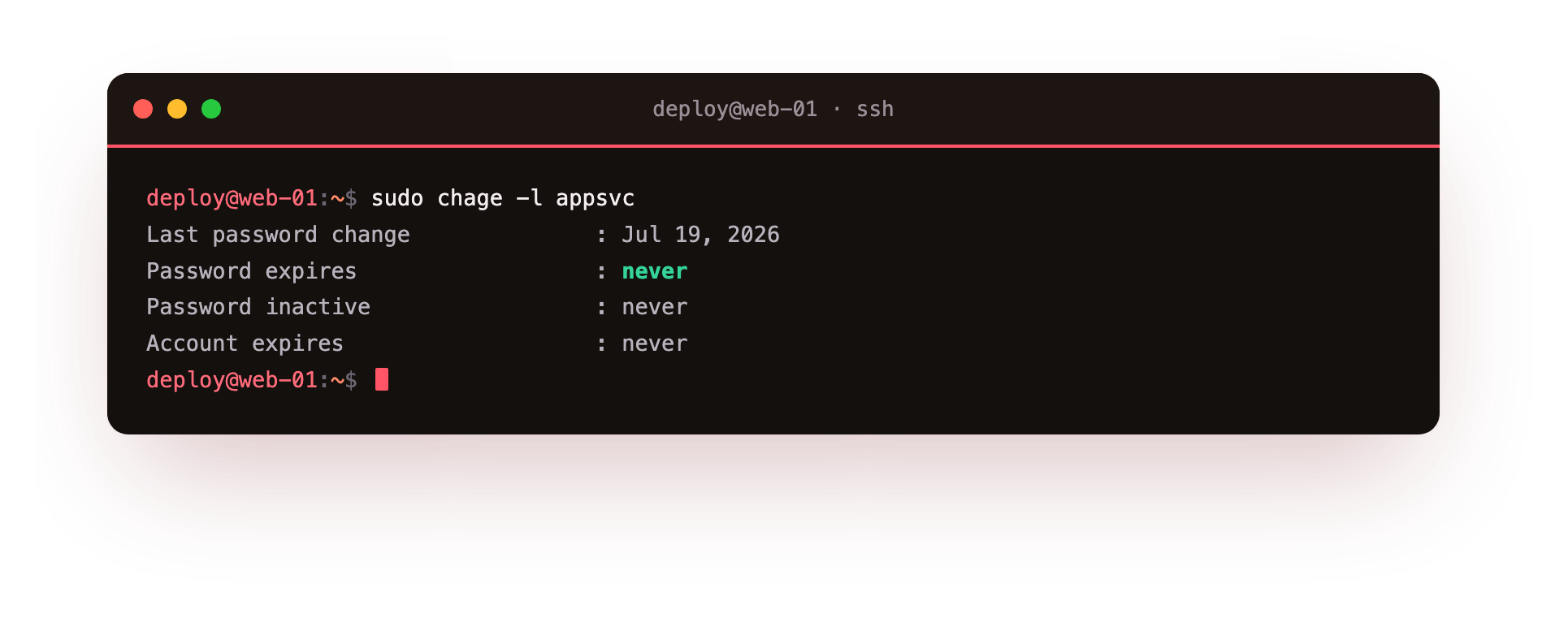
You need sudo because reading another account's ageing data is a privileged action. The output lists several dated fields in plain language: "Last password change" is when the password was last set, "Password expires" is the date the current password stops being accepted, "Password inactive" is a grace window after expiry, "Account expires" is a hard end date for the whole account, and three numeric lines show the minimum days between changes, the maximum password age, and the warning period.
For a fresh service account most of these read "never," which means no ageing is enforced yet. This listing is your baseline before you tighten anything.
How do you set a maximum password age?
The most common ageing control is a maximum age, after which the password must be changed. The -M flag sets that maximum in days.
sudo chage -M 90 appsvc
This tells the system that appsvc must change its password every 90 days. Run sudo chage -l appsvc again and the "Maximum number of days between password change" line now reads 90, with a computed "Password expires" date 90 days after the last change. Two companion flags round this out: -m sets the minimum days before a password can be changed again, which stops a user cycling straight back to the old value, and -W sets how many days of warning appear at login before expiry.
The defaults that apply to newly created accounts live in one file, /etc/login.defs. Its PASS_MAX_DAYS, PASS_MIN_DAYS, and PASS_WARN_AGE settings seed the ageing values for any account made after you edit them. Changing /etc/login.defs does not touch accounts that already exist, so chage remains the way to adjust appsvc and other current users.
Locking, releasing, and expiring
Ageing is a slow control. Sometimes you need an immediate one. To stop an account authenticating right now, lock its password:
sudo passwd -l appsvc
The -l flag on passwd locks the password by prefixing an exclamation mark to the stored hash, so no password can match. The account still exists and its files are untouched, but it cannot log in with a password. When the pause is over, reverse it:
sudo passwd -u appsvc
The -u flag reverses that lock by stripping the prefix back off. Locking is reversible and leaves everything else intact, which makes it the right choice for a temporary suspension.
For a permanent cut-off tied to a date, expire the whole account with usermod:
sudo usermod --expiredate 2026-08-01 appsvc
The --expiredate flag sets a hard end date in YYYY-MM-DD form. After that date the account cannot be used at all, ageing rules aside. To expire immediately, some admins pass a date already in the past, or use sudo usermod --expiredate 1 to mark the account expired at once.
A clean offboarding checklist
When a person leaves, do the steps in an order that closes access first and cleans up second. Here is the sequence worth following:
- Lock the password right away with
sudo passwd -l <user>so no new logins succeed. - Set a hard account expiry with
sudo usermod --expiredate <date> <user>to catch any auth path the lock misses. - Kill live sessions and scheduled work:
sudo pkill -u <user>for running processes, then checkcrontab -l -u <user>and remove any jobs. - Revoke keys and tokens: clear
~/.ssh/authorized_keysand rotate any shared secrets in files likeapp.envthat the person could read. - Reassign or archive their files before deleting the account, so nothing owned by them is orphaned.
- Only then remove the account with
sudo deluser <user>if policy calls for full deletion, or leave it locked and expired if you must retain it for audit.
Following the linux password policy chage tooling for ageing, plus passwd and usermod for state, gives you both the slow and the immediate controls in one place.
Troubleshooting account policy
chage says "Permission denied." Reading or changing another account's ageing is privileged. Prefix the command with sudo, as in sudo chage -l appsvc. A user may run chage -l on their own account without sudo.
The account is locked but the person still logs in. passwd -l locks only the password. An SSH key in authorized_keys bypasses the password entirely, so the account can still log in by key. Remove the key and set a hard expiry with usermod --expiredate to close every path.
usermod rejects the expiry date. --expiredate expects YYYY-MM-DD form, for example 2026-08-01. A wrong format is refused. To expire an account at once, pass a date already in the past or use usermod --expiredate 1.
Frequently asked questions
What is the difference between locking and expiring an account?
Locking with passwd -l disables the password and is reversible with passwd -u, so it suits a temporary suspension. Expiring with usermod --expiredate sets a hard end date after which the account cannot be used at all. Offboarding usually applies both.
Does changing /etc/login.defs affect accounts that already exist?
No. PASS_MAX_DAYS and its neighbours only seed the ageing values for accounts created after you edit the file. To adjust a current account such as appsvc, use chage directly, for example chage -M 90 appsvc.
How do I force a user to change their password at next login?
Run sudo chage -d 0 appsvc, which sets the last-change date to the epoch and marks the password expired. The user is then prompted to set a new one the next time they log in.
What is a safe order for offboarding someone?
Close access first, then clean up. Lock the password, set a hard account expiry, kill live sessions and scheduled jobs, revoke SSH keys and rotate shared secrets, reassign their files, and only then delete the account if policy requires it.
Recap
An account has ageing and a lock state. Read the ageing policy with chage -l, set a maximum password age with chage -M, and seed defaults for new accounts in /etc/login.defs. Lock and reverse it with passwd -l and passwd -u, set a hard end date with usermod --expiredate, and when someone leaves, work the offboarding checklist top to bottom so access closes before cleanup begins. The linux password policy chage tooling covers the slow ageing controls, while passwd and usermod cover the immediate ones.