The ten characters behind linux file permissions rwx
Run ls -l on any file and the line begins with ten characters like -rw-r--r--. Those ten characters are the whole story of linux file permissions, and the rwx letters inside them decide who can read, change, or run the file. As deploy in ~/perms-demo on Ubuntu 24.04, you look at these bits every time you debug why a service cannot open a config or why a script will not run. Learning to read them on sight saves you real time in day-to-day server work.
- The first character of an ls -l line is the file type; the next nine are three rwx triads.
- The triads apply in order to the owning user, the owning group, and everyone else, called other.
- A dash in any slot means that permission is absent; the r, w, x letters never change position.
- rwx means different things on directories: read lists names, write adds or removes entries, execute lets you enter.
The ten characters split into a clear structure. The first character is the file type. The next nine are three groups of three, and each group is a read, write, execute triad. The three groups apply, in order, to the owning user, the owning group, and everyone else, which Linux calls "other". Ownership, from the previous chapter, is what decides which triad applies to a given account.
Breaking down the ten characters
Take -rwxr-xr-- as an example and read it left to right:
- Character 1,
-, is the type. A-means a plain file,dmeans a directory, andlmeans a symbolic link. - Characters 2 to 4,
rwx, are the user triad. The owning user may read, write, and execute. - Characters 5 to 7,
r-x, are the group triad. The owning group may read and execute, but the dash in the middle slot means write is absent. - Characters 8 to 10,
r--, are the other triad. Everyone else may only read.
A dash in any slot always means that permission is not granted. The letters always appear in the same order, r then w then x, so a missing permission shows as a dash in its fixed position rather than the letters shifting along.
What do the rwx bits mean on files and directories?
Here is the part that trips people up. The same three letters mean different things depending on whether the target is a file or a directory. These are the linux file permissions rwx rules worth memorising.
| Bit | On a file | On a directory |
|---|---|---|
| r (read) | View the file's contents | List the names inside the directory |
| w (write) | Change the file's contents | Create, rename, or delete entries inside |
| x (execute) | Run the file as a program | Enter the directory and reach items by name |
Two rows deserve a second look. Execute on a directory does not let you run it. It lets you pass through the directory to reach what is inside, which is why a directory almost always needs its x bit set for anyone expected to use it.
And write on a directory controls the list of names, not the files themselves. A user with write on a directory can delete a file inside it even without write permission on that file, because deletion changes the directory listing rather than the file. That surprise sits behind many permission bugs.
Listing everything in the directory
Look at the full contents of the demo directory, including hidden entries.
ls -la
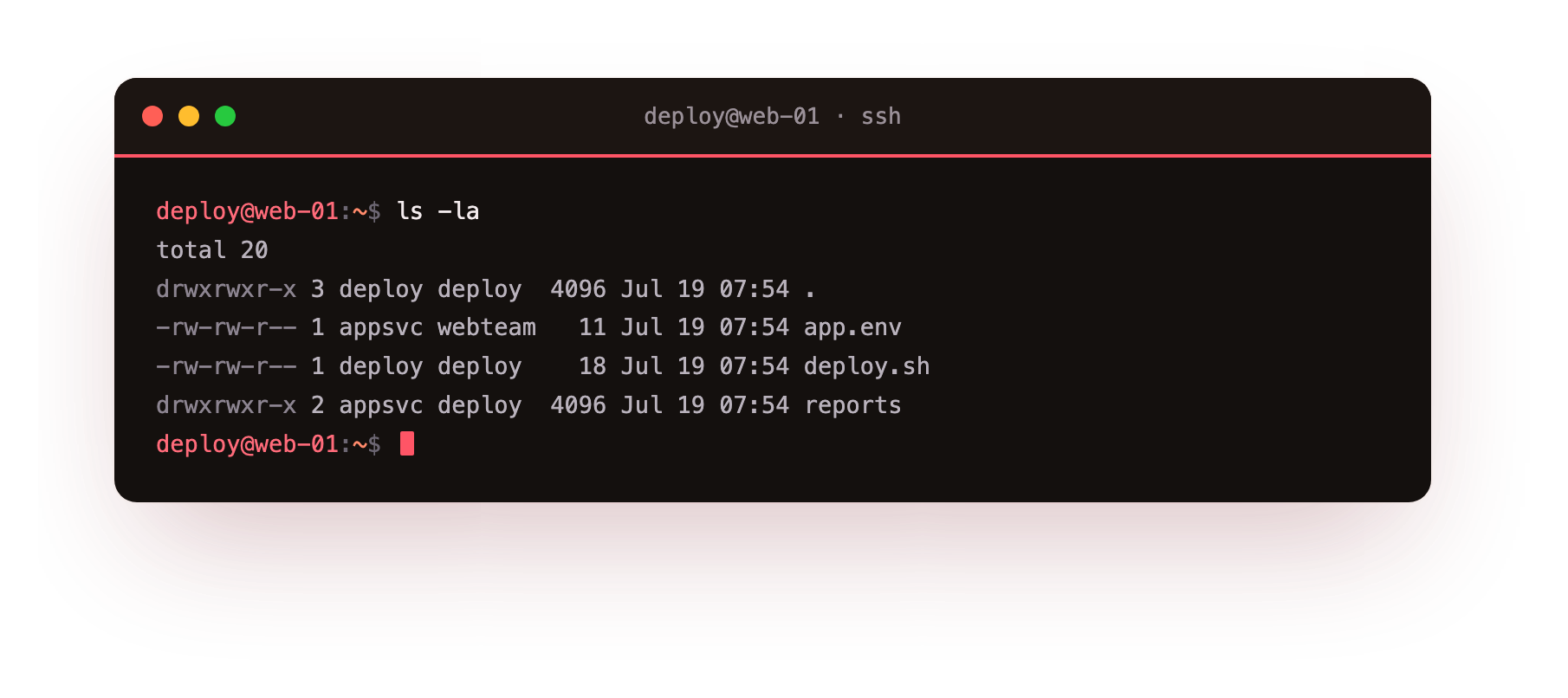
ls lists, -l gives the long format with the permission bits, and -a adds entries whose names begin with a dot, which are normally hidden. In the screenshot you see one line per entry. The first lines are . and .., the current directory and its parent, both marked with d at the start because they are directories.
Below them sit app.env, deploy.sh, and the reports directory. Scan down the first column and you can read each entry's type and its three triads at a glance. This is the linux file permissions view you will reach for most often.
Reading a mode like drwxr-xr-x
The reports line begins with drwxr-xr-x. Decode it with the structure above:
d: this entry is a directory.rwxfor the user: the owner may list, modify, and enter it.r-xfor the group: group members may list and enter, but not create or delete entries.r-xfor other: everyone else may also list and enter, but not change the contents.
This exact mode, often written as the number 755, is the normal setting for a directory that should be readable by all but writable only by its owner.
Two ways to see the same mode
The letter form is readable, but permissions also have a numeric form, and one command shows both together.
stat -c '%A %a %U:%G %n' app.env deploy.sh
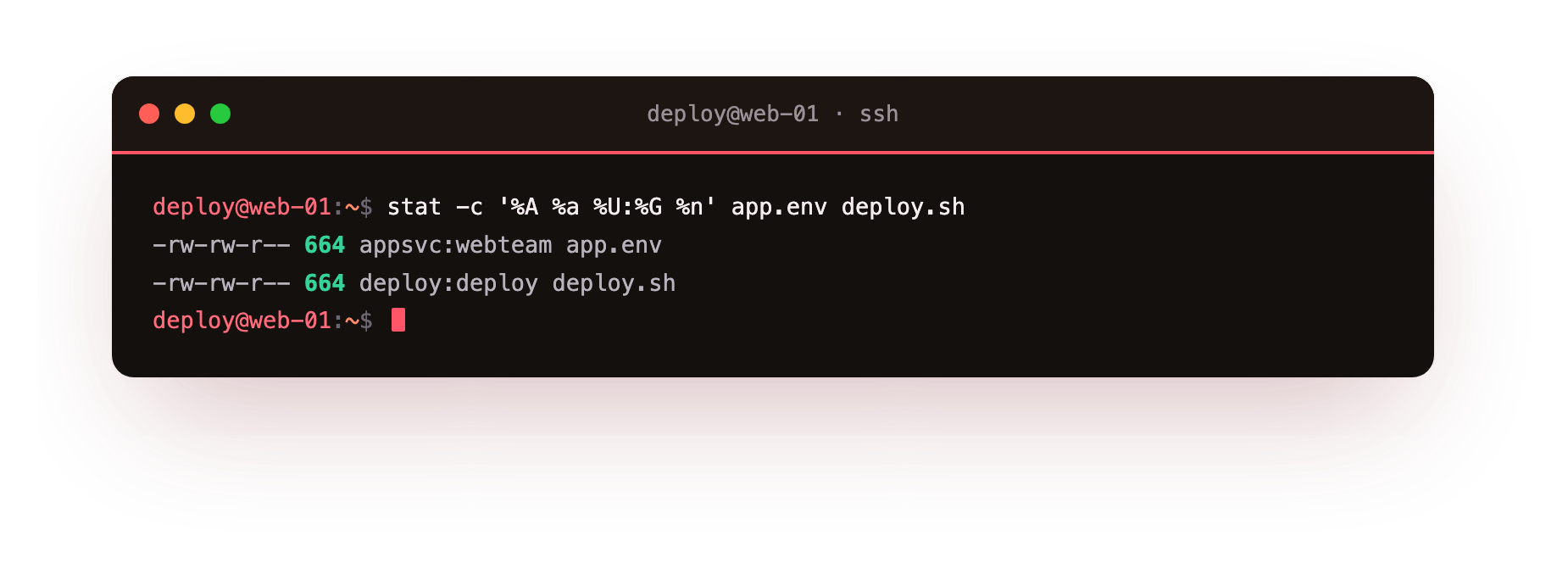
stat reports metadata about a file, and -c lets you choose which fields to print with a format string. Each token is a placeholder: %A is the permission bits in the letter form you just learned, %a is the same bits as an octal number, %U:%G is the owning user and group joined by a colon, and %n is the file name.
In the screenshot each file prints on one line, so you can line up -rw-r--r-- against its numeric twin 644 and against the appsvc:webteam ownership set in the last chapter. Seeing the letters and the number side by side is a good way to build a feel for how the two notations map onto each other, and both describe the same linux file permissions.
Frequently asked questions
What does execute mean on a directory?
On a directory the execute bit does not run anything. It lets you pass through the directory to reach items by name, so cd and paths that go deeper only work when x is set. A directory with read but no execute lets you list names yet not open what is inside.
Why can someone delete a file they cannot write to?
Deleting a file changes the directory listing, not the file itself. So write permission on the containing directory is what allows a delete, even when the user has no write permission on the file. This catches people out and is behind many permission bugs.
What is the difference between the letter form and the octal number?
They describe the same bits two ways. The letter form like rw-r--r-- is easy to read at a glance, while the octal 644 is compact and used with chmod. stat prints both together with the %A and %a tokens, which is a good way to learn the mapping.
Recap
You learned to read the ten-character mode string, split it into user, group, and other triads, and interpret rwx differently on files and directories. You confirmed it on real entries with ls -la and stat. On a live server this is the reflex that turns a permission-denied error from a mystery into a two-second read of one line. The next chapter builds on it: changing these bits deliberately with chmod, using both the letter and numeric forms you just saw.